© 2005-2016 Nira Control AB 67
4.7.3 Advanced Logging
Sometimes it is useful to be able to start logging whenever a parameter goes
above or below a certain value. Likewise, it may be useful to stop logging
whenever a certain event happens. For such situations, there’s a trig function
in NIRA rk.
Clicking on the -button or hitting F5 on the keyboard opens up a dialog
box in which you can set conditions for starting/stopping the logging and
how many seconds before/after the trig point you want to be part of the log.
4.7.4 Opening an Existing Log File
You can open an existing log file by selecting ”Load log file…” under File in
the main menu or by hitting Ctrl-F8 on the keyboard.
Note: You can also load NIRA rk log files in MATLAB.
4.7.5 Graphical Presentation
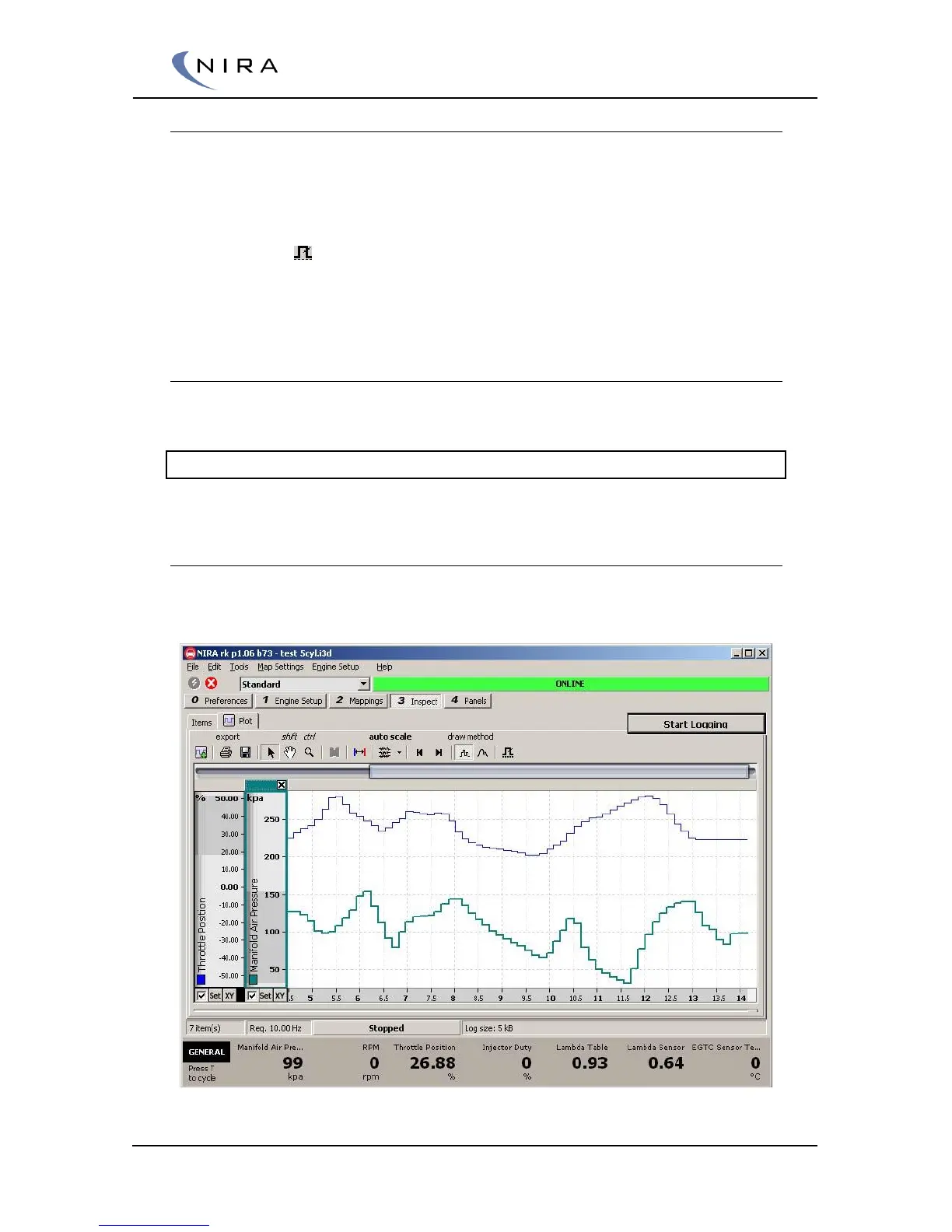
Select the ”Plot” tab to view the logging graphically.
Picture 4-26: Graphical view of logged parameters.


 To Next Page