Advice
In order to program the dierent tools, please refer to Software documentation
(index.html#advanced-programming).
Robot operating modeRobot operating mode
Ne2 Robot comes with 3 diffrent operating modes.
Current mode can be determined visually via the color of the Led Ring (index.html#led-ring-indications) on
the robot’s base.
The different modes are listed in the table below
Operating Mode Description
Manual mode - Robot calibration
The robot automatically defines the Zero positions of each
axis.
Collaborative mode -
Programming
Programming, editing, loading and execution of the
programs
Manual mode - FreeMotion The axes of the robot can be moved by hand.
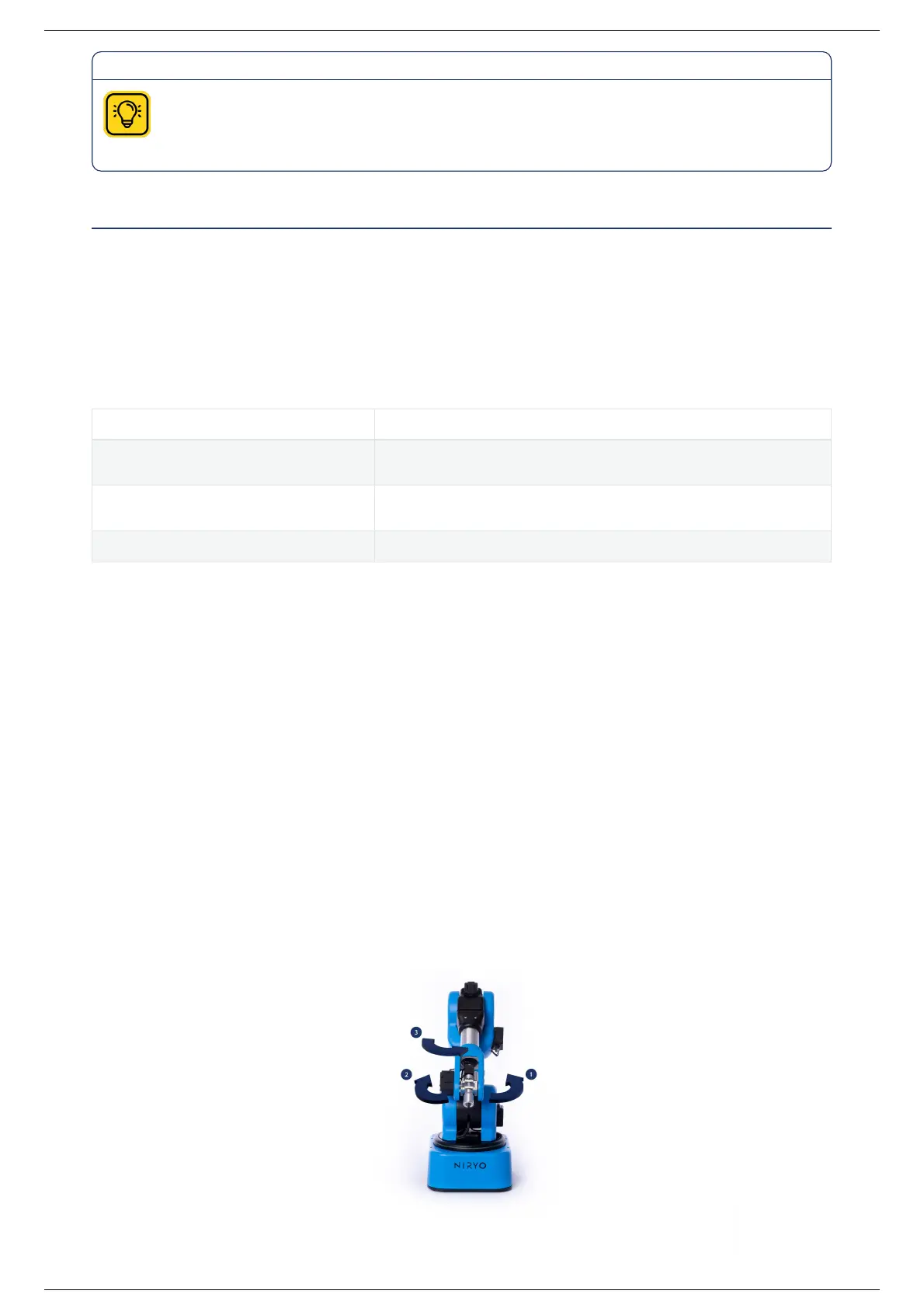
Robot calibrationRobot calibration
Ned2 does not have a mechanical calibration. The calibration phase is fully automatic and must be
completed in order to control the robot. This matches up the position of each motor with its controller.
The procedure is as follows for the first 3 axes:
1. the axis rotates in the direction as shown in the photo below until it stops;
2. the axis stops when the limit is detected;
3. the axis moves back in the opposite direction;
4. the axis rotates in the direction up to the limit stop;
5. the axis stops when the limit stop is detected, and the Zero position is set at this point.



 To Next Page