22
Notes on setting Security Level/Sensor Options
▪Setting the sensor serial data may affect the authentication rate. It is
recommended that the default sensor setting be used.
▪If individual options are not set, server settings will be only be applied to
server-authenticated users in network mode.
▪Individual user settings are not applied during 1:N authentication, they are
applied after the user registration process is completed.
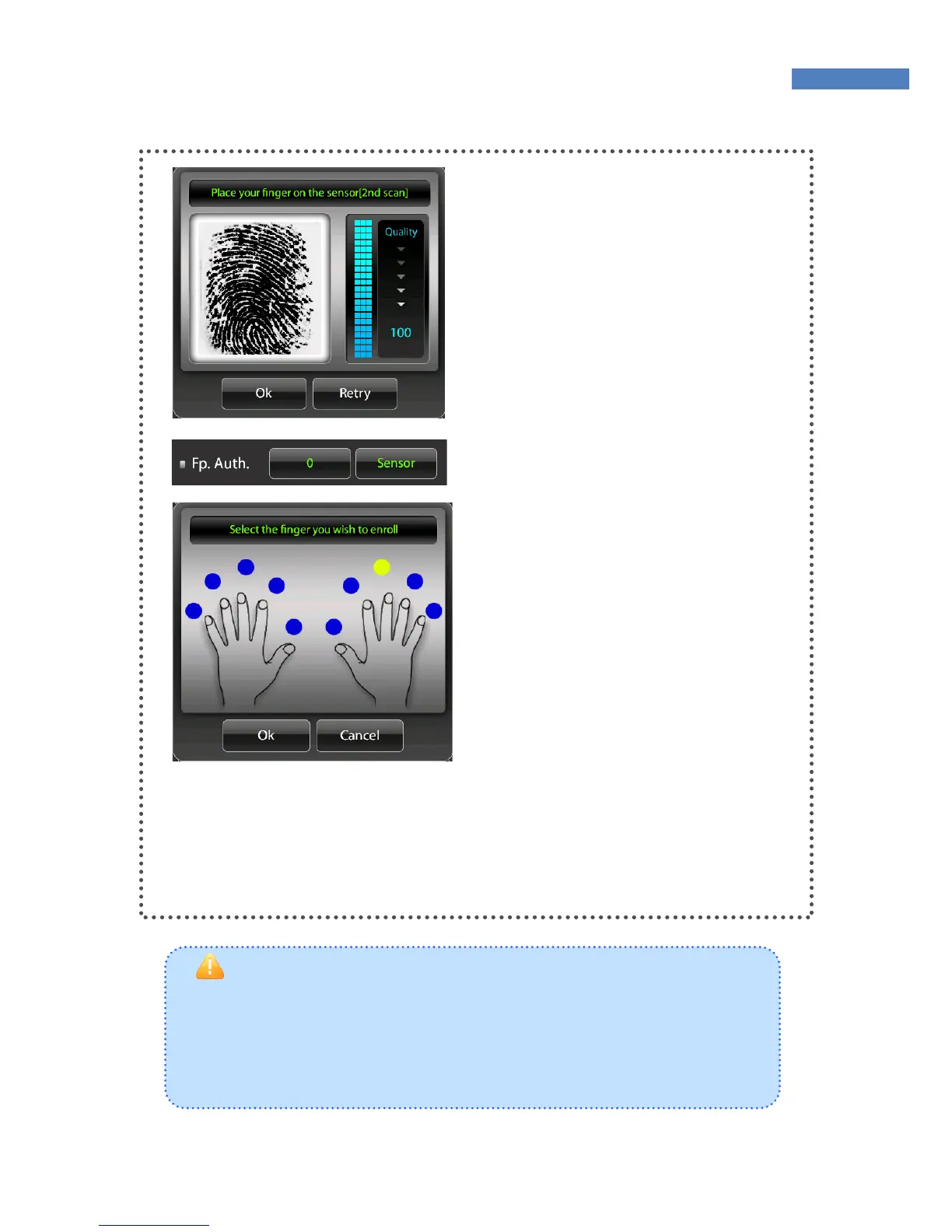
② Place a finger on the sensor.
The fingerprint will be displayed
with a quality indicator. The
fingerprint must score at least 30
points to be registered and the
likelihood of authentication rises
with the score. Place the core of
the fingerprint on the sensor.
③ After a fingerprint is registered,
the “Security Level” and “Sensor”
menus will be activated on the
“Fingerprint Authentication” menu.
Security Level 0 will use the
terminal’s default sensor setting.
(the user can set the security level
in Administrator menu ->
Authentication -> Default.)
④ After the fingerprint is properly registered, the blue dot above
the finger will turn yellow as shown in the figure. To change the
fingerprint, press the yellow dot, and press “no” when asked
whether to delete the fingerprint.



 To Next Page