How to customize record plan
Warm notice: A hard drive is required for recording. If the hard drive was
purchased separately, please install it into NVR box (shows on page 3)
and remember to format it before using.
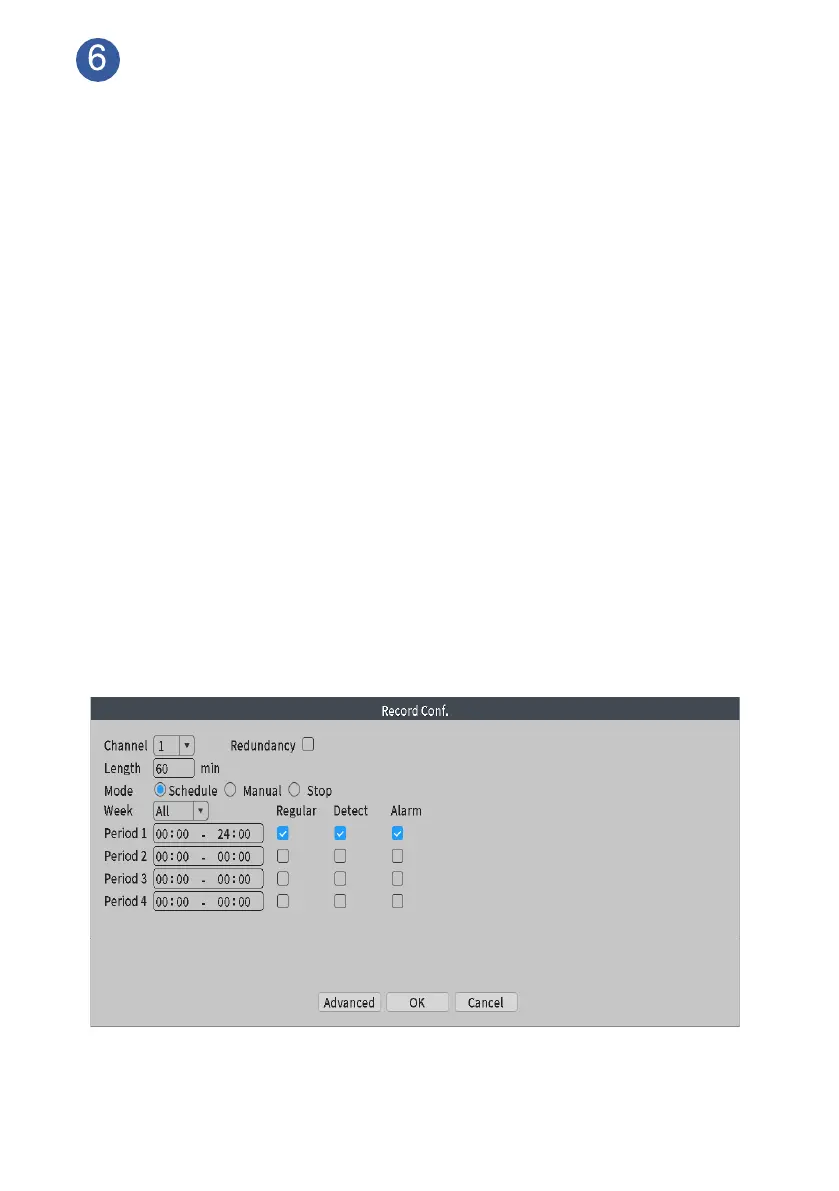
The system default setting is both 24/7 continuous recording and human
detection recording. If you want to change it to time scheduling recording
plan based on your own schedule. Please check following steps.
Customize Schedule Record:
From home screen, please navigate to Main Menu>Record Conf, choose
channel. (We don’t suggest customer to change the recorder plan
because system default setting would be better.)
Length: Time length of each recorded video file, 60 minutes per file as default.
Mode: Choose Schedule
Week: Select All
Period: Set record period based on your own schedule. (For examples,
when you are not at home at 7:00am to 9:00am, 17:00pm to 19:00pm, you
can set period 1 as 7:00—9:00, period 2 as 17:00—19:00 for regular record)
Enable Regular behind period, click OK. Select another channel, set record
schedule again as the same steps. Cameras will record continuously within
the period when human detection alarm triggered.



 To Next Page