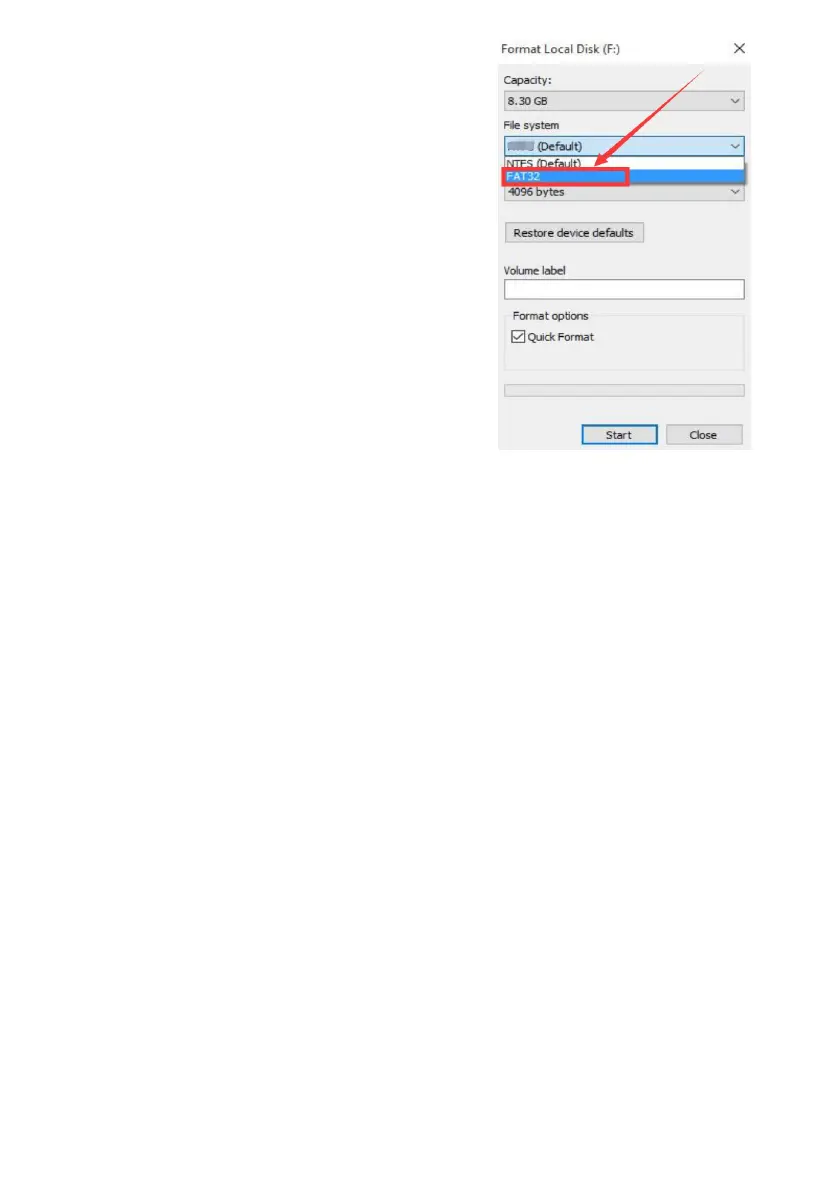
Q7: What if my USB flash drive can’t be
detected by the system?
Please insert your USB flash drive
into computer and format, it as “FAT32
Default”. Then, insert it to NVR to search
again.
Q8: How does human detection recording work?
When human movement detected, cameras will start to record immediately,
cameras will stop recording after human has gone. (In Main Menu>System
Setup>Intelligent Alert page, you can change interval time)
Q9: Do I need to set the system only record when human detected for saving
hard drive storage?
Our system has most advanced video data compression technology, 1TB hard
drive can record more than 2 weeks 24/7 continually. When hard drive is full, the
oldest files will be deleted automatically.
To avoid missing important information, we do recommend customers to
keep human detection recording and regular recording opened.
Q10: How to add a new camera to NVR recorder?
The cameras are paired with NVR recorder by default, and they will auto pair
with NVR. If any camera lost connection with NVR recorder accidentally or you
want to add a new camera to this kit, please pair the camera with NVR box as
follow steps.



 To Next Page