Q2: APP offline or Display device not connected
1,Restart your XMEye Pro APP.
2,Power off and power on your Modem and Router. If it’s not working,
unplug your NVR and plug in again to see if its connected or not.
3,Check if you have already connected NVR to Router via a network cable.
Ensure the network cable is good.
(Connect the network cable with PC to see if its working)
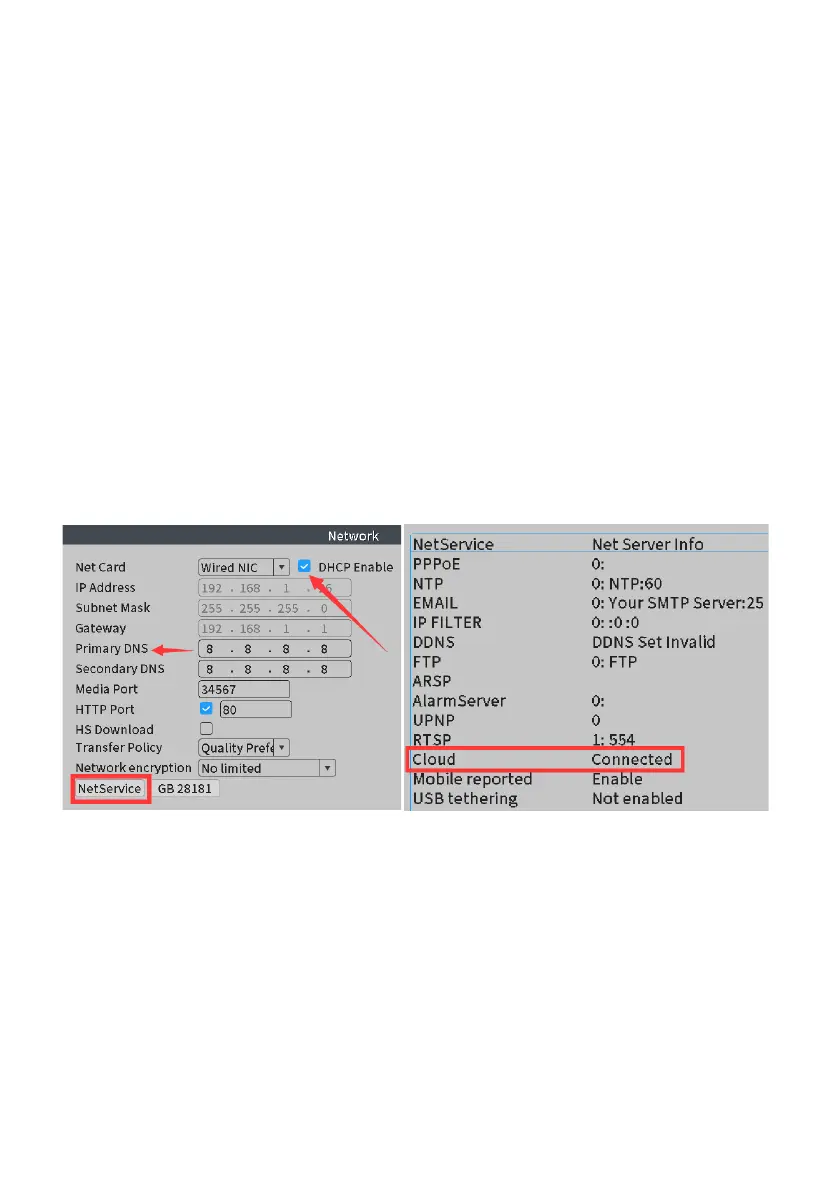
4,Right click the mouse and click NetDetect>Network, check whether
DHCP Enable is turned on if it's not, please turn it on, and then click OK
to exit the menu. Multi-wait a while, then enter the interface just now again,
click NetService, and check if the cloud status is connected.
(If "Probing DNS" showing, change the Primary DNS into 8.8.8.8, click OK to
exit the menu. You will see whether the Cloud status is connected later).
5,Log in your router to check whether the firewall is turned on or not. If yes,
please turn off the firewall.
6,Restore NVR. (Refers to Q3)
Q3: How can I Restore the system back to factory?
On your monitor screen, please click Main Menu>Advanced> Restore,
reset the system back to factory.



 To Next Page