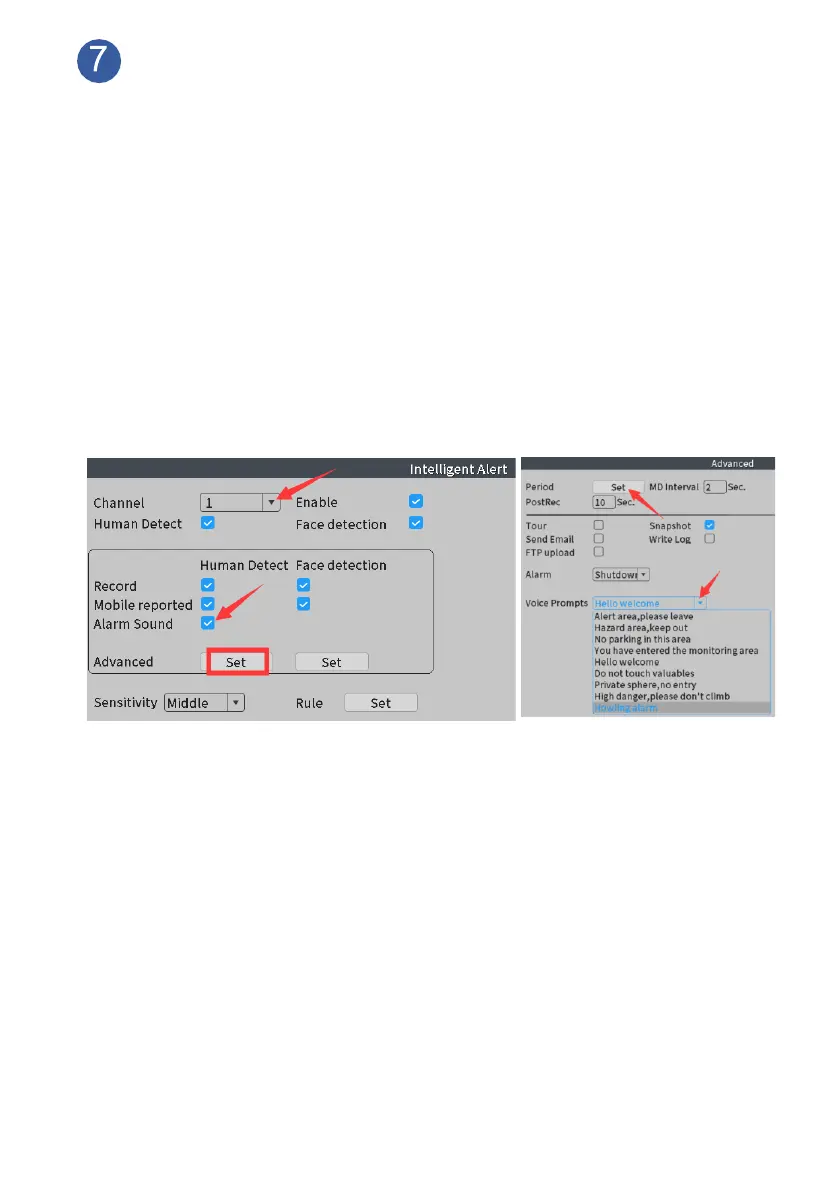
How to customize human detection alarm plan
Human detection function has already been turned on before shipping, system
will detect and record human movements 24/7 continually under each
camera’s whole coverage, Siren alarm and app alert will be triggered once
human detected. Floodlight will be triggered only when human detected at night
(when environment is dark).
You can customize human detection area, time and trigger actions based on
your requirements.
Customize Human Detection Alarm Plan:
From home screen, please navigate to Main Menu>Alarm>Intelligent Alert,
choose Channel, make sure Enable and Human Detect are checked.
Make sure Record and Mobile Reported is checked.
Alarm Sound: When human movement detected, cameras will turn on
siren alarm and floodlight as default setting. You can disable Siren Alarm
here. (Or change the content of the alarm sound, click Set)
MD Interval: the shortest time between two triggered events.
Record Channel: Select a channel to record when the camera catches human
movement, or you can choose all channels to record, and views will show full of
the screen.
Tour: When the camera detected human movement, it’ll zoom in full screen.
Snapshot: please make sure related channel has been selected. Otherwise,
app notifications won’t be sent.
Click “Period” button: Please select “All” at “week” option, set human
detection periods based on your own schedule. (For example, when you are
not at home from 7:00am to 9:00am, 17:00pm to 19:00pm, you can set
period 1 as 7:00—9:00, period 2 as 17:00—19:00)



 To Next Page