Camera System Setup
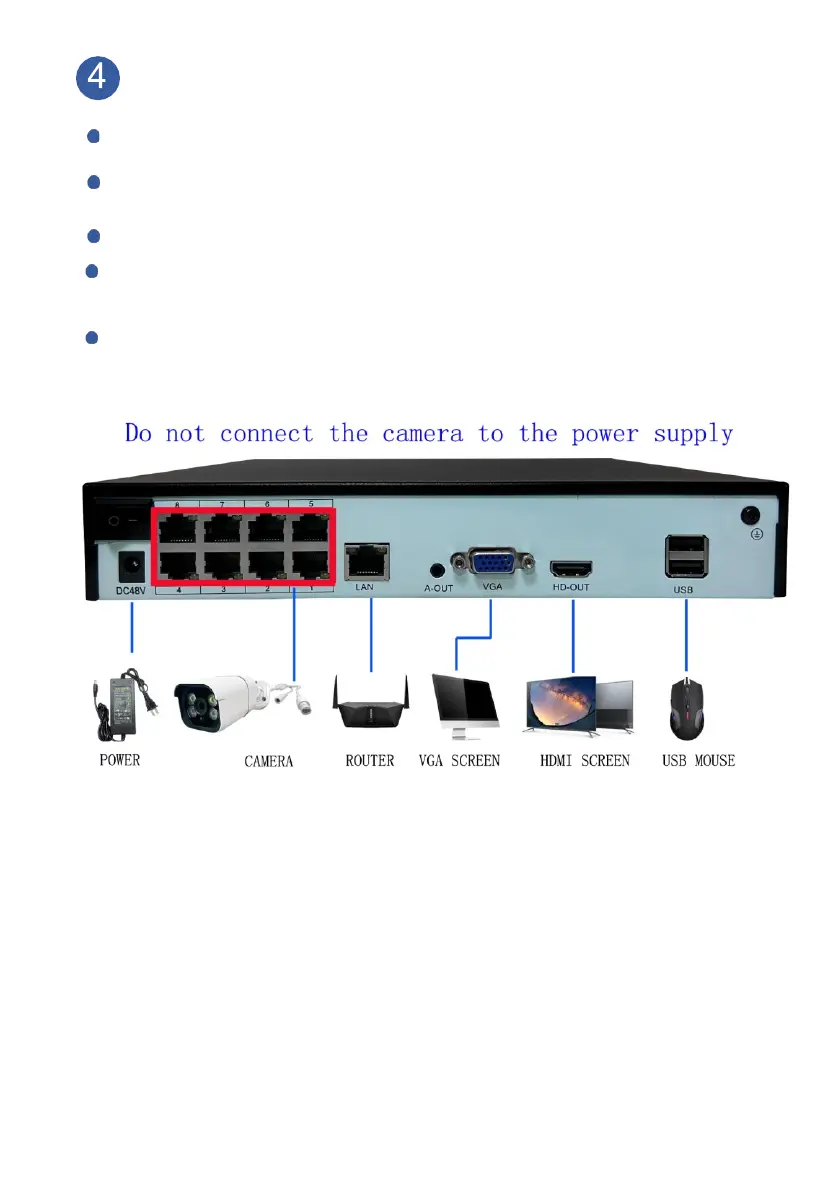
Connect cameras to NVR by provided Ethernet cable.
Connect NVR to power supply by provided 52V power adapter.
NOTICE:DO NOT USE NVR’s ADAPTER FOR CAMERA
Connect provided mouse to NVR box.
Connect NVR to PC Monitor or TV by VGA/ HDMI cable, please kindly noted
that the system doesn’t support on laptop and All- in-One PC for initial Setup.
Connect NVR to the router by provided Ethernet cable, the router must be
WAN (wide area work).
(Image may vary for different model)
Notice: We provide 70ft Ethernet cables for each camera. If needed, you can
replace the Ethernet cable up to 300ft. Normal Cate 5/6 Ethernet cable supported.
We don’t recommend adding on Ethernet cables on original cables by any kind
of Ethernet connector, it may cause video or power lose.
After system initialization, camera’s image will come up one by one in minutes.
If no image comes up, please check FAQ 1 on page19.
Or contact Customer Service for tech support.



 To Next Page