ACCESS GATEWAY
Introduction 7
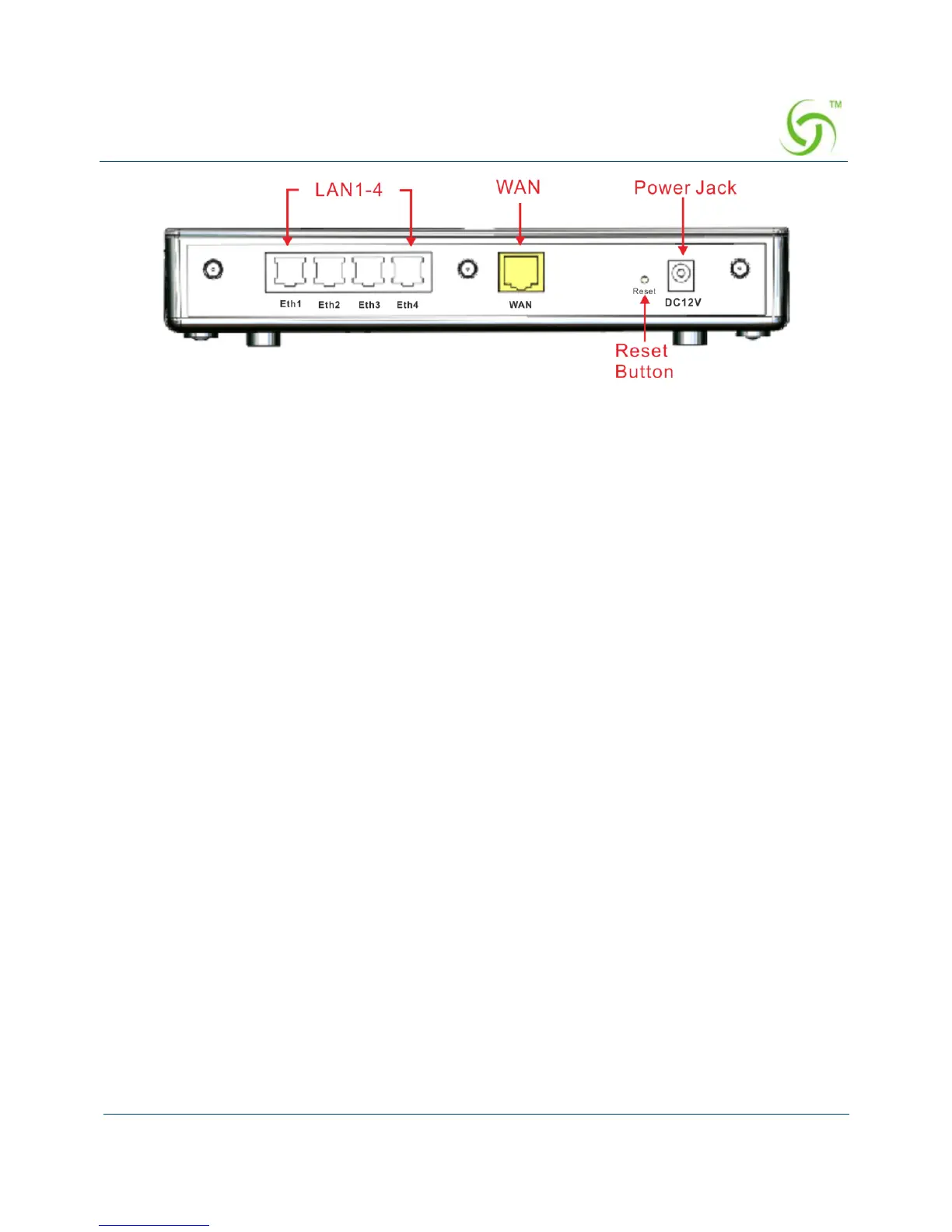
Figure 3 Wireless Connect Gateway Rear Panel
1. ETH (1-4):
The rear panel supports four auto-sensing RJ-45 ports and all ports can be auto-switched
to MDI-II connections. The LAN ports are used for linking hosts or other network
devices.
2. WAN: One Ethernet port used for linking to an ISP connection.
3. Reset Button:
The Wireless Connect Gateway has a reset button at the rear panel of the device. Use this
control button to reset the system back to factory defaults.
4. Power Jack: Used to connect the external power supply with the Wireless Connect
Gateway.
Technical Specifications
Hardware Specifications
Network Specification
IEEE802.3 10BaseT Ethernet
IEEE802.3u 100BaseTX Fast Ethernet
IEEE802.11b/g/n Wireless LAN
ANSI/IEEE 802.3 NWay auto-negotiation
Wi-Fi Compatible
Connectors
Four LAN Ports (10BaseT/100BaseTX Auto cross-over)
One WAN Port (10BaseT/100BaseTX Auto cross-over)



 To Next Page