CRC200R USER GUIDE ISSUE 02
4-4
The CRC200R can support both simple and extended access control requirements for different
types of card relating to the following factors:
Valid reader(s)
Valid times of the day
Valid days of the week
In ‘Line’ mode, the Time Zones used for door open can also be used for card validity (see 4.2.2.4).
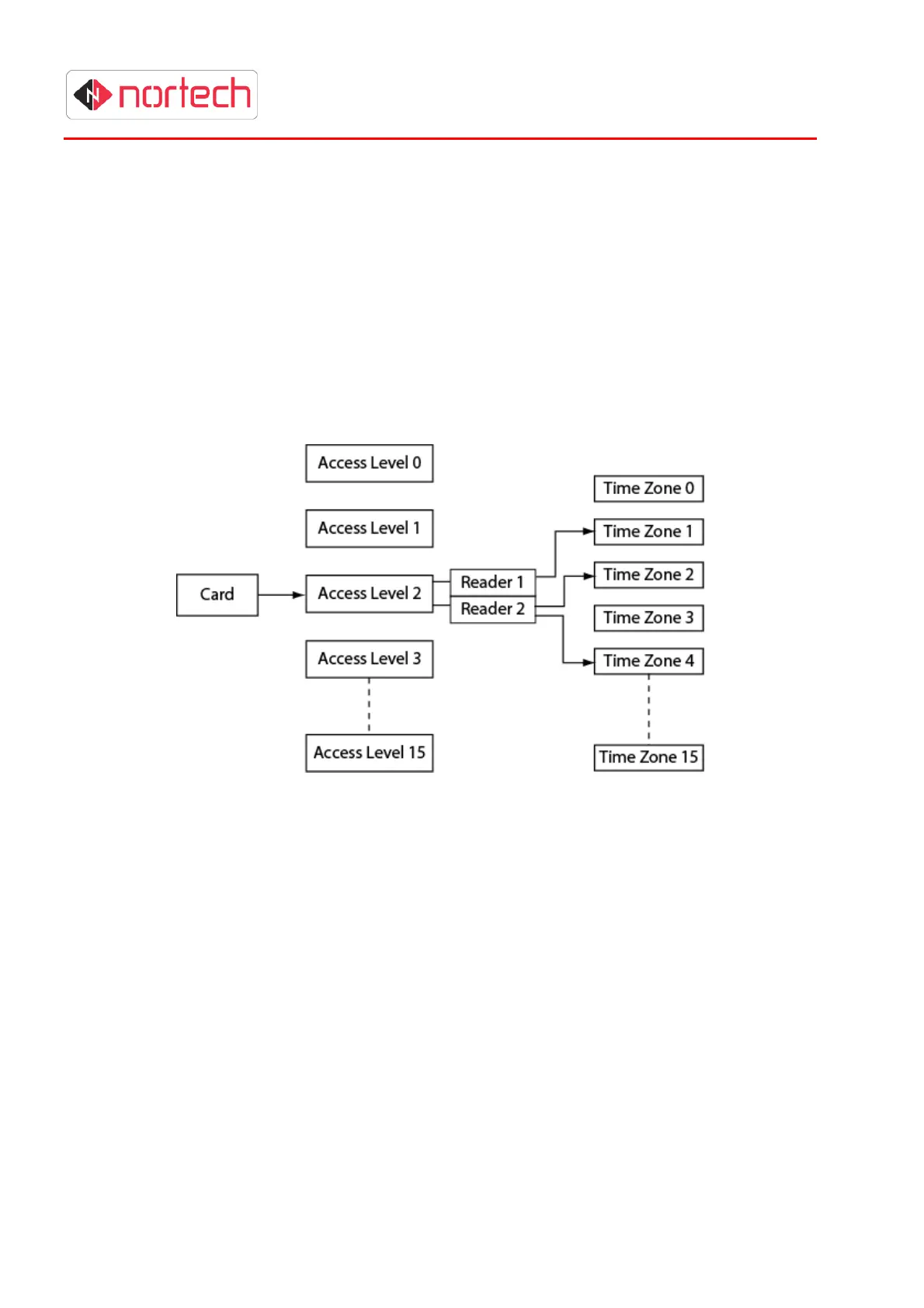
If Mode 210 (extended time zone mode) is used, there are 16 access levels, each of which can be
assigned a different set of validity time zones for each reader. There are 15 programmable time
zones available in addition to two fixed time zones (0 = never valid, 1 = always valid). Several time
zones can apply to the same access level, therefore allowing very complex validity period tables to
be set up. The diagram shows the relationship between cards, access levels and time zones.
In this example, the card is assigned to access level 2. For this access level, the card is valid on
reader 1 for those times of day/days of the week set up in time zone 1, and is valid on reader 2 for
those times of day/days of week set up in time zones 2 and 4 (where more than one time zone is
assigned, the card will be valid when any of these time zones are set to valid).
The procedure for setting up access levels and time zones in this mode is:
1.
Choose all likely active time periods (e.g. working hours, morning, afternoon, evening, etc.)
and active days (e.g. weekdays, weekend, etc.) and set up appropriate time zones (see
.section 5.8 for programming procedure).
2.
Choose the access levels for groups of cardholders based on applicable validity time zones
specific to each reader, and add them to the CRC200R (see 5.9 for programming
procedure).
3.
Add cards and assign the appropriate access levels (see section 5.1.2 for programming
procedure).
Note:
210 mode is the standard factory setting and should be used for new installations where
possible. Line mode can be used if a simpler system is required or if it is already in use on
other controllers.



 To Next Page