43
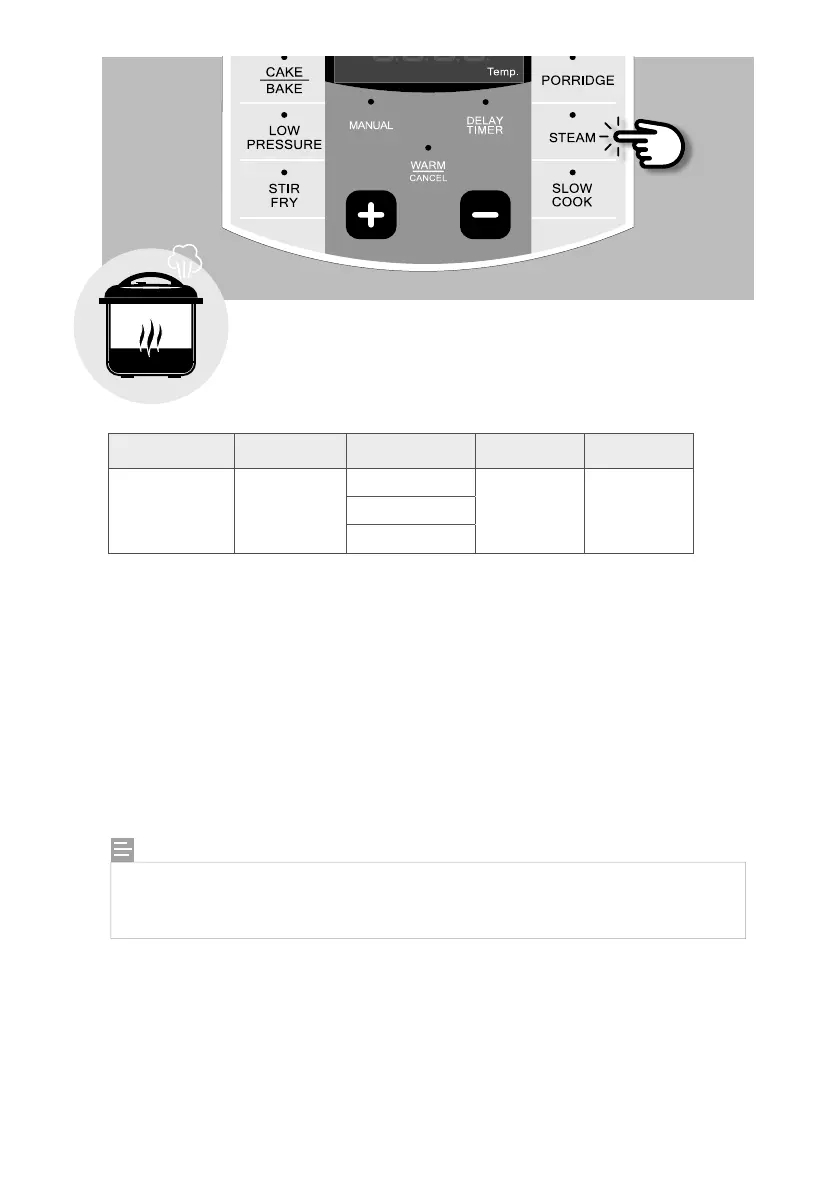
n Steam Function
This program quickly brings cooking liquid to a boil for steaming delicate
foods such as fish and vegetables.
Function Default Time Preset Time Timer Temperature
Steam 10 min
Less 3 min 0:01-4:00,
1 minute
increments
100°C
Normal 10 min
More 15 min
1. Place the inner pot into the NEMPC.
2. Place about 1-2 cups of water into the inner pot. Insert a steamer rack making sure that the
water sits slightly below it.
3. Place ingredients onto the steamer rack and close the lid of the cooker.
4. Turn the pressure regulator knob to “STEAM”.
5. Press the [STEAM] button repeatedly to select the desired preset cooking time or adjust the
time according to your recipe by pressing the [ + ] or [ – ] buttons. Wait for 4 seconds and the
unit will start automatically. The top display window will show “ON”.
6. Once the temperature has been reached, the unit will start to count down your steaming time.
7. When the time is up, the unit will beep to let you know that the steaming process has ended
and will switch to WARM function.
NOTE:
When using the STEAM function, the regulator knob must be turned to “STEAM”. If
you are using STEAM function without enough liquid in the inner pot, the unit will
beep every 5 seconds to alert you that more liquid needs to be added.


 To Next Page