41
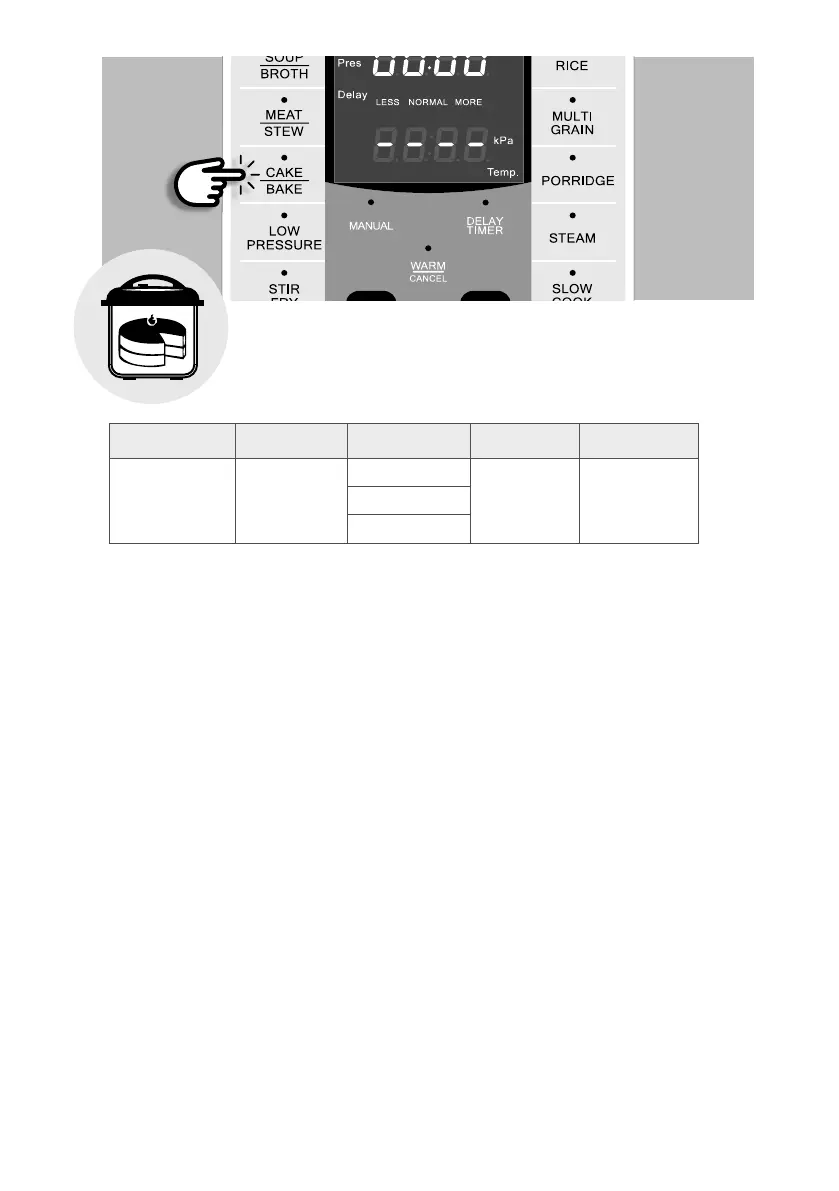
n Cake/Bake Function
This program allows you to bake delicious recipes quickly and easily.
Function Default Time Preset Time Timer Temperature
Cake/Bake 40 min
Less 25 min 0:01-4:00,
1 minute
increments
130°C-150°C
Normal 40 min
More 50 min
To bake cake inside the non-stick inner pot:
1. Grease the inner pot and pour in your prepared cake batter.
2. Smooth the top of the batter using a spatula and lightly tap the inner pot a few times on the
countertop to eliminate any bubbles in the batter.
3. Place the lid on the cooker, align the self-locking pin with the unlock symbol and turn the lid
counterclockwise until it locks into place.
4. Turn the pressure regulator knob to “STEAM”.
5. Press the [CAKE/BAKE] button repeatedly to select the desired baking time or adjust the time
according to your recipe by pressing the [ + ] or [ – ] buttons. Wait for 4 seconds and the unit
will start automatically. The top display window will show “ON”.
6. Once the temperature has been reached, the unit will start to count down your baking time.
7. When the time is up, the unit will beep to let you know that the baking process has ended and
will switch to WARM function.
8. Open the lid carefully to avoid water condensation from dripping onto your cake.


 To Next Page