13
CARE & MAINTENANCE
Cleaning & Care for Your
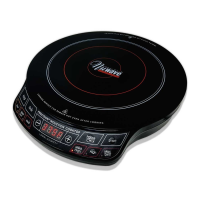
NuWave
PIC Pro Chef™
IMPORTANT - Do not immerse unit in water or
attempt to cycle through dishwasher. The outer
surface may be cleaned by wiping carefully with
a damp dishcloth or sponge.
BEFORE USE
Wipe surface with a damp cloth or sponge.
• Clean after each use.
• Make sure unit has cooled completely prior to cleaning.
• The outer surface may be cleaned by wiping carefully with a damp dishcloth
or sponge.
• Remove the power plug prior to cleaning the NuWave PIC Pro Chef. Do not
use caustic cleaning agents. Water should not penetrate the interior of the
induction cooktop.
• Never immerse the NuWave PIC Pro Chef, its cables or plug in water or
other liquids.
• Do not use oil-based cleansing products as their use may damage plastic
parts, the casing, or the operating panel.
• In order to keep your NuWave PIC Pro Chef looking like new, take
measures to ensure that the bottom of cookware does not scrape the unit’s
glass surface, although a scratched surface will not impair the use of the
induction cooktop.
• Make sure to properly clean the unit before storing it in a cool, dry place.


 To Next Page