DOC-13000 Rev. E 7–3
Connex500/350 User Guide
2. Afterthecomputerboots,logintoWindowsandlaunchtheConnex
controlapplication:
• Onthecomputerdesktop,double‐clicktheConnexprintericon.
or—
• FromtheStartmenu,selectObjet > Connex500/350Connex500/350.
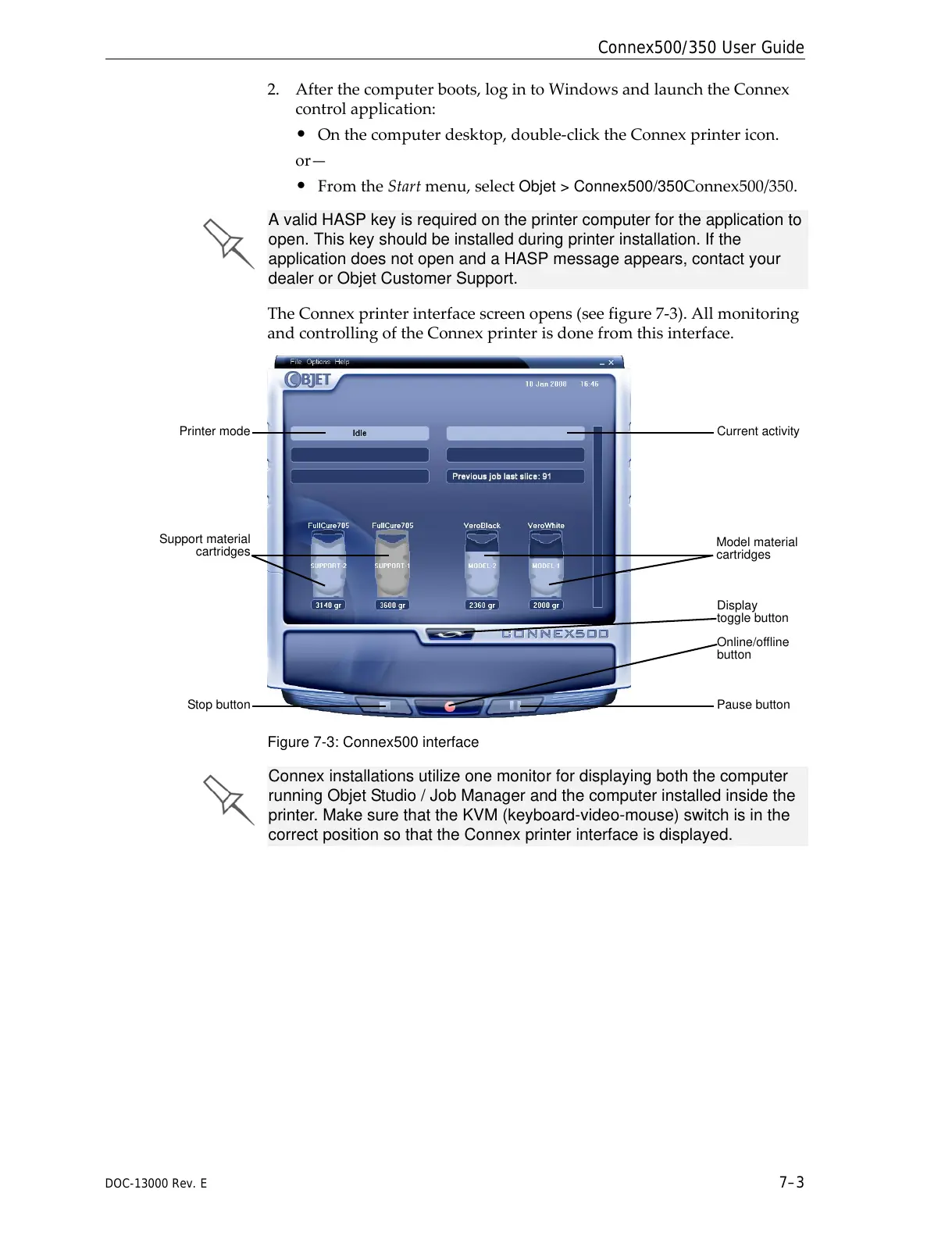
TheConnexprinterinterfacescreenopens(seefigure 7‐3).Allmonitoring
andcontrollingoftheConnexprinterisdonefromthisinterface.
Figure 7-3: Connex500 interface
A valid HASP key is required on the printer computer for the application to
open. This key should be installed during printer installation. If the
application does not open and a HASP message appears, contact your
dealer or Objet Customer Support.
Connex installations utilize one monitor for displaying both the computer
running Objet Studio / Job Manager and the computer installed inside the
printer. Make sure that the KVM (keyboard-video-mouse) switch is in the
correct position so that the Connex printer interface is displayed.



 To Next Page