DOC-13000 Rev. E 7–9
Connex500/350 User Guide
Resuming Production After Printing has Stopped
Iftheprintingprocessisinterruptedforanyreason,JobManagerstops
sendingslicestotheConnexprinter.
To continue printing the model:
1. Switchtheprintertoonlinemodebyclickingtheredbuttonatthe
bottomoftheConnexprinterinterface(seefigure 7‐3onpage 3).
Thebuttonchangesfromredtogreen(seefigure 7‐4onpage 6).
2. MakesurethatthecomputernetworkconnectingtheprinterandJob
Managerserverisactive.
3. IntheJobMa
nagerinterface,clicktheResumeicon .
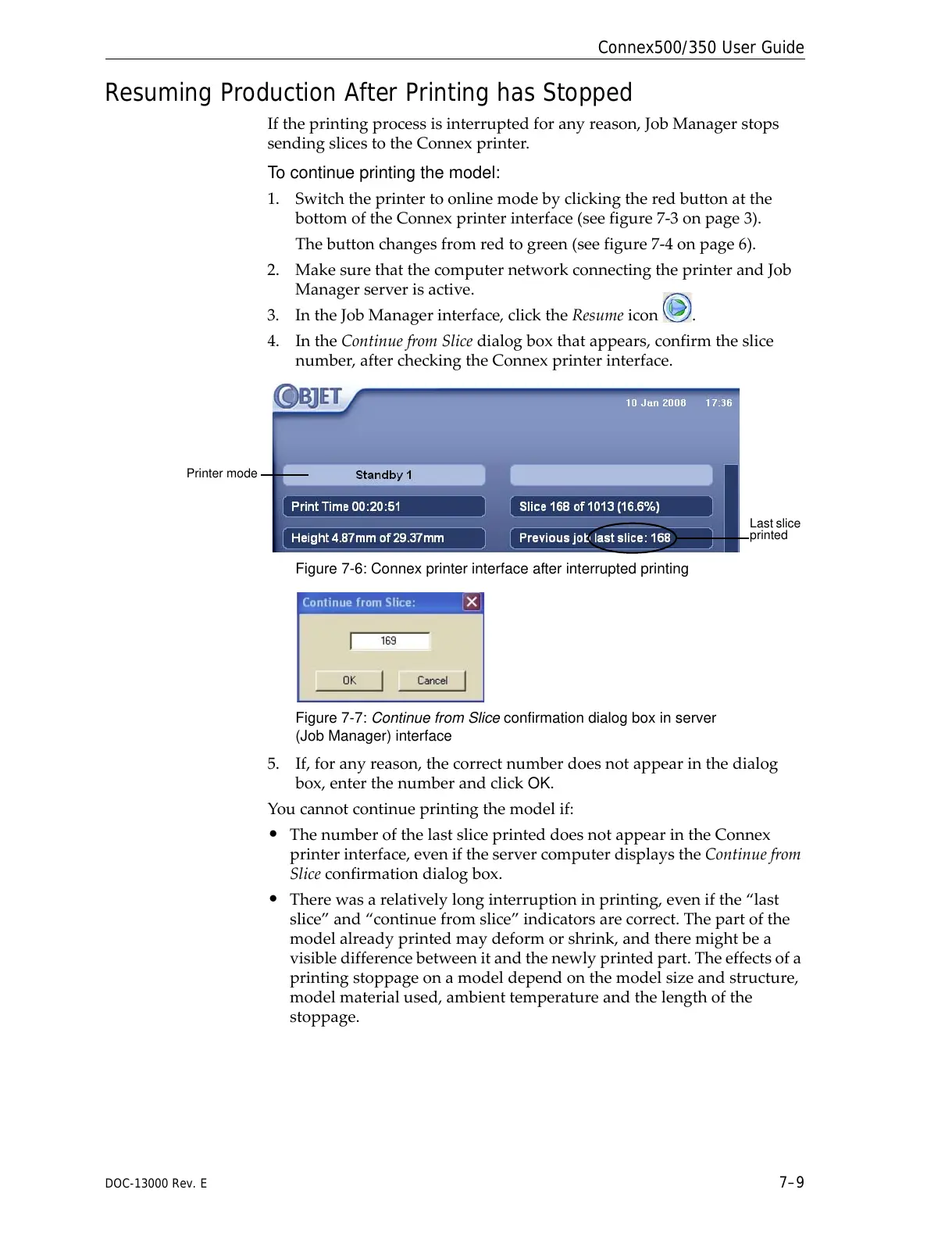
4. IntheContinuefromSlicedialogboxthatappears,confirmtheslice
number,aftercheckingtheConnexprinterinterface.
Figure 7-6: Connex printer interface after interrupted printing
Figure 7-7: Continue from Slice confirmation dialog box in server
(Job Manager) interface
5. If,foranyreason,thecorrectnumberdoesnotappearinthedialog
box,enterthenumberandclick
OK.
Youcannotcontinueprintingthemodelif:
• ThenumberofthelastsliceprinteddoesnotappearintheConnex
printerinterface,eveniftheservercomputerdisplaystheContinuefrom
Sliceconfirmationdialogbox.
• Therewasarelativelylonginterruptioninprinting,evenifthe“last
slice”and“continuefromslice”indicatorsarecorrect.Thepartofthe
modelalreadyprintedmaydeformorshrink,andtheremightbea
visibledifferencebetweenitandthenewlyprintedpart.Theeffectsofa
printingstoppageonamod
eldependonthemodelsizeandstructure,
modelmaterialused,ambienttemperatureandthelengthofthe
stoppage.



 To Next Page