DOC-13000 Rev. E 7–23
Connex500/350 User Guide
Cleaning and
Replacing the
Wiper
Arubberwiperremovesexcessmaterialfromtheprintheadsafterthe
purgesequence.Thisisdoneautomaticallybeforeeachprintjob,and
performedmanuallyduringmaintenancetasks.Youshouldcleanthe
wiperandsurroundingareaatleastonceaweek.Ifthewiperisdamaged
orworn,replaceit.
To inspect and clean the wiper:
1. Prepare—
• isopropanol(IPA—isopropylalcohol)orethanol(ethylalcohol)
• disposablecleaninggloves
• anObjet‐suppliedcleaningclothorequivalent
• asparewiper
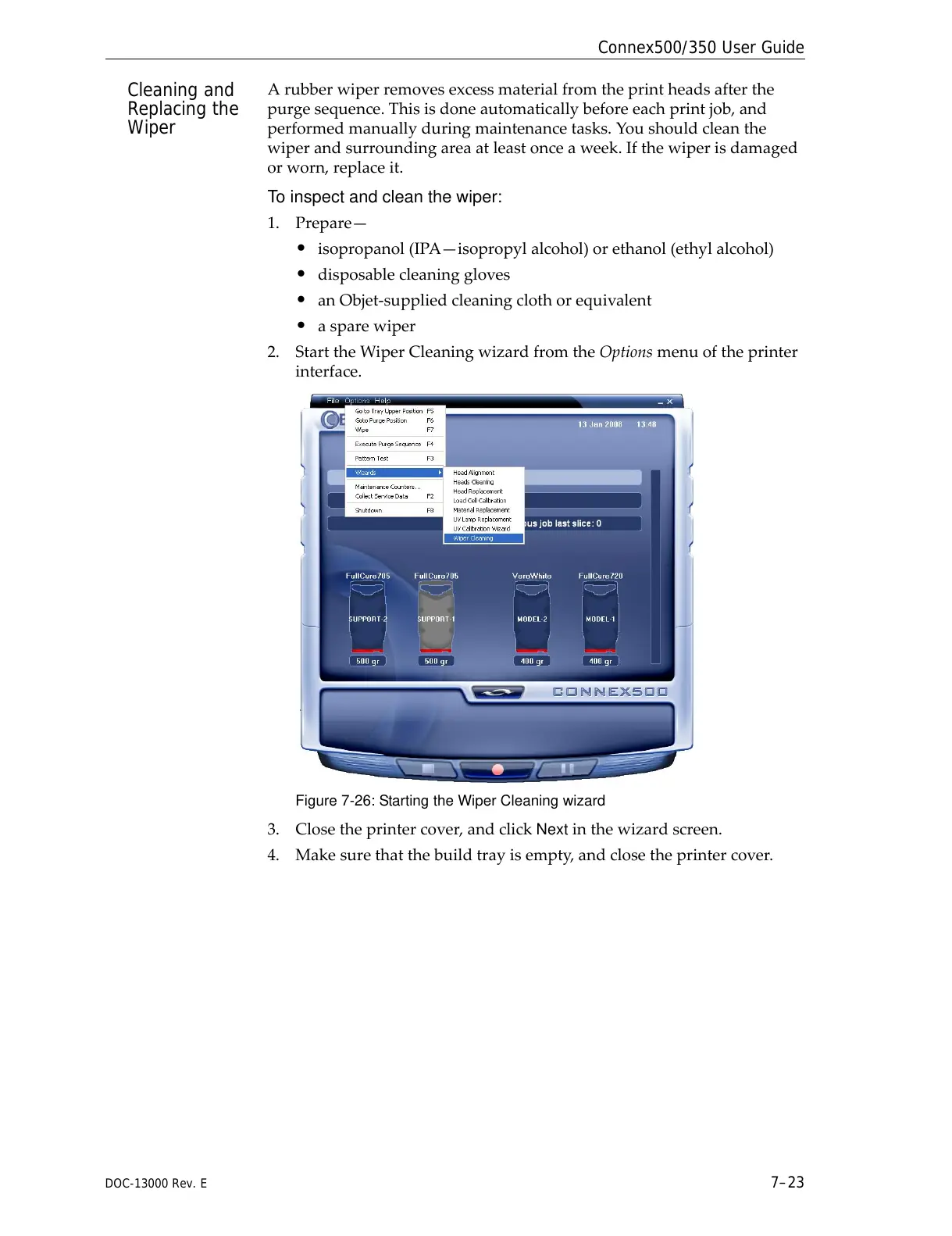
2. StarttheWiperCleaningwizardfromtheOptionsmenuoftheprinter
interface.
Figure 7-26: Starting the Wiper Cleaning wizard
3. Closetheprintercover,andclickNextinthewizardscreen.
4. Makesurethatthebuildtrayisempty,andclosetheprintercover.



 To Next Page