4: Sample Experiments
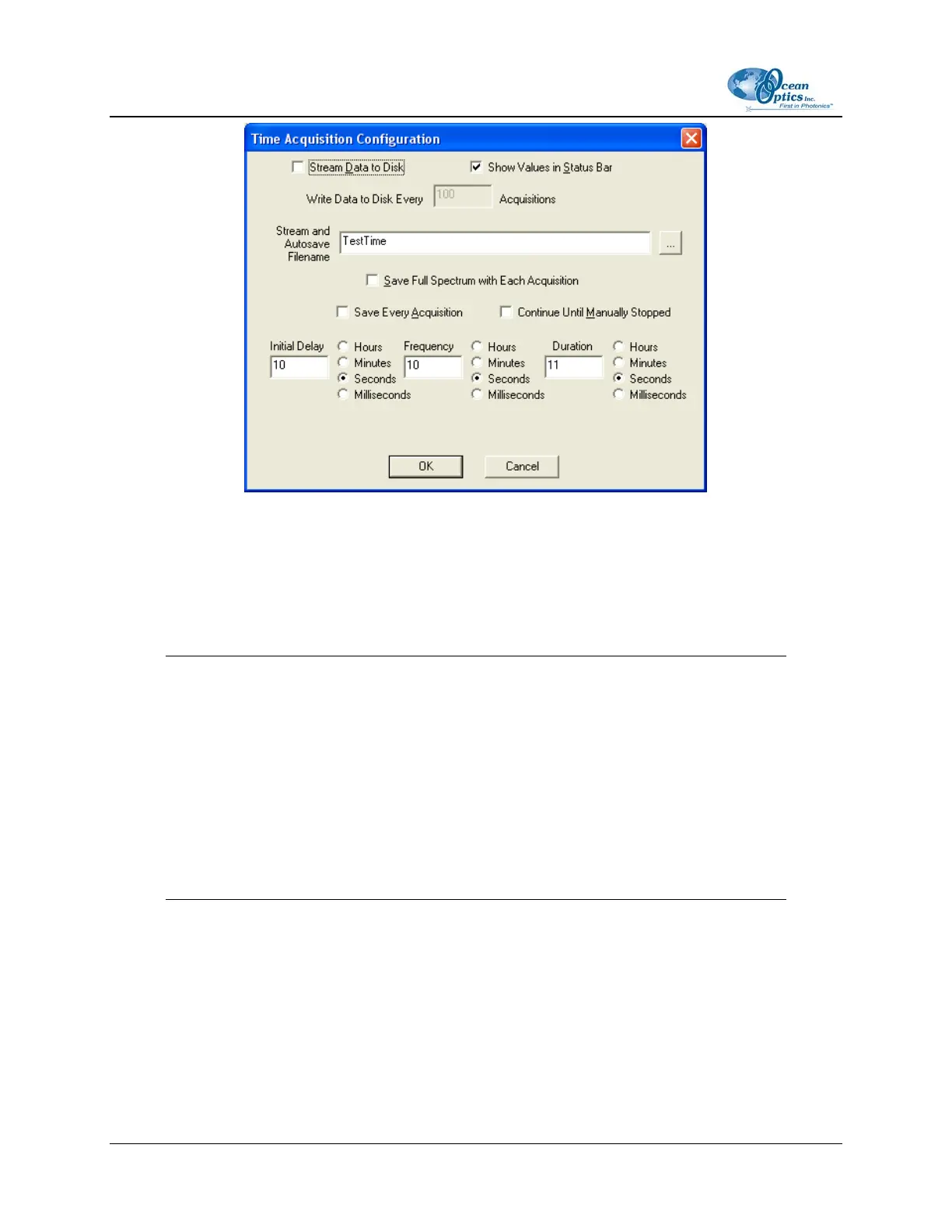
2. Enable Stream Data to Disk to save time acquisition data.
3. Enter a value in the Write Data to Disk Every x Acquisitions box to set the frequency for saving
data. OOIBase32 saves data more frequently if the number is smaller, or less frequently if the
number is larger. Entering a large number enhances the performance of the time acquisition
process.
Note
At specified time intervals, OOIBase32 stores data into time acquisition channels or
combination channels. OOIBase32 can plot the data in a spectral window, or stream the
data to disk, or both. OOIBase32 can display up to 2048 acquisitions in a spectral
window. If OOIBase32 collects more than 3684 acquisitions, it only displays the last
2048. To store more than 2048 acquisitions, you must stream the data to disk.
Writing data to the disk is a slow process (relative to the speed of some spectral
acquisitions) and causes a decrease in system performance. However, writing data to disk
more frequently gives a larger margin of safety.
4. Enable Show Values in Status Bar to see the time acquisition values in the status bar. These
values replace the cursor values.
5. Name the Stream Filename for the time acquisition process. Clicking on the ellipsis to the right
of this box opens a File Save dialog box, allowing you to navigate to a designated folder.
6. Enable Save Every Acquisition to store data for every spectral acquisition during a time
acquisition process (optional).
30 197-00000-512-02-0305



 To Next Page