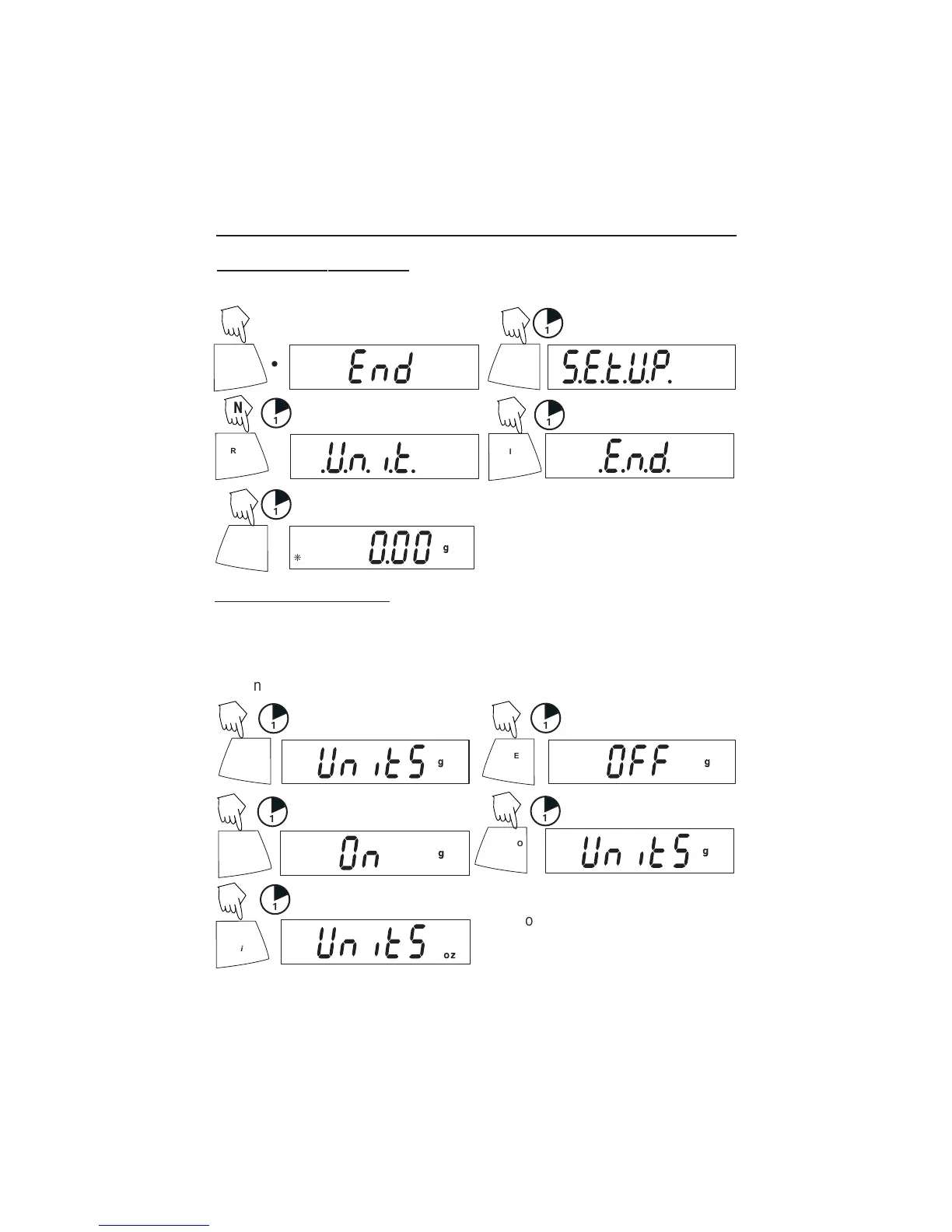
proceda al menú .E.N.D.
1
••
1
PRINT
Unit
1
PRINT
Unit
ON/ZERO
Off
1
Y
Y
N
N
N
Entrar al menú .U.N.I.T.
El menú .U.N.I.T. contiene las unidades de medida, el PC (conteo de partes), el
pesar por porcentaje y FIN. Las unidades varían según el tipo de modelo.
Determine qué unidades se van a encender o apagar.
ON/ZERO
Off
1
ON/ZERO
Off
1
Comience en el menú .U.N.I.T. Para cada unidad seleccione ENCENDIDO o APAGADO
(Encender)
PRINT
Unit
1
ON/ZERO
Off
1
PRINT
Unit
1
Repita los pasos anteriores para todas las
unidades excepto para conteo de partes y
pesar por porcentaje.
(Para avanzar)
(Para aceptar)
Y
Y
Y
N
N
NOTA: El oprimir repetidamente el botón PRINT
Unit
recorrerá todas las unidades; entonces,
podrá seleccionar ENCENDIDO o APAGADO. El conteo de partes es ligeramente diferente.




 To Next Page