9
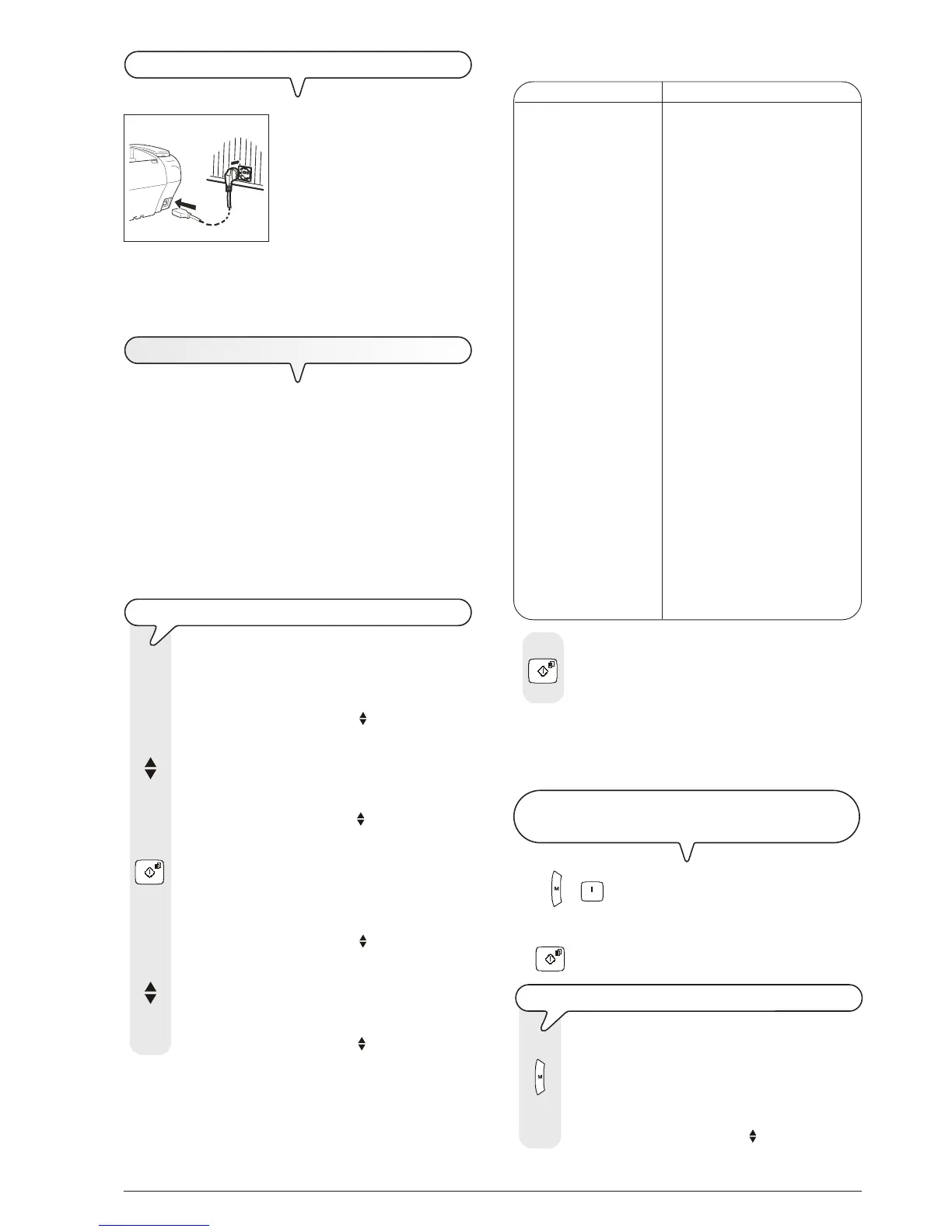
CONNECT THE FAX MACHINE TO THE POWER SUPPLY
1. Insert the female connector (A)
at one end of the power cable
into the male connector on the
rear of the fax machine.
Then insert the plug (B) at the
other end of the cable into the
wall power socket.
important
The plug (B) of the power supply cable may vary from coun-
try to country.
S
ETTING
SOME
PARAMETERS
Once the fax is connected to the power supply, it automatically
runs a short test to check that its components are working and
the display may show:
- the language in which the messages will be displayed
or
- the message "AUTOMATIC 00" ("AUTOMATIC" in the base
model) and, alternating on the second line, the messages
"SET DATE/TIME" and "CHECK CARTRIDGE".
In the first case, to enable the fax machine to work properly,
you must set the language and country in which it is to be
used as described in the procedure below. In the second
case, you can move on to set the date and time directly.
TO SET THE LANGUAGE AND THE COUNTRY OF DESTINATION
The display shows the language in which the messages
are displayed. For example:
LINGUA
ITALIANO
1. To select the desired language, press the keys:
The display shows, for example:
LINGUA
ENGLISH
2. To confirm the setting, press the key:
The display shows a country of destination, for exam-
ple:
CHOOSE COUNTRY
ITALIA
3. To select the desired country, press the keys:
The display shows, for example:
CHOOSE COUNTRY
U.K.
To select a different country, see the table below:
COUNTRY COUNTRY TO BE SELECTED
Argentina AMERICA LATINA
Australia AUSTRALIA
Austria ÖSTERREICH
Belgium BELGIUM
Brazil BRASIL
Chile AMERICA LATINA
China CHINA
Colombia AMERICA LATINA
Denmark DANMARK
Finland SUOMI
France FRANCE
Germany DEUTSCHLAND
Holland NEDERLAND
Italy ITALIA
Luxembourg BELGIUM
Mexico AMERICA LATINA
New Zealand AUSTRALIA
Norway NORGE
Peru AMERICA LATINA
Portugal PORTUGAL
Rest of world INTERNATIONAL
Spain ESPAÑA
Sweden SVERIGE
Switzerland SWITZERLAND
UK/Ireland U.K.
Uruguay AMERICA LATINA
Venezuela AMERICA LATINA
4. To confirm the setting, press the key:
The fax machine automatically returns to its initial stand-
by mode.
important
The fax machine may not be on sale in all of the countries
listed above.
TO CHANGE THE LANGUAGE AND THE COUNTRY OF
DESTINATION
Press + and repeat the procedure "To set the lan-
guage and the country of destination" from the start, re-
membering always to confirm the settings made by pressing
the
button.
TO CHANGE THE COUNTRY ONLY
1. Press the key:
The display shows:
MENU
RECEPT. SET-UP
A
1
B



 To Next Page