2
Recording
12
EN
Recording
Basic recording procedure
1
Changing the recording scene
(☞ P. 11).
• Each new voice recording file is saved
in the selected folder.
2
Point the built-in microphone
in the direction of the sound to
record.
3
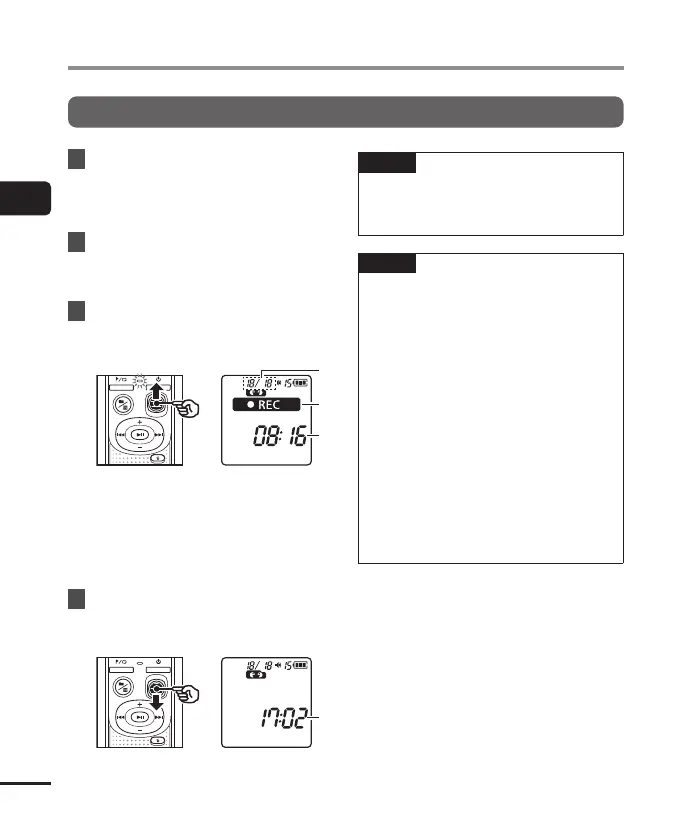
Slide the
REC
switch to start
recording in the direction of the
arrow.
a File number/Total number of
recorded files in folder
b Voice recorder status indicator
(during recording)
c Elapsed recording time
• The LED indicator light lights.
4
Slide the
REC
switch to stop
recording in the direction of the
arrow.
d File length
TIP
• Even when the power is turned off, you
can immediately start recording by
sliding the REC switch up.
NOTE
• To prevent the beginning of the
recording being cut off, start recording
after the LED indicator light has lit or
recording indicator has appeared in
the display.
• When the remaining possible recording
time is 60 seconds, the LED indicator
light starts flashing. It flashes more
rapidly as the remaining time decreases
(at the 30- and 10-second points).
• If the number of files inside the
recorder reached 199 or the memory
becomes full, you will not be able to
record any further, and [FULL] will
be displayed. You will need to delete
unnecessary files to record more
(☞P.24).



 To Next Page