3
Playback
15
EN
Playback
In addition to files recorded by the voice recorder, you can also play files in WMA format
transferred from a PC.
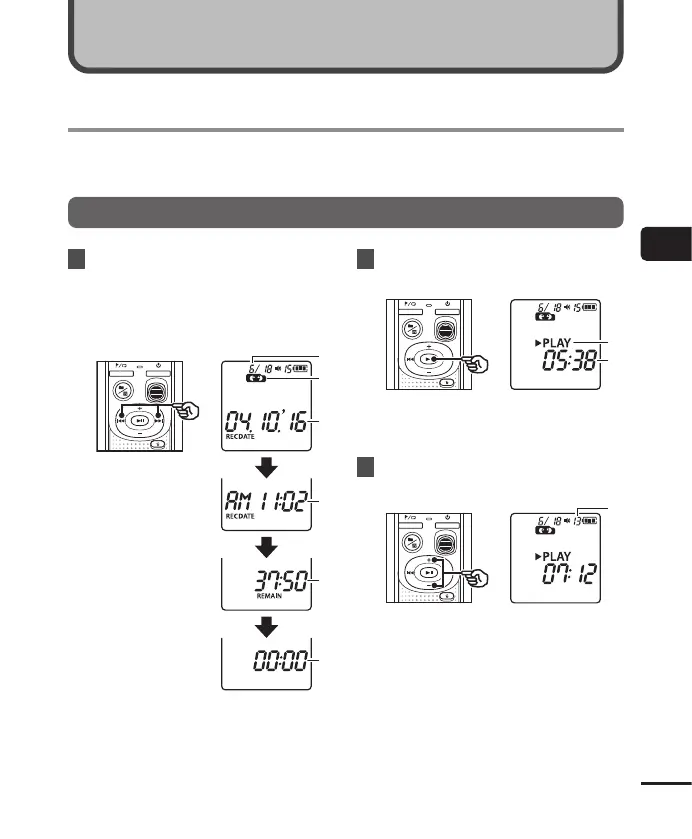
Basic playback procedure
1
Select the file to play from the
folder containing it.
• Immediately after selecting the file,
the following file information will be
displayed in order.
a Current file
number
b Current folder
c Recording
date
d Recording
time
e File length
f File start
2
Press the p button to start
playback.
g Voice recorder status indicator
(during playback)
h Elapsed playback time
3
Press the
+
or
–
button to adjust
the volume to the desired level.
i Volume
• The volume can be adjusted to a
setting between [00] to [30]. The
higher the number, the louder the
volume.
• If the volume is set too loud, a warning
screen may appear.
Playback



 To Next Page