3
Repeat playback
20
EN
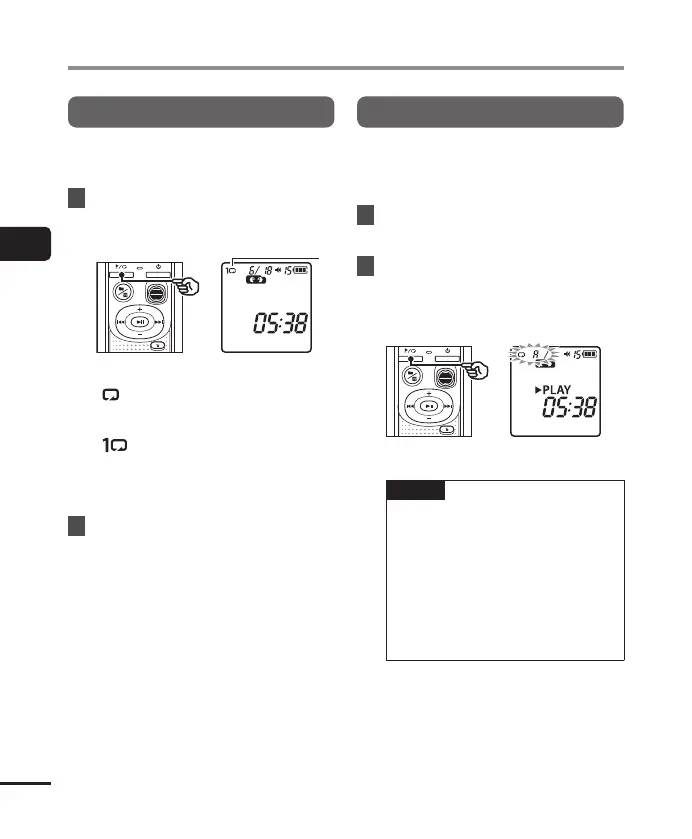
Folder/File repeat playback
You can select the repeat range in the file or
the folder.
1
Press and hold the l button
while the voice recorder is in stop
mode.
a Repeat indicator
[
]:
Plays the files in the current folder
repeatedly.
[
]:
Plays the current file repeatedly.
• Press and hold the l button to
switch repeat settings.
2
Release the p button to finalize
the setting.
A/B repeat playback
The voice recorder has a function with
which you repeat the playback of a portion
(segment) of the file being played.
1
Select a file for A/B repeat
playback, and start playback.
2
Press and hold the l button
when playback reaches the
desired start position for A/B
repeat playback.
• [A] will flash on the display.
TIP
• You can change the playback speed
(☞P.19), and fast-forward/rewind
(☞P.16, P.17) when the [A]
indicator is blinking.
• If playback reaches the end of the file
when the [A] indicator is blinking,
the end of the file is treated as the
segment end position, and repeat
playback starts.
Repeat playback



 To Next Page