4
Erasing les
24
EN
This section describes how to erase a single unnecessary file from a folder, erase all the files in
the current folder at once. Files cannot be restored after being erased, so please check carefully
before erasing a file.
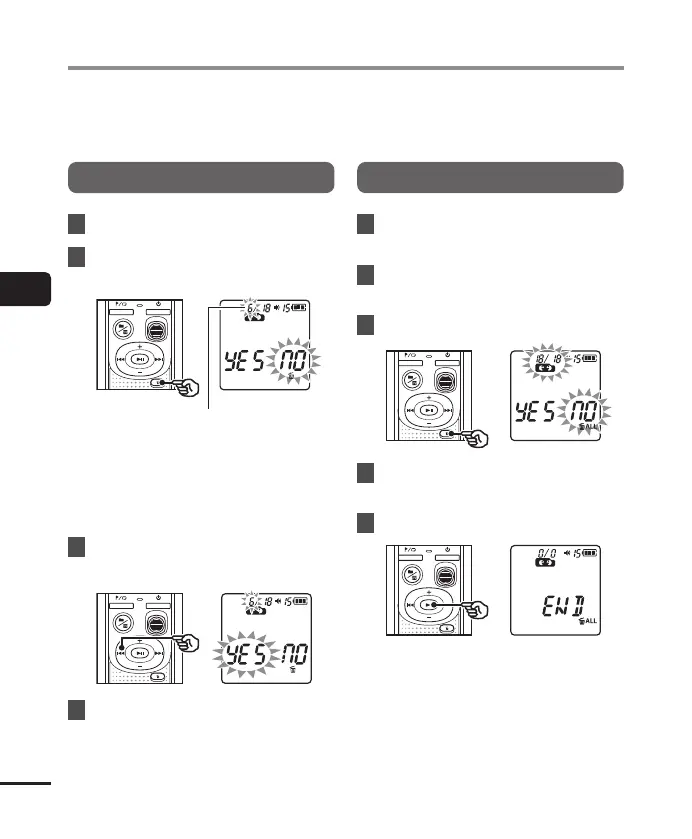
Erase a single file
1
Select the file you want to erase.
2
Press the k button while the
voice recorder is in stop mode.
The file of this number is
erased. After it is erased,
renumbering is performed
automatically.
• The voice recorder returns to the
stopped mode if no operation is
performed for 8 seconds.
3
Press the 0 button to select
[
YES
].
4
Press the p button.
• [END] appears when the process has
finished.
Erase all the files in the folder
1
Select the folder from which to
erase all files.
2
Press the k button while the
voice recorder is in stop mode.
3
Press the k button again.
4
Press the 0 button to select
[
YES
].
5
Press the p button.
• [END] appears when the process has
finished.
Erasing files



 To Next Page