4
22
EN
Changing the information screen/
Preventing accidental le erasure (File Lock)
Editing
With the file lock feature you can lock
important files to prevent them being
accidentally erased. Once locked, file is not
erased even if the operation for erasing all the
files in its folder is performed (☞P.24).
NOTE
• Select the file you want to lock, and stop
at the start of the file.
1
Select the file you want to lock.
2
Press the l button while the
voice recorder is in stop mode.
a File lock indicator
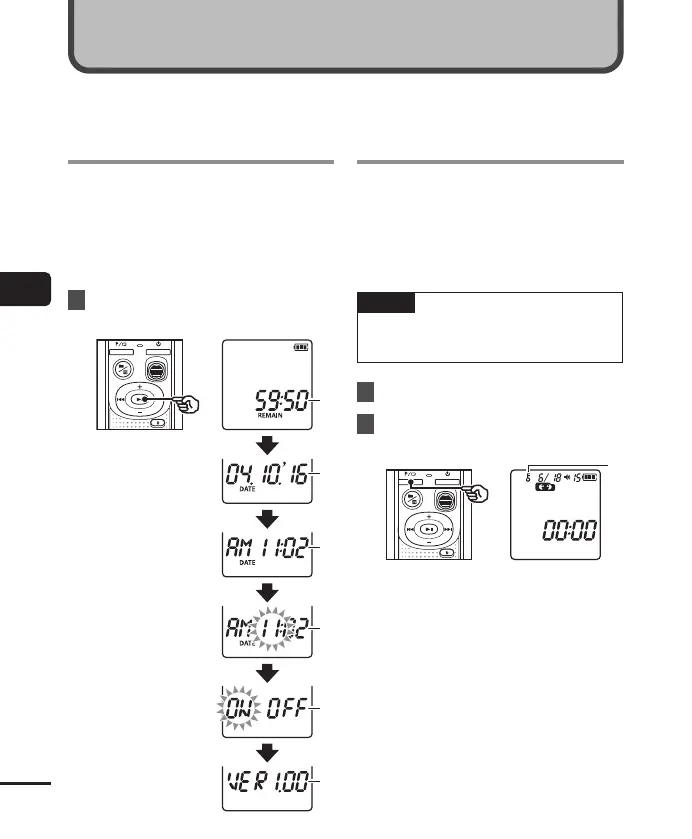
Press and hold the p button while the voice
recorder is in stop mode to display the remaining
recording time, as well as the current time/date.
Continue press and hold the p button to
display the time/date settings screen (☞P.7).
1
Press and hold the
p
button while
the voice recorder is in stop mode.
a Remaining
possible
recording
time
b Current date
c Current time
d Setting the
time/date
e Setting the
beeping
sounds
f Version
information
Preventing accidental
file erasure (File Lock)
Changing the
information screen



 To Next Page