PTO Data Input Verification Procedure Optional Accessories
9-4 80-JB566-1 Rev. G
MAY CONTAIN U.S. AND INTERNATIONAL EXPORT CONTROLLED INFORMATION
8. Verify through the Performance Monitoring screens that the PTO application is
recording correctly.
9. Start the vehicle.
10. Turn the PTO device ON.
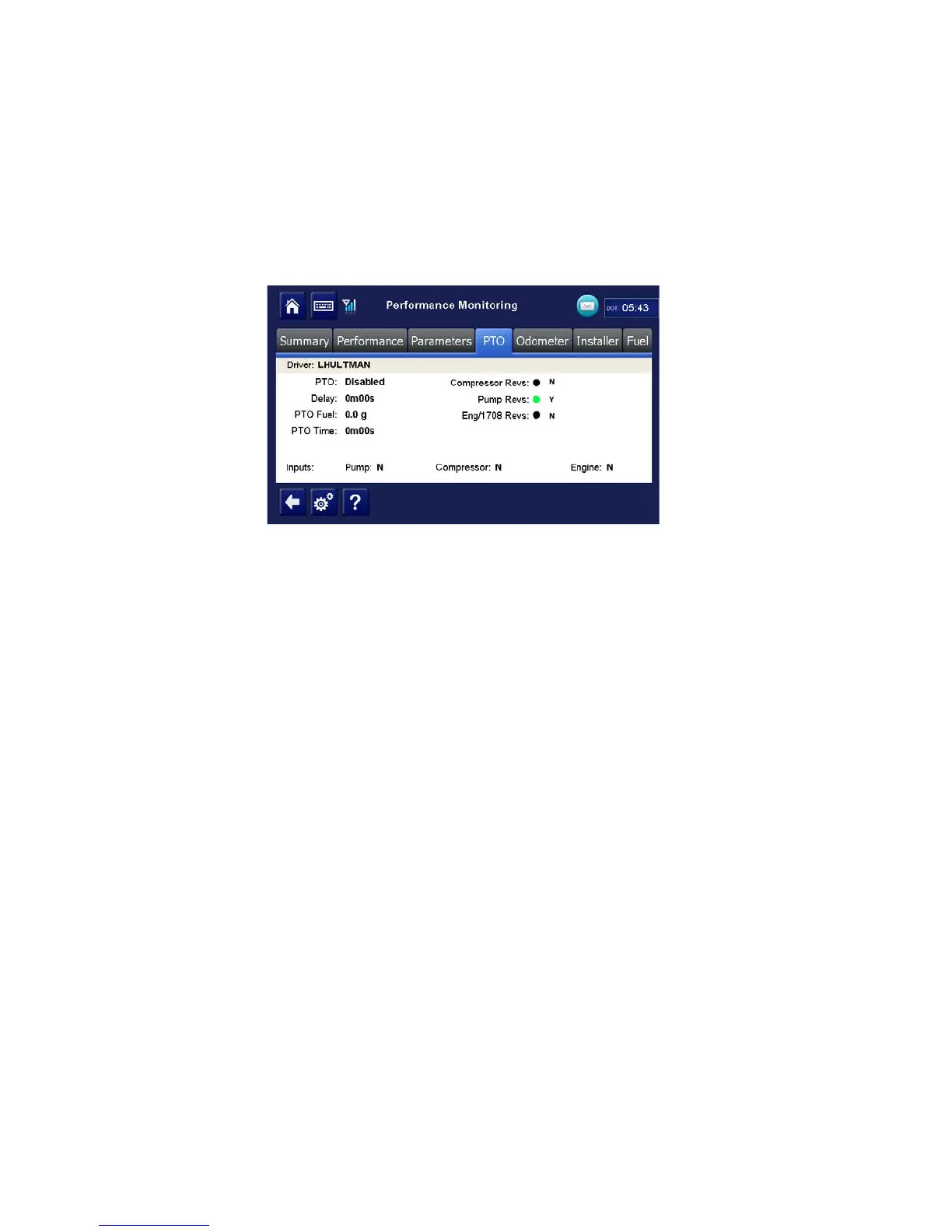
11. Navigate to the PTO screen. Tap the Performance Monitoring button the tap PTO tab.
Note: If the performance monitoring button is grayed out, Performance Monitoring is not
enabled. Call your company dispatch to have this application enabled. Performance
Monitoring parameters must be sent to the unit as well.
12. Verify that PTO is Enabled and the Compressor or Pump displays a Y according to what
is active.
13. You should see the green indicator light according to what is active.
14. Check that the PTO Time field is incrementing. Is this field incrementing?
Note: In order for PTO time to be recorded in Performance Monitoring, RPM must be >0,
speed <20 mph, and the PTO time delay (customer configured) must be reached.
• If yes, PTO verification is complete.
• If no, check the wire connections.
15. Turn off PTO device. PTO time should now stop incrementing.


 To Next Page