80-JB566-1 Rev. G 9-3
MAY CONTAIN U.S. AND INTERNATIONAL EXPORT CONTROLLED INFORMATION
Optional Accessories PTO Data Input Verification Procedure
PTO Data Input Verification Procedure
1. Start the vehicle.
2. Turn the PTO switch ON.
3. Navigate to the System VDS screen.
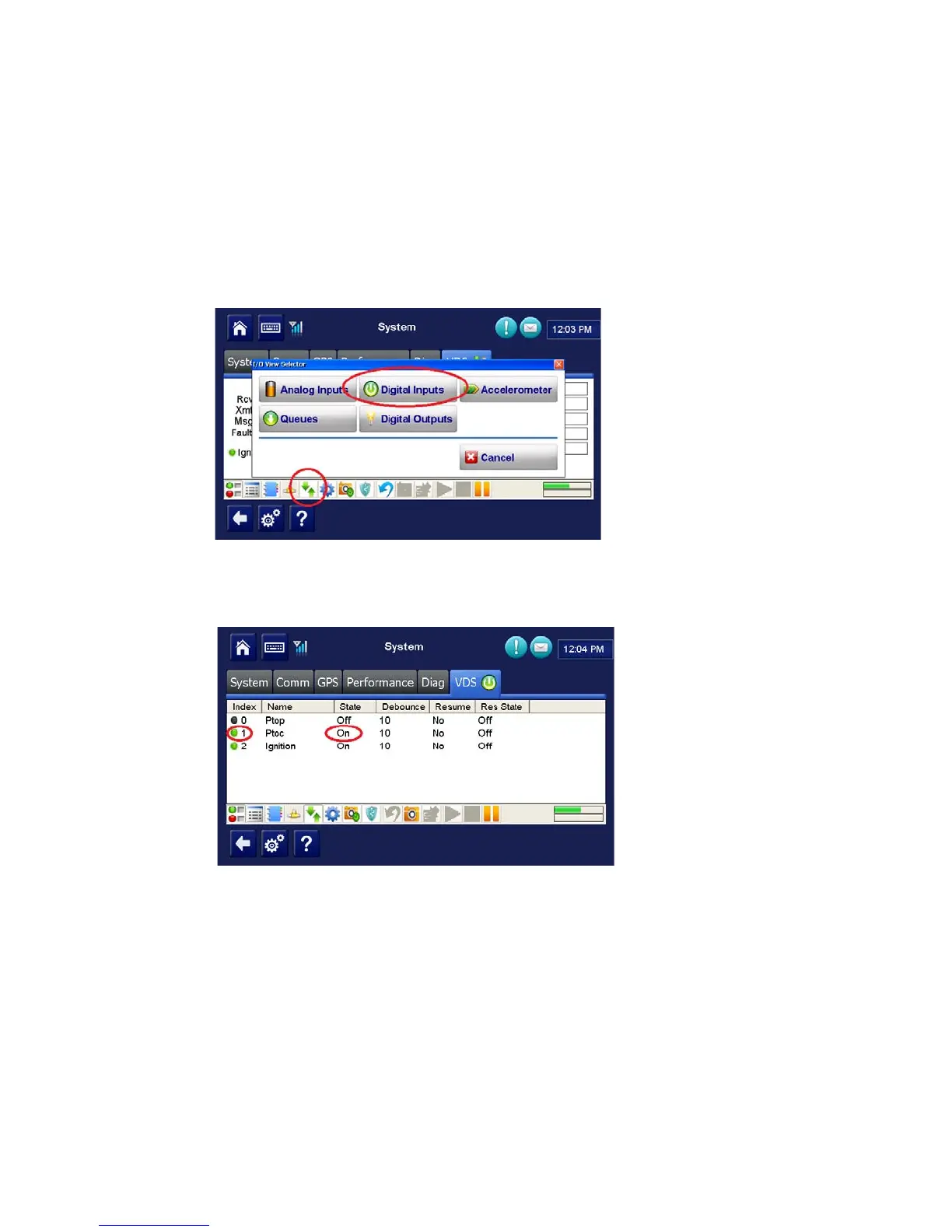
4. Tap the green up and down arrow button at bottom of the screen (circled below).
5. Verify either PTOP or PTOC has a green dot under the Index column and shows “On”
under the State column.
NOTE:
PTOC: Dig 1_in wire in the wire harness
PTOP: Dig 2_in wire in the wire harness
If neither PTOP or PTOC is showing a green dot or “On,” check the PTO wire
connections.
6. Turn off PTO device. The green dot and State will change (i.e., to a black dot and “Off.”)
7. At this point, the PTO wire installation verification is complete.


 To Next Page