Chapter 3 Source Connecon
11111111
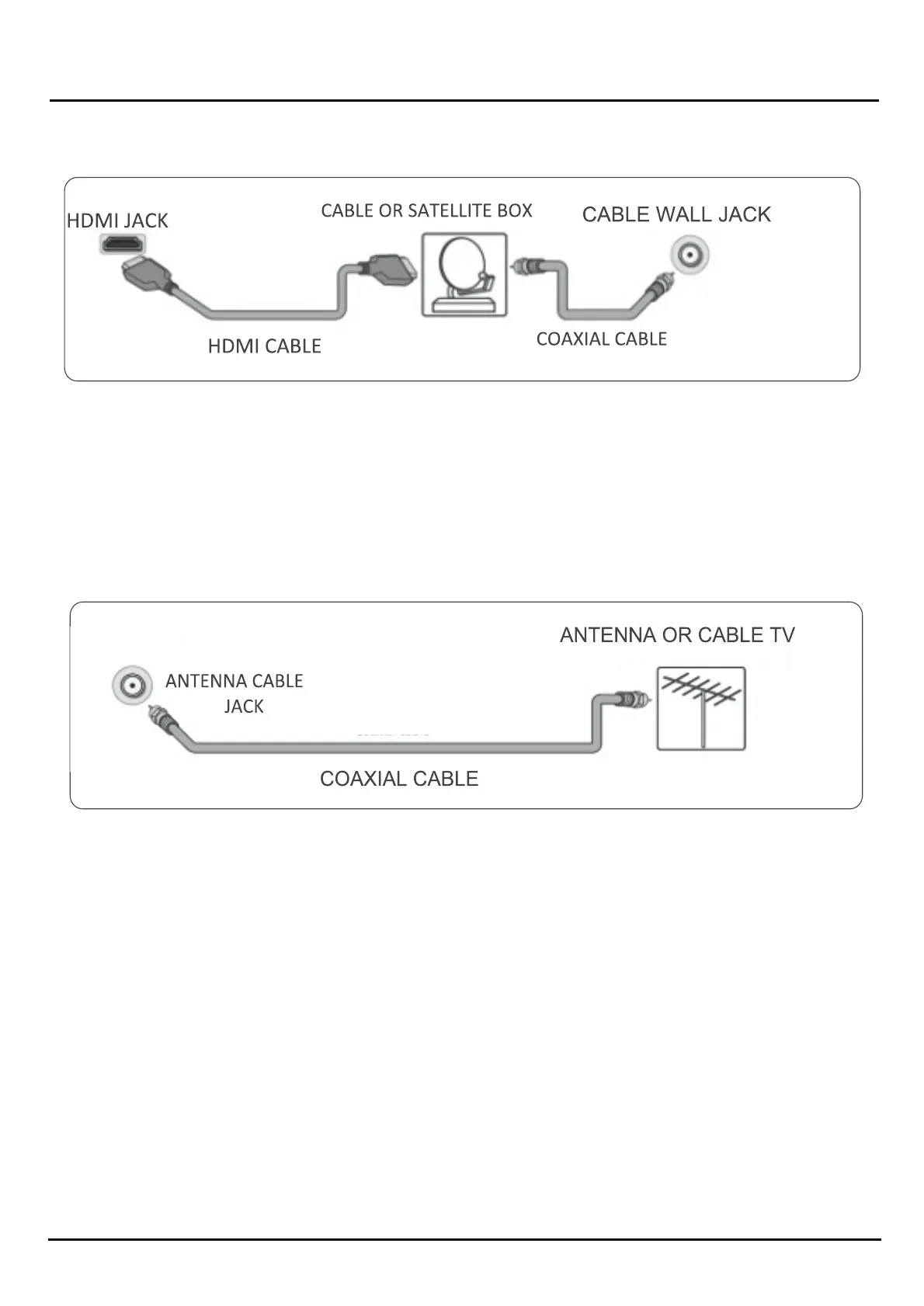
Connecng a Cable or s t Top box or DTH.
Many cable or STB TV boxes have more than one connecon type. o get the best video, you should use the best cconnecon
type available. You can connect a cable or STB /DTH using (in order of preference)
1) .Make sure that your TV's power cord is unplugged and all connected equipment is turned Off.
2 .)Connect a coaxial cable (not provided) to the cable wall jack and to the cable -in jack on the cable or STB.
3.) Connect an HDMI cable (not provided) to one of the HDMI jacks on your TV and to the HDMI out jack on the cable or
STB/DTH box
4 .) On the HOME screen, navigate to the INPUTS row, then select HDMI 1 ,HDMI 2 or HDMI 3
Note: An HDMI cable carries both audio and video. You do not need to use separate audio cables
Connecng An A tenna :1.) Make sure that your TV's power cord is unplugged and all connected equipment is turned
off.
2.) Connect a coaxial cable (not provided) to the antenna/ cable jack on your TV and to the antenna or cable connecon.
3.) Plug your TV's power cord into a power outlet, then turn on your TV.
4.) On the HOME screen, navigate to the INPUTS row, then select Antenna.
Note: • use a coaxial cable to eliminate interference and noise from radio waves.
• If the antenna is not installed correctly, contact qualified service personnel to correct the problem.
• If the signal level for a channel is weak, the picture may be distorted. Adjust the antenna or use a highly direconal oudoor or
set top Antenna with a built in amplifier.
• If the picture quality is good on some channels and poor on others, the problem may be caused by a poor or weak signal from
the Broadcaster or cable TV provider.
• If you connect to cable TV without a set top box and experience poor picture quality, you may need to install a set top box to
improve Signal recepon and pictue quality. Contact your cable TV provider about upgrading to a set top box.
AV/COMPOSITE :
Note: Cables are ofen color-coded to match color-coded jacks
1.) Make sure that your TV's power cord is unplugged and all connected equipment is turned Off.
2.) Connect a coaxial cable (not provided) to the cable wall jack and to the cable-in jack on the cable or STB box
3. Connect an AV cable (not provided) to the AV/Composite jacks on your TV and to the AV out jacks on the cable or STB box.


 To Next Page