171717171717
Chapter 4 General Operaon
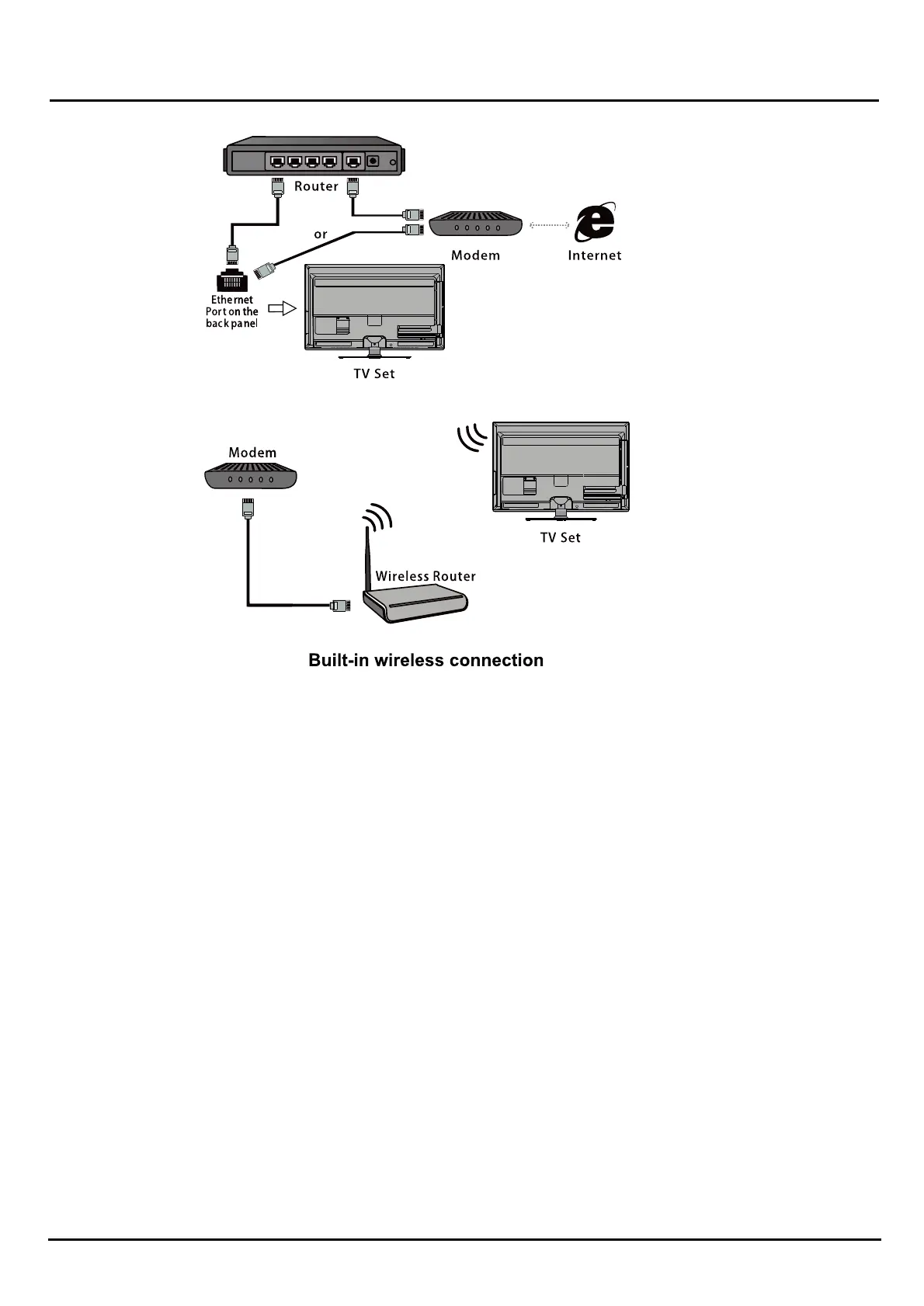
Connecng o a wireless network
To connect to a wireless network
1. Ensure you have:
• A router broadcasng a high-speed wieless signal
• A high-speed internet connecon
2. Use the Network Sengs o configure the TV
Note: Some models may have no internal wireless module, you can use wireless network by inserng xternal wireless
adapter into USB socket of the TV. Some external wireless adapters can't be compable with the T .
Inial s tup
The firsst meou switch the seset on, the Inialtup screen appears, which guides you thrthrough the iniatup
process.
Follow the on-screen instrucons to finish the inial tup pr process such as selecng the lan e ,ce ,connecng
to the network, scanning channels, and more. During each step, either make a choice or skip the step. If you
skip a step, you can perform the setup later from the sengs menu.
Note: If the channel search retrieved only the analogue channels it could be caused by poor broadcasng and
therefore is not covered by manufacturer warranty. Manufacturers cannot be held responsible for lack of
or poor broadcasng in some aeas.


 To Next Page