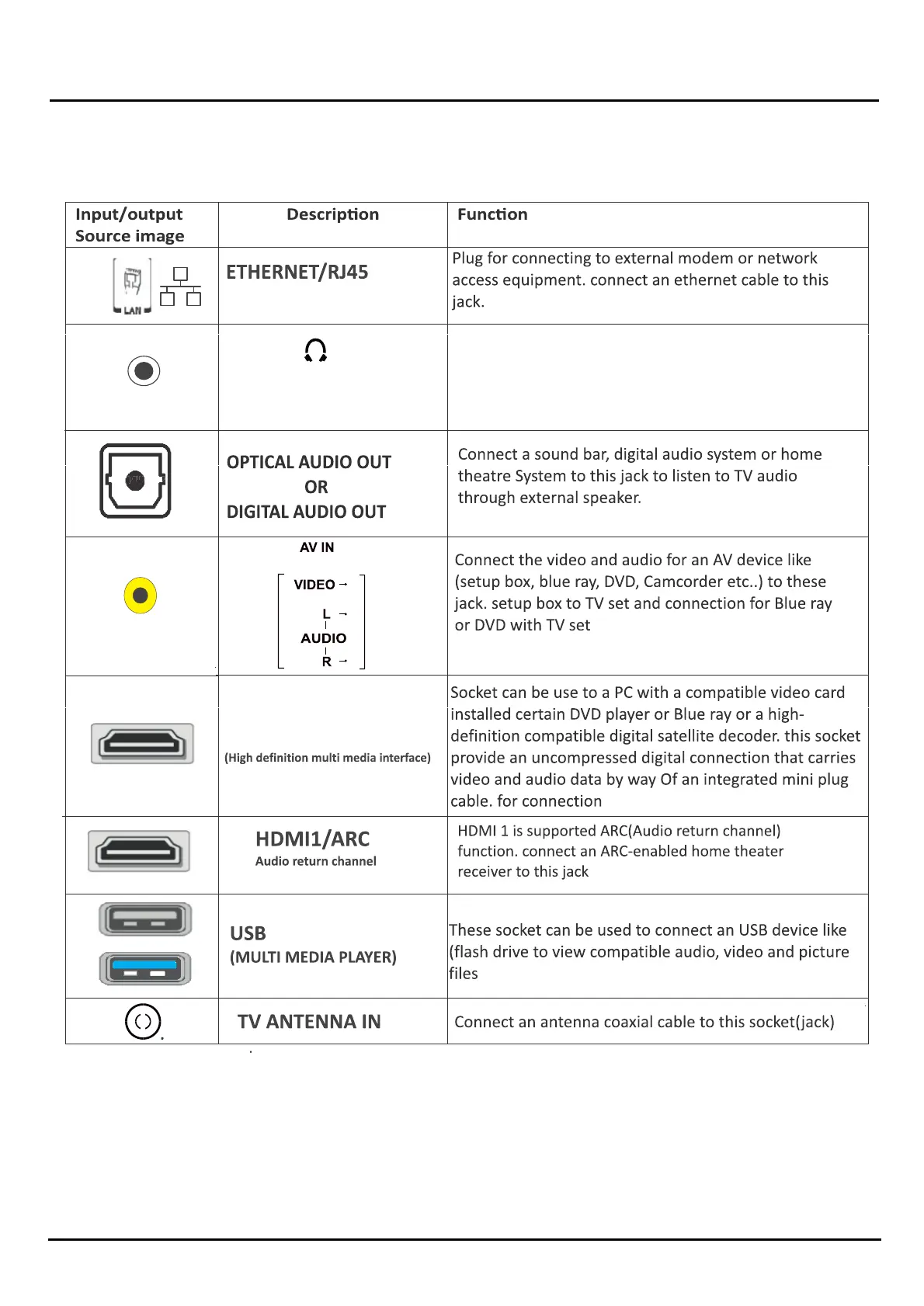
USB 3.0
HDMI1,HDMI 2,HDMI 3
Chapter 2 Introducon
999
USB 2.0
HEADPHONE OUT
HEADPHONE OUT Socket(output)
Allow you to connect earphones to listen to the sound
coming from the TV
Note: Excessive sound pressure from earphones can
cause hearing loss
Note: The locaon and names of the soc ets on the TV may vary according to TV model, and not all sockets available on all
models.
CAUTIONS: • Check the jacks for Posion and type b fore making any cconnecons.
• Loose connecons an cause poor audio or video quality. Make sure that all cconnecons are and secure
• The external audio/video equipment shown may be different from your equipment. If you have quessons,efer to the
documentaon th t came along with your equipment.
• Always unplug the power cord when connecng xternal equipment.
Note : Graphics contained within this publicaon ae for presentaaon on.
INPUT/OUTPUT SOURCE DESCRIPTION


 To Next Page