Pa
ge 19
DX17V GB
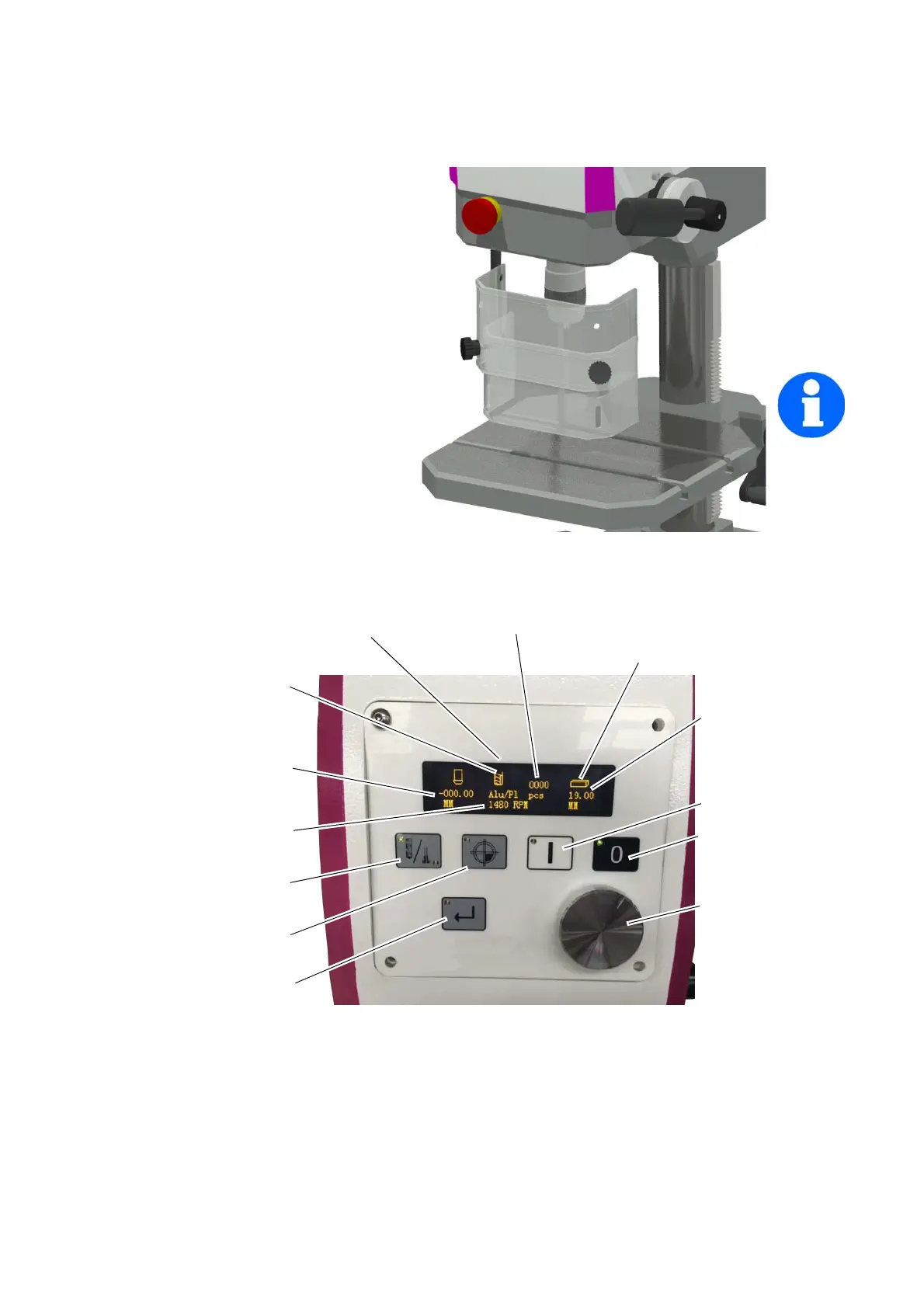
4.2 Drill chuck protection
Adjust the protective equipment to the cor-
rect height before you start working.
Push the drill chuck protection up or down.
Loosen the clamping screws and adjust the
total coverage height.
A switch is integrated into the fixture of the
spindle protection which monitors that the
cover is closed.
INFORMATION
You cannot start the machine if the drill
chuck protection is not closed.
Img.4-1: Drill chuck protection
4.3 Control panel
selected tool and material
Depth indicator
Spindle speed,
Accuracy +- 1%
Tool selection
- D
rill
- Sc
rew tap
Set zero point (workpiece
starting point)
Confirmation key
Press Enter, accept values
Drill depth as target value
Start
Stop
Rotary knob
Rotate, set values
Piece counter
Drilling or thread depth
Symbol is flashing - input is expected



 To Next Page