In DIN mode, the tool length is
activated automatically, but in ISO
mode, you must activate the tool
length via G code.
G43/G44 and G49
Use G43/G44,the tool length
compensation value will be
activated.
G43: Tool length compensation in
positive direction
G44: Tool length compensation in
negative direction
G49: Cancel tool length
compensation
H01→Offset value 20.0
H02→Offset value -30.0
H03→Offset value 30.0
H04→Offset value -20.0
G90 G43 Z100.0 H01;Z will reach 120.0
G90 G43 Z100.0 H02;Z will reach 70.0
G90 G44 Z100.0 H03;Z will reach 70.0
G90 G44 Z100.0 H04;Z will reach 120.0
Note: In DIN mode, you must open the H code list
in the tool list. For information on the opening
method, please refer to the instructions for H
code on
G98 :Fixed cycle back to
the original point
G99 :Fixed cycle back to R point
G80 :Cancel the fixed cycle
Pausing function G04
G04 X5.0 >delay 5 s
G04 P5 >delay 5 ms
N5 G90 T1 M06
N10 M3 S2000; spindle rotation
N20 G99 G81 X300 Y-250 Z-150
R-10 F120;after orientation drilling, back to R
point
N30 X1000. ;after orientation drilling, back to R
point
N40 G04 X2.0 ;delay 2 s
N50 G98 Y-550 ;after orientation drilling, back to
start point
N60 G80 ;cancel the fixed cycle
N70 M5 ;spindle rotation stop
N80 M30
Code G02 and G03
G02 circular interpolation in positive
direction
G03 circular interpolation in negative
direction
You can specify the circle end point in the
following X/Z address for both. You can
also describe circle radii with I, J, K
incremental or use parameter R to specify
radii directly.
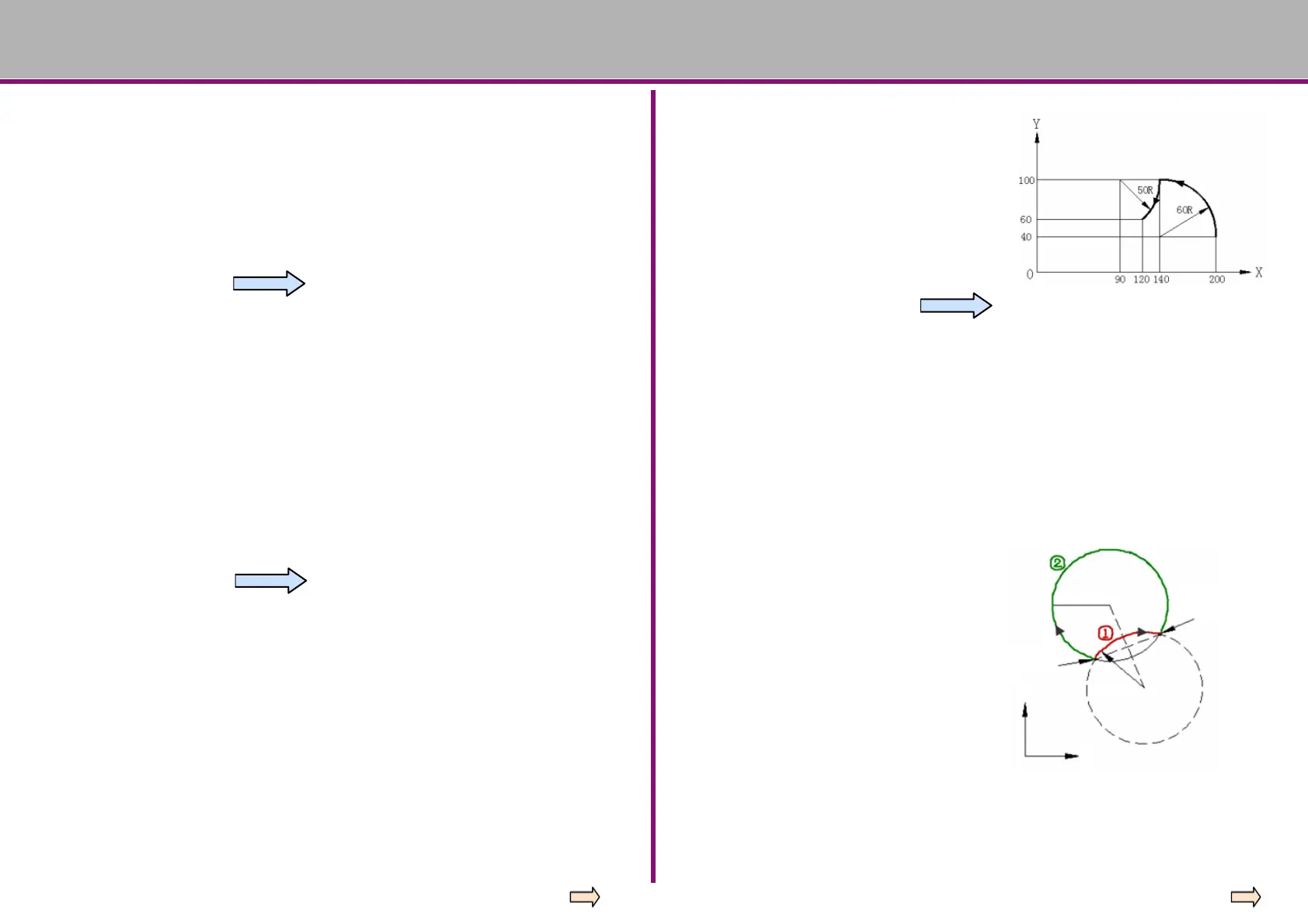
Method 1 (use incremental to describe
circular radius)
G92 X200.0 Y40.0 Z0
G90 G03 X140.0 Y100.0 I-60.0 F300.0
G02 X120.0 Y60.0 I-50.0
Method 2 (use parameter R to describe
circular radius)
G92 X200.0 Y40.0 Z0
G90 G03 X140.0 Y100.0 R60.0 F300
G02 X120.0 Y60.0 R50.0
Start point
End point
Y=50mm
Y=50mm
Y
X
When specifying circle radii with parameter R
Circles less than 180° is assigned positive values
① →G02 X6.0 Y2.0 R50.0
Circles greater than 180° are assigned negative
values
② →G02 X6.0 Y2.0 R-50.0
X6.0 Y 2.0





 To Next Page