28 © Hypercom EMEA Ltd. 2011 Using your terminal
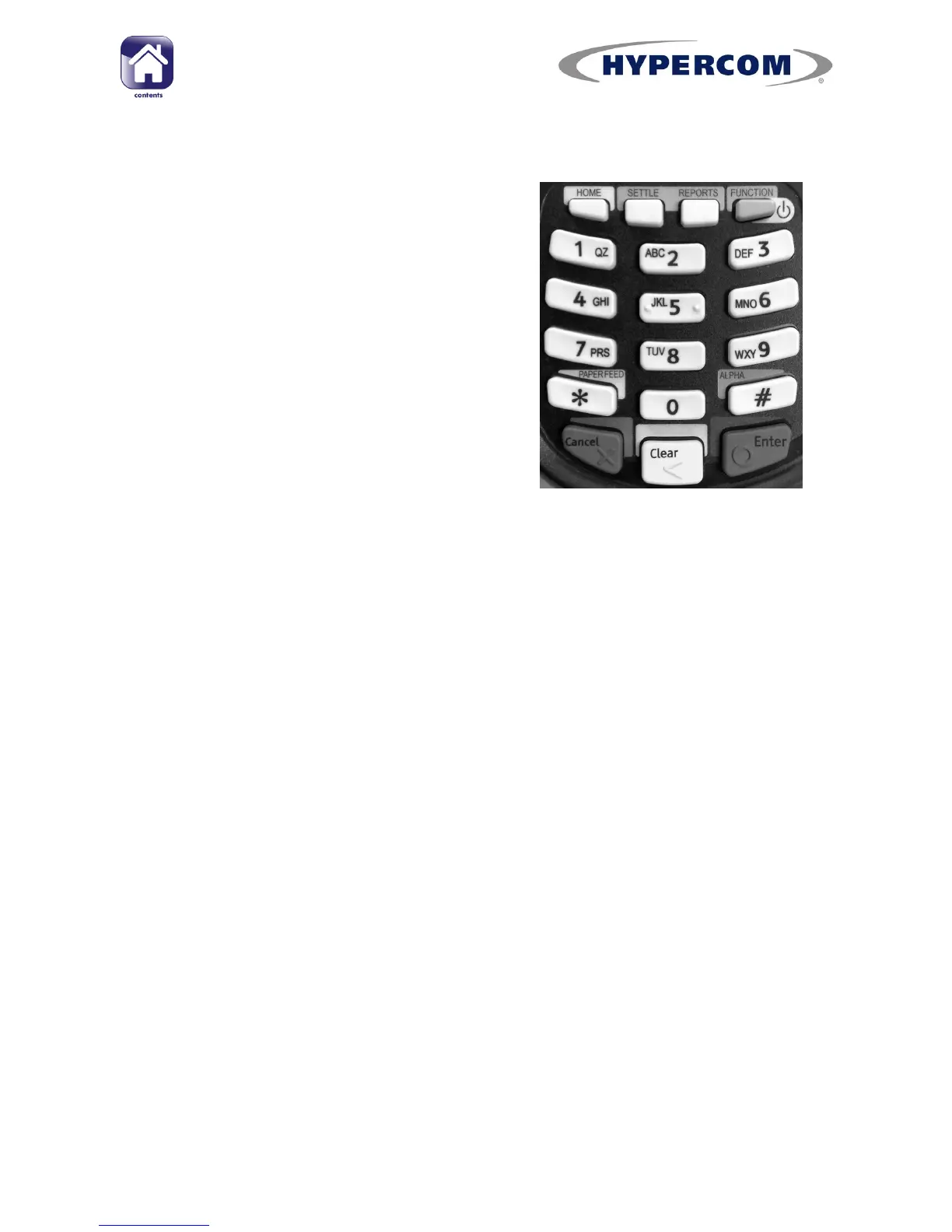
Keypad buttons
Home Returns to the Desktop screen*
Settle Starts the Settlement procedure
when on the idle screen**.
(See page 57 for more information)
Reports Displays the Reports menu when
on the idle screen**.
(See page 59 for more information)
Function & ON/OFF
All models:
The function button allows you enter terminal functions when
on the idle screen** and start the Application Manager when on the
Desktop screen*.
(See Appendix C for information about terminal functions)
M
4230
& M
4240
only:
To turn the terminal on or off, hold down the function
button for eight seconds until terminal powers down.
*
(Paper Feed) Feeds the paper by 1cm when on the idle screen**
Enter Press to accept on-screen options or prompts.
Clear Deletes editable information on the screen and can be used instead
of pressing NO to on-screen options or prompts.
Cancel Terminates current action and returns to the idle screen**
*See page 29 for information about the Desktop screen
**See page 30 for information about the Idle screen
Clearing entered information
To clear the whole value to zero at once, press the Clear button on the
keypad.
To clear one digit at a time, press the Navigation Button next to back
arrow on the screen.



 To Next Page