Using your terminal © Hypercom EMEA Ltd. 2011 41
Card details Key Entry
If the terminal cannot read the chip or the magnetic strip on the card, or
you are in a Mail Order Telephone Order (MOTO) environment you can key
enter the card number for most card types. The terminal will then prompt
for additional information depending such as Start and Expiry Dates, Issue
number, Card Holder Verification Code and Address Verification data. This
will vary depending upon card type.
The terminal will also request whether the customer is present or not, and
you must answer this correctly; if you respond incorrectly, then you may
incur charge-backs in the case of fraudulent transactions.
Cardholder Verification Code and Address
Verification Service
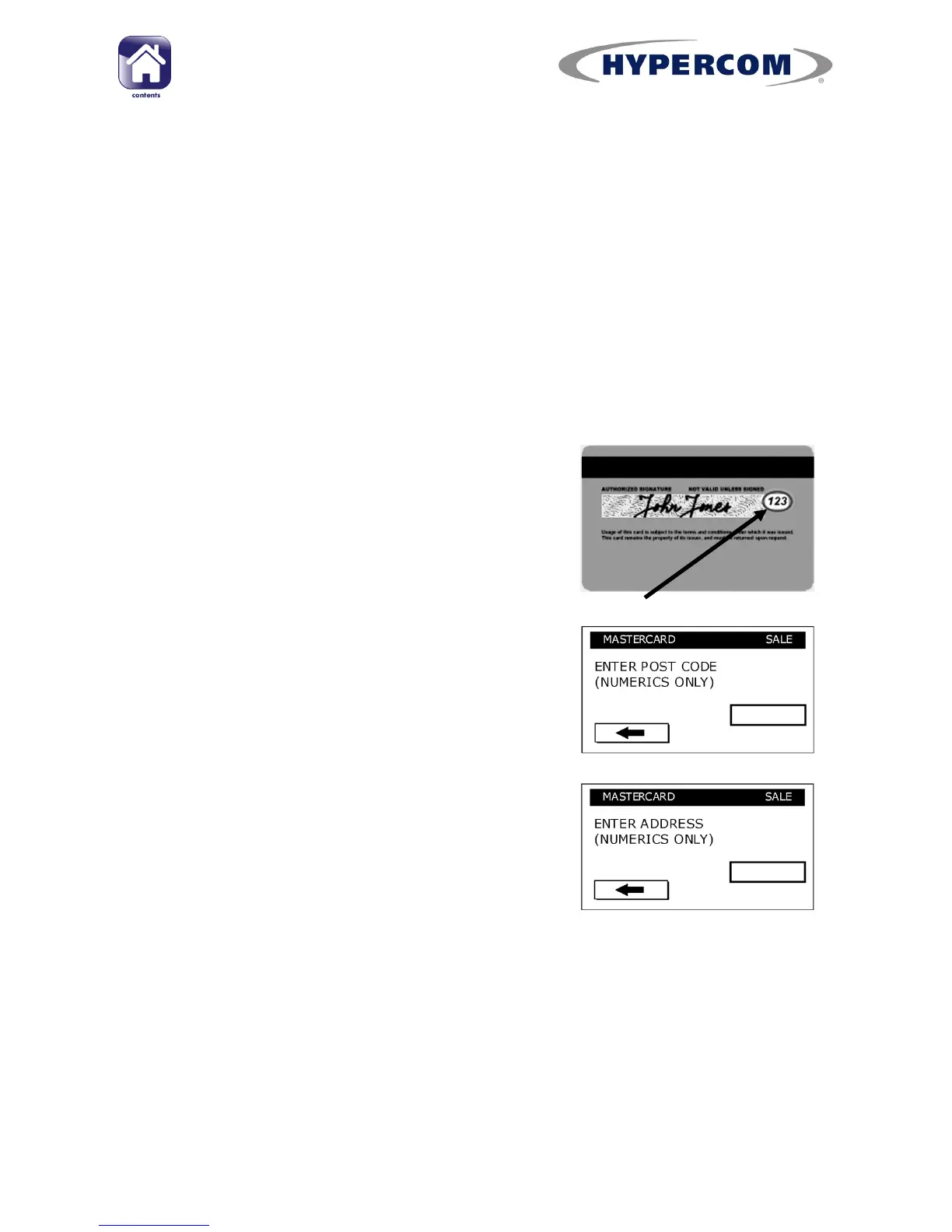
The Cardholder Verification Code is a three digit
code at the right hand end of the signature
strip for most cards, the exception being
American Express where it is a four digit code
printed on the front of the card.
You must enter this code when prompted.
The Address Verification Service allows you to
enter numeric digits related to the Cardholders
address, and you may enter these when
prompted.
Type in the numbers from the Post Code of the
cardholder‟s registered address and press
Enter.
Example: TD15 9EN
In this case you would enter the Post Code as
159
Then type in the house/building number of the card‟s registered address
and press Enter.
For international cards or cards where the address doesn‟t have a house
number, the Address Verification data entry can be skipped by pressing
Enter. For cards where the address is unknown, this can also be skipped.
continued...



 To Next Page