24
*
DVD Projector
English
Using the Remote Control
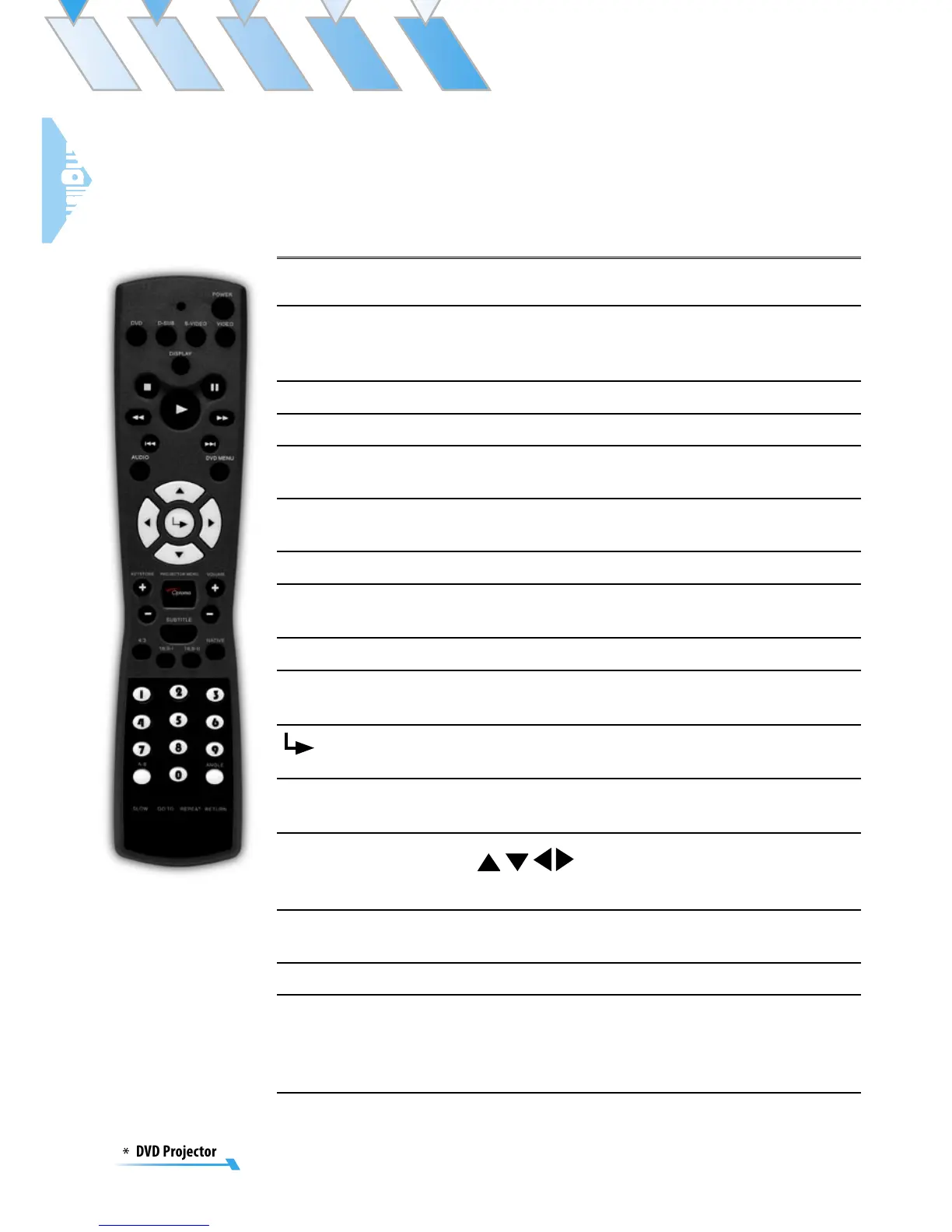
Power
Press [Power] to turns on the projector’s lamp,
refer to the “Powering On/Off the Projector” sec-
tion on page 16~19 for more details.
4:3
Scale the image at a 4:3 aspect ratio.
16:9-I
Scale the image at a 16:9 aspect ratio.
16:9-II
Scale to 854x480, then center 800x480 image to
display.
Native
The input source will be displayed without scal-
ing.
DVD
Choose DVD source.
D-SUB
Choose Analog RGB/Component sources from
VGA/Component/SCART connector.
S-VIDEO
Choose S-Video source from S-VIDEO connector.
VIDEO
Choose composite video source from VIDEO
connector.
Enter
Confirm your item selection.
Projector
Menu
Display or exits the on-screen display menus for
projector.
Four Direc-
tional Select
Keys
Use
to select items or make adjust-
ments to your selection.
Keystone +/-
Adjusts image distortion caused by tilting the
projector.
Volume +/-
Adjusts to increase/decrease the volume.
DVD Menu
Some DVDs allow you to select the disc con-
tents using the menu. When you play back these
DVDs, you can select the subtitle language and
sound-track language, etc. using the menu.
Control Panel & Remote Control
There are two ways for you to control the functions: with con-
trol panel and remote control.



 To Next Page