EasyManua.ls Logo

OTARI MX-55T-M - 2.4 Amplifier Panel

OTARI MX-55T-M
46 pages
Print Icon
To Next Page IconTo Next Page
To Previous Page IconTo Previous Page
Loading...
MX-55
Operation
Manual
Controls
and
Indicators
2.4
Amplifier
Panel
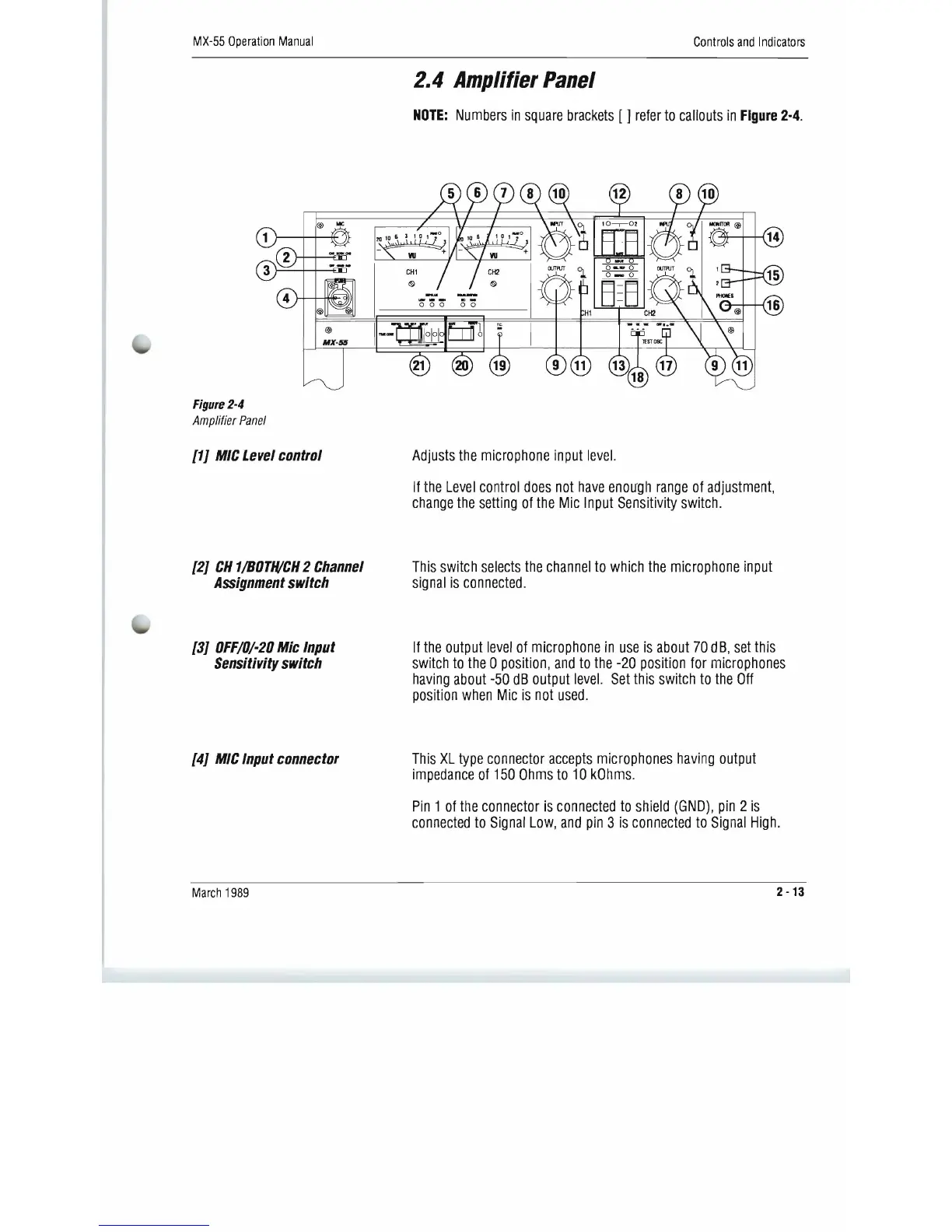
NOTE:
Numbers
in
square
brackets
[ ]
refer
to
callouts
in
Figure
2·4_
@
MX-56
March
1989
2
-13
Figure
2-4
Amplifier
Panel
[1J
MIC
Level
control
[2J
CN
1/BOTH/CN
2
Channel
Assignment
switch
[3J
OFF/O/-20
Mic
Input
Sensitivity
switch
[4J
MIC
Input
connector
Adjusts
the
microphone
input
level.
If
the
Level
control
does
not
have
enou'gh
range
of
adjustment,
change
the
setting
of
the
Mic
Input
Sensitivity
switch.
This
switch
selects
the
channel
to
which
the
microphone
input
signal
is
connected.
If
the
output
level
of
microphone
in
use
is
about
70
dB,
set
this
switch
to
the
0
position,
and
to
the
-20
position
for
microphones
having
about
-50
dB
output
level.
Set
this
switch
to
the
Off
position
when
Mic
is
not
used.
This
XL
type
connector
accepts
microphones
having
output
impedance
of
150
Ohms
to
10
kOhms.
Pin
1
of
the
connector
is
connected
to
shield
(GND),
pin
2
is
connected
to
Signal
Low,
and
pin
3
is
connected
to
Signal
High.

Related product manuals