5.Advanced User Guidebook
(3) Press the F1 button to select the Band Limit as full band. The high
frequency of the signal will be allowed to pass.
(4) Press the F2 button to select the Band Limit as 20M. The bandwidth is
limited to 20MHz. The frequencies above 20MHz will be rejected.
Use Mathematical Manipulation Function
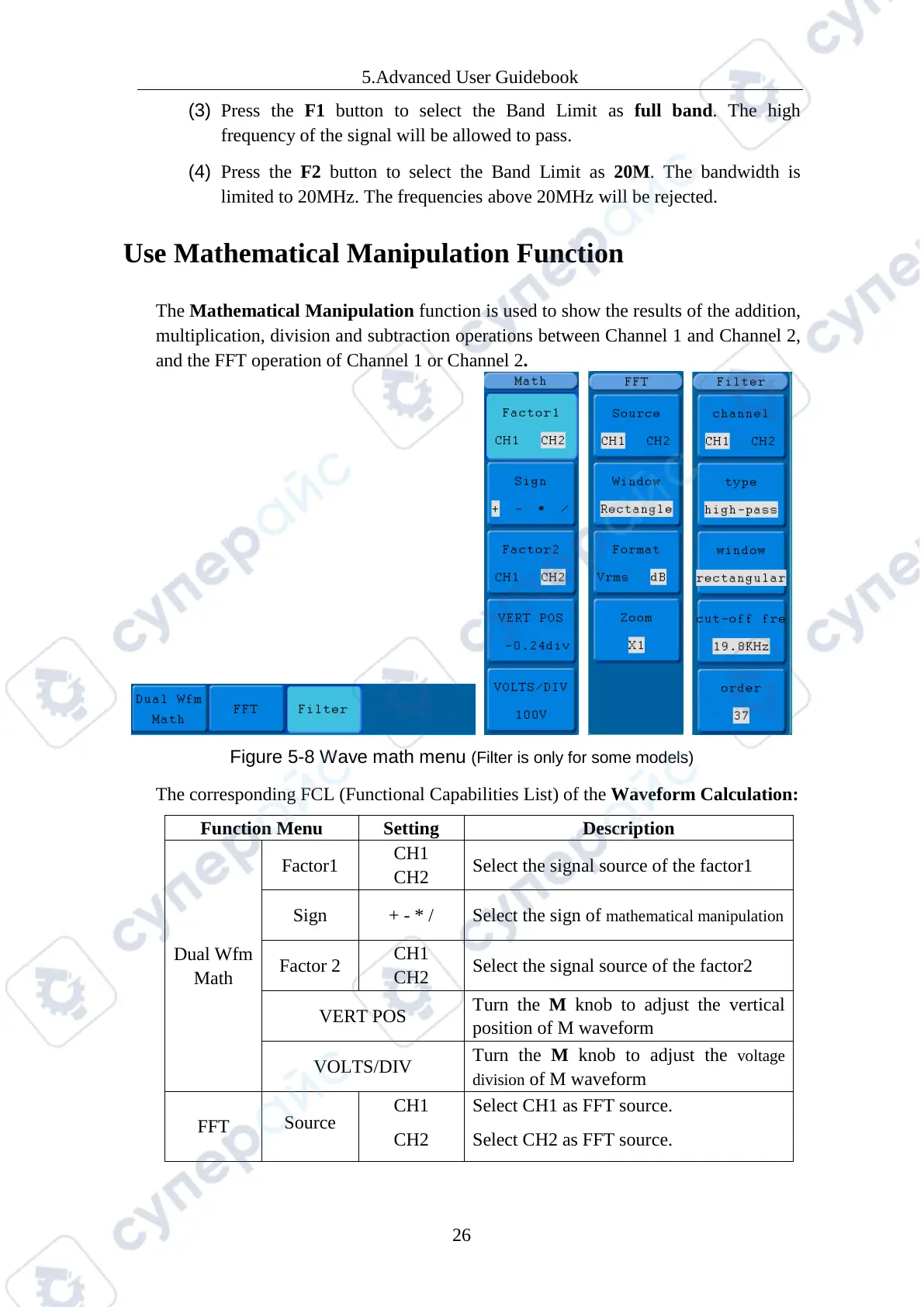
The Mathematical Manipulation function is used to show the results of the addition,
multiplication, division and subtraction operations between Channel 1 and Channel 2,
and the FFT operation of Channel 1 or Channel 2.
Figure 5-8 Wave math menu (Filter is only for some models)
The corresponding FCL (Functional Capabilities List) of the Waveform Calculation:
Dual Wfm
Math
Factor1
Select the signal source of the factor1
Sign + - * / Select the sign of mathematical manipulation
Factor 2
Select the signal source of the factor2
VERT POS
Turn the M knob to adjust the vertical
position of M waveform
VOLTS/DIV
Turn the M knob to adjust the
voltage
division
of M waveform
FFT
Source
CH1
CH2
Select CH1 as FFT source.
Select CH2 as FFT source.



 To Next Page