5.Advanced User Guidebook
How to Measure Automatically
Press the Measure button to display the menu for the settings of the Automatic
Measurements. At most 8 types of measurements could be displayed on the bottom
left of the screen.
The oscilloscopes provide 24 parameters for auto measurement, including Period,
Freq, Mean, PK-PK, RMS, Max, Min, Vtop, Vbase, Vamp, OverShoot, PreShoot,
Rise Time, Fall Time, +D width, -D width, +Duty, -Duty, Delay A→B , Delay
A→B , Cycle RMS, Cursor RMS, Duty cycle, and Phase.
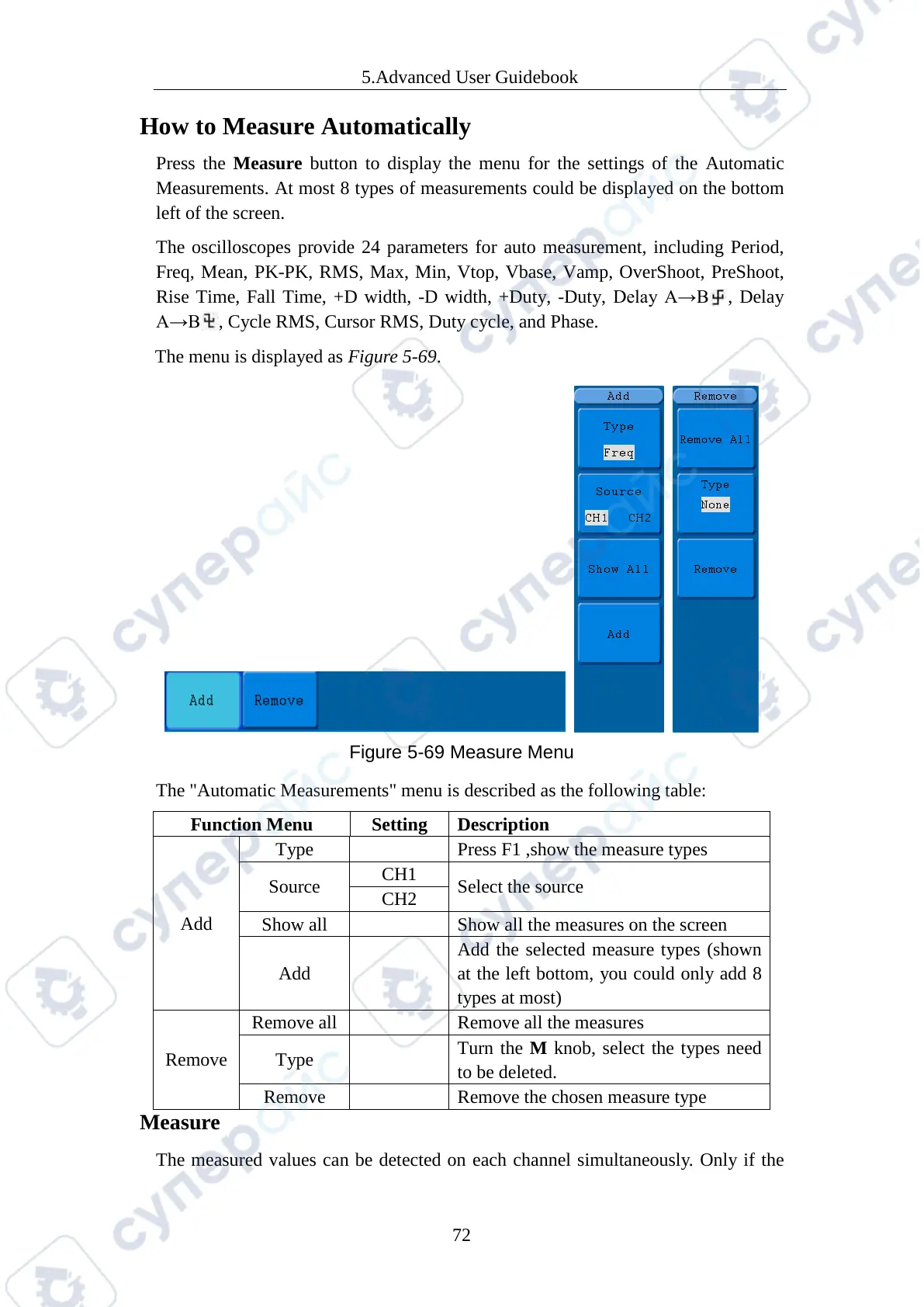
The menu is displayed as Figure 5-69.
Figure 5-69 Measure Menu
The "Automatic Measurements" menu is described as the following table:
Add
Press F1 ,show the measure types
Source
Select the source
Show all the measures on the screen
Add
Add the selected measure types (shown
at the left bottom, you could only add 8
Remove
Type
Turn the M knob, select the types need
to be deleted.
Remove the chosen measure type
Measure
The measured values can be detected on each channel simultaneously. Only if the



 To Next Page