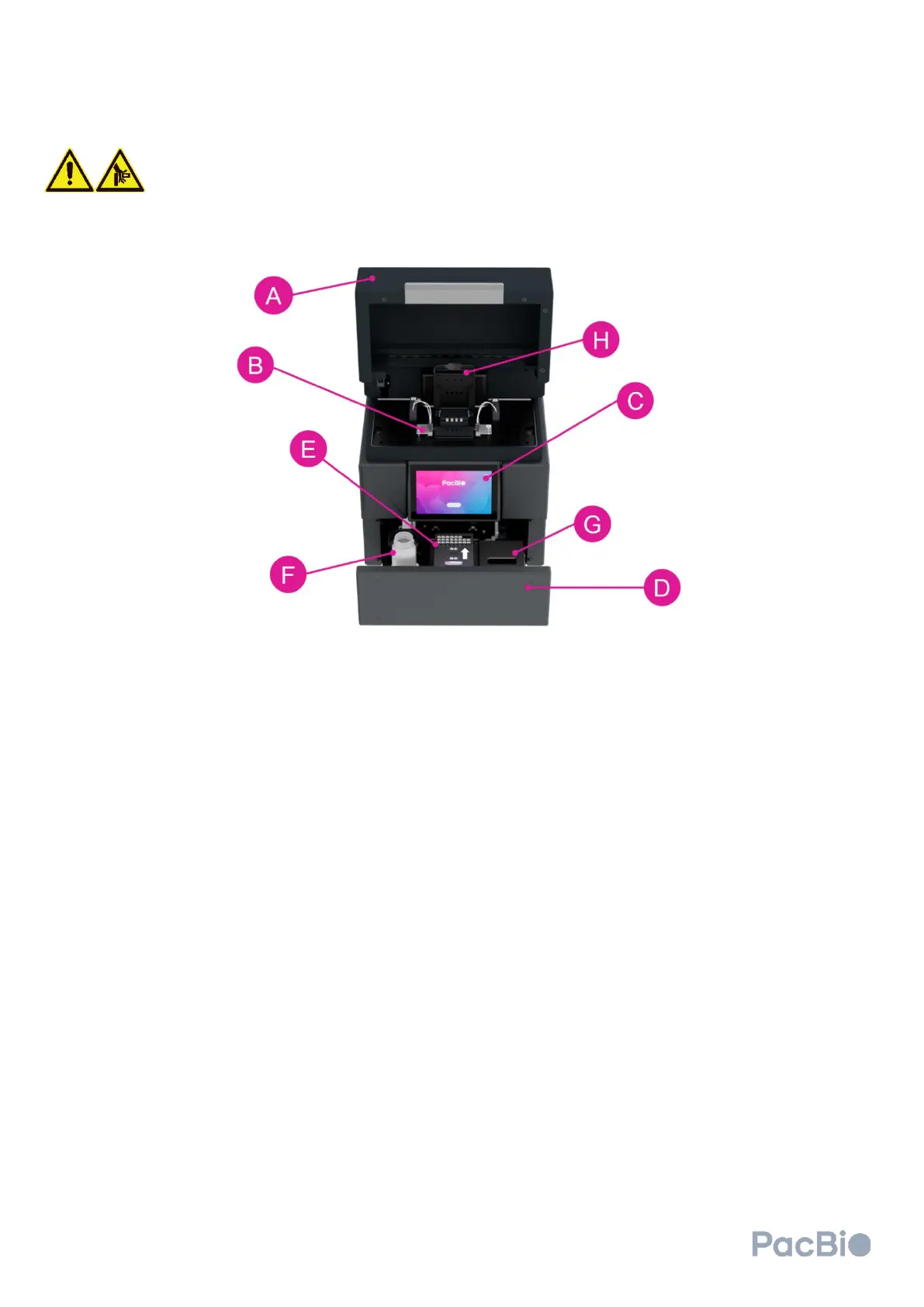
Cluster generator
Pinch Point Safety Precautions
Do not place your hands or fingers in or between the reagent drawer and cluster
generator once the automated opening or closure of the drawer has been started.
The (A) workspace door lifts upward to allow for loading of the (B) flow cell with attached MICA. Users can operate
the cluster generator by way of the (C) cluster generator touchscreen. The (A) workspace door and (D) reagent
drawer will remain locked in the closed position prior to initiating the clustering software, and during a clustering
run. When initiating the clustering software by clicking “Get started” (see section 5 below), the reagent drawer can
be prompted by the user to open/close by way of the software. The reagent drawer opens towards the user, and
houses the (E) clustering reagent plate, (F) waste container, and contains (G) storage locations for wash cartridges.
Clustering reagent plates are single-use and contain a QR code which should be visible from the right-hand side
when the drawer is open and when the reagent plate is properly loaded on the clustering instrument. The waste
container should be emptied and returned to its correct position within the instrument prior to starting a clustering
run. The (H) magnetic flow cell clamp and metal guide pins are seated within the workspace door, allowing the user
to properly place and secure the flow cell. The flow cell clamp lifts upward, hinging away from the user.



 To Next Page