6.4 Analog Output Hold while in PROG. Mode
■
Overview of functions
This function holds analog output when the PLC mode is switched from RUN to PROG.
● Make analog output hold settings on a channel-by-channel basis.
● The analog output value can be set to "Desired value hold", "Current value hold" or "Non-
hold" on a channel-by-channel basis.
(Note) The converted digital value varies with the setting of the range if "Desired value hold"
is set.
■
Configuration
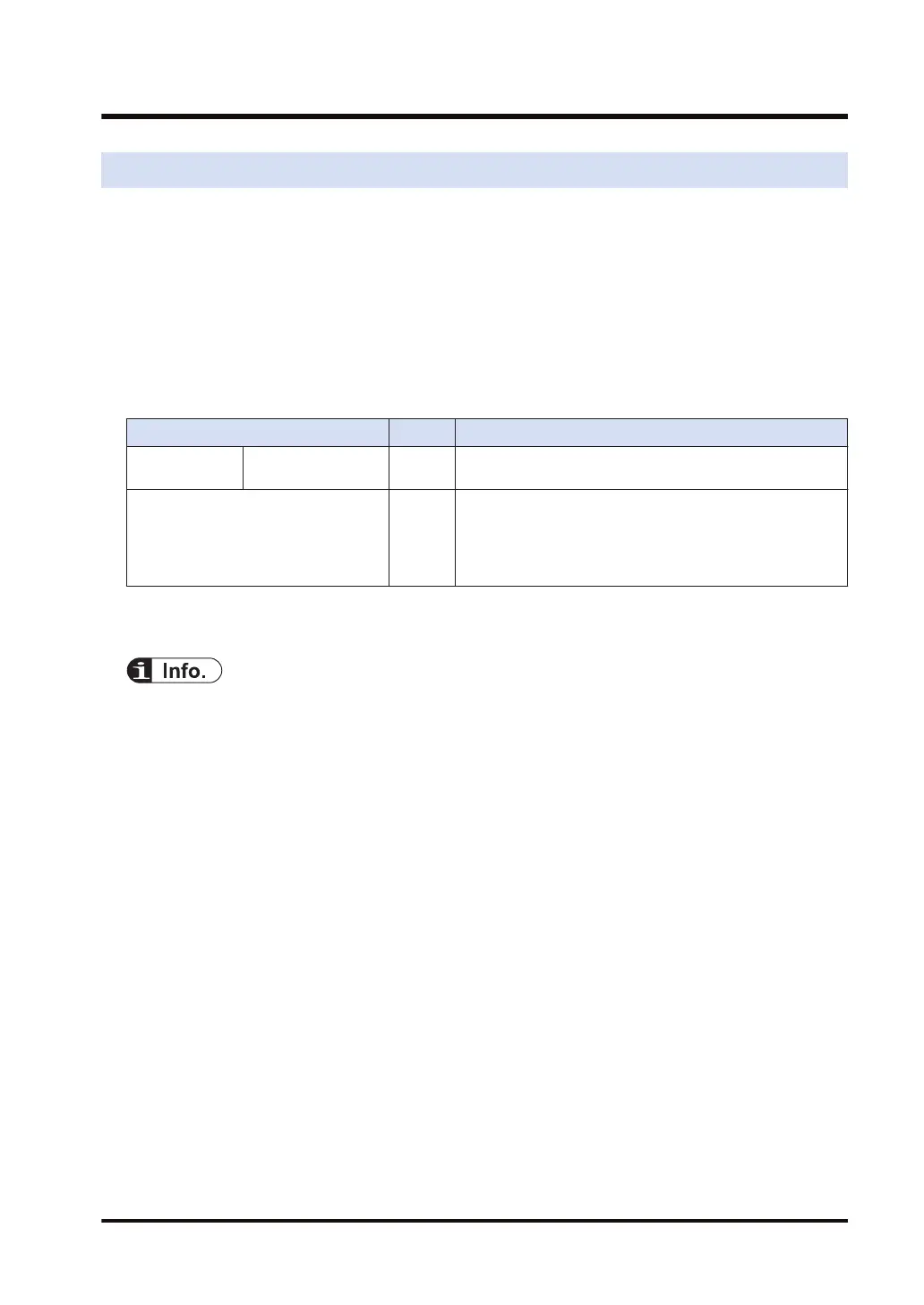
Name Default Setting range and description
Function setting Analog output in
PROG. mode
Non-
hold
Non-hold / Current value hold / Desired value hold
Analog output in PROG. mode
(Note 1)
K0 Set a digital value corresponding to the analog output when
a desired value is set for the analog output while in PROG.
mode.
Setting range: -31,250 to +31,250 (Specified with a signed
integer)
(Note 1) This configuration is enabled when "Analog output hold settings while in PROG. Mode" is set to
"Desired value hold".
● If no analog output is held, the output will be turned OFF (0 V or 0 mA) while in PROG. mode.
● The output will be turned OFF (0 V or 0 mA) if an error occurs.
6.4 Analog Output Hold while in PROG. Mode
WUME-FP7AOH-03 6-7



 To Next Page