80
Using a Keyboard:
Using a Keyboard
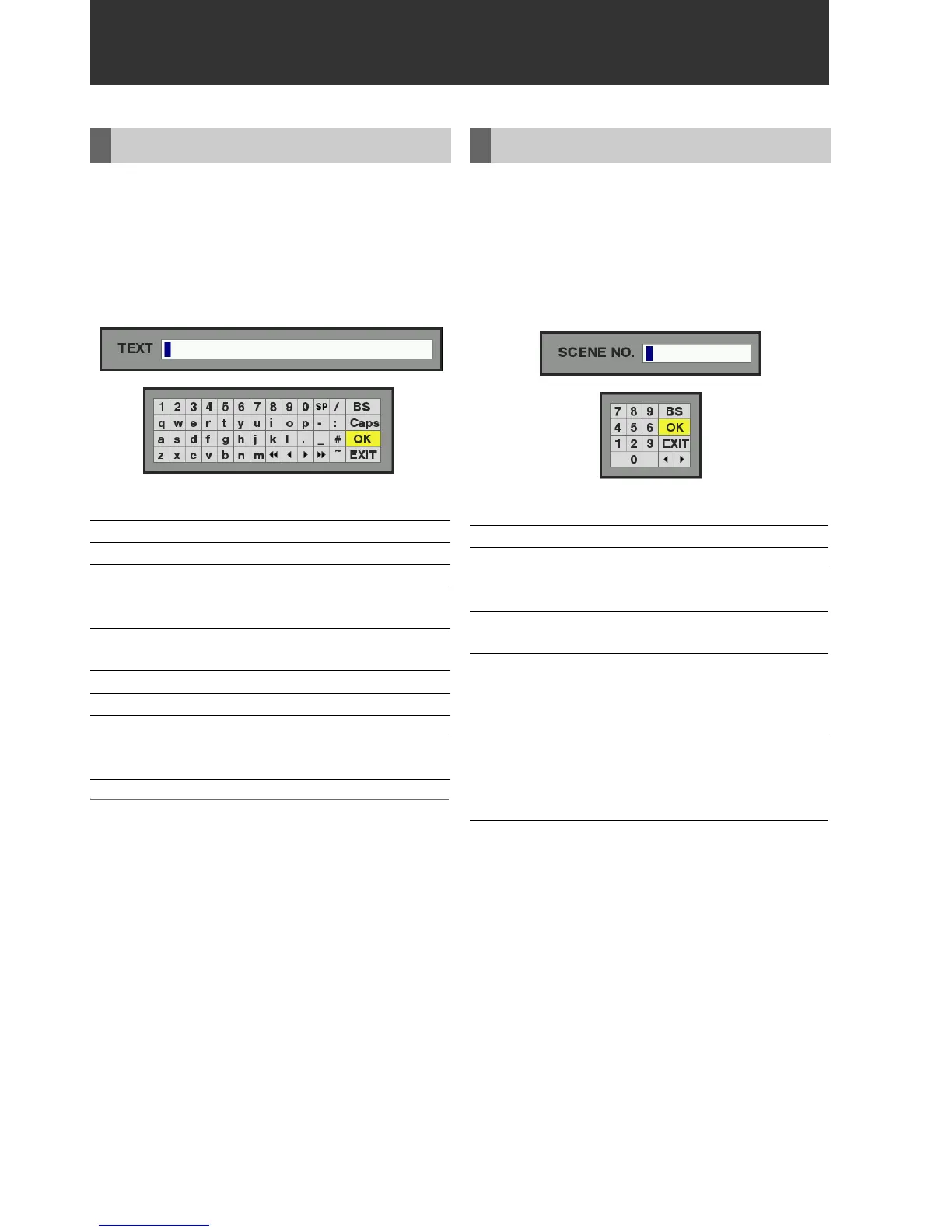
The full keyboard appears when meta data input or other
English input is required.
Move the cursor to the character you want to enter and press
the SET button.
Use the Up/Down/Left/Right cursor buttons to move the
cursor.
The keyboard keys have the functions listed below.
◆ NOTE:
• Press the RESET button to delete all entered characters.
• Pressing the EXIT button displays a confirmation message before
exiting the keyboard. Select YES and press the SET button to close
the soft keyboard.
• Switching Caps also changes the symbols on the keyboard.
Use the numeric keyboard when you need to enter only
numbers.
Move the cursor to the figure you want to enter and press the
SET button.
Use the Up/Down/Left/Right cursor buttons to move the
cursor.
The keypad keys have the functions listed below.
Full Keyboard
Key Function
BS Deletes one character
Caps Toggles between upper and lower case
OK Saves made entries and closes the on-screen
keyboard
EXIT Cancels made entries and closes the on-screen
keyboard
Moves the cursor to the first character
Moves the cursor 1 character space back
Moves the cursor 1 character space forward
Moves the cursor to the location after the last
character
▲
▲
▲
▲▲
▲
Numeric Keyboard
Key Function
BS Deletes one character
OK Saves made entries and closes the soft
keyboard
EXIT Cancels made entries and closes the soft
keyboard
<Decimal entries>
Moves the cursor 1 character space back
<Time code entries>
Moves the cursor 1 item space back
<Decimal entries>
Moves the cursor 1 character space forward
<Time code entries>
Moves the cursor 1 item space forward
▲
▲







 To Next Page