For Long and Trouble-Free Operation: Warning and Error Messages
89
For Long and Trouble-Free Operation
• If an error occurs, the OSD alternately displays an error number and “AUTO OFF”.
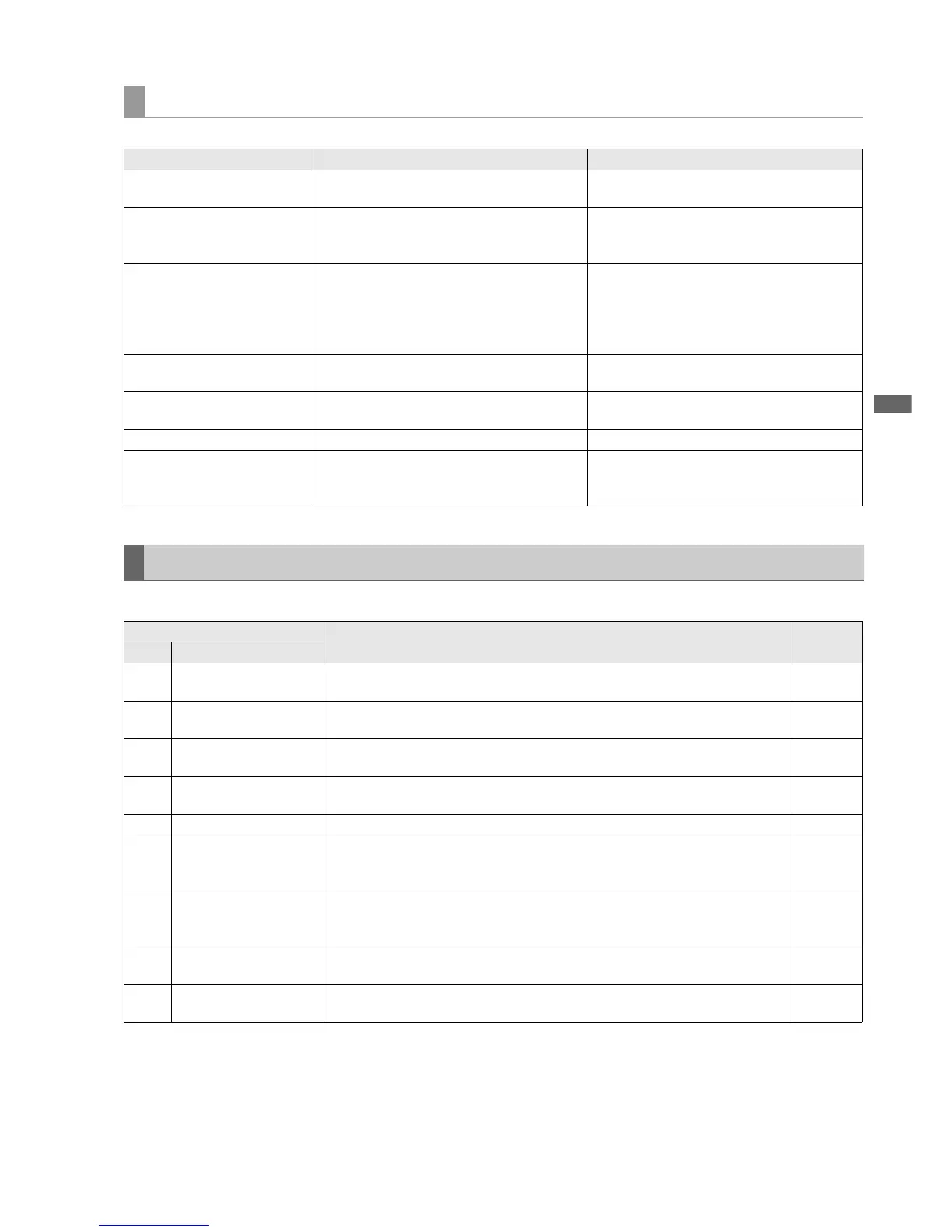
Warning information displayed in 3D REC/PB mode and SYNC PB mode
Message Description Measure
ERROR
REF IN NOT DETECT
A reference signal has not been connected or the
slave side is not powered up.
Turn on the slave side and check connection of the
reference signal line.
ERROR
USB DISCONNECT
The LINK (USB) connection signal could not be
detected after 2 minutes.
Check LINK (USB) cable connection.
Turn on the slave side. If the error persists after the
slave side starts operation, check the slave side.
ERROR
SLAVE IS BUSY
Mode changes cannot be made during slave side
operation. This message may also appear during
startup when the slave side is started up
simultaneously with or after master side startup.
Displayed during slave side operations such as
recording, playback, menu display or remote
status.
Cancel the remote status, menu display, or other
operation to enter the STOP status.
ERROR
SERIAL NO. MISMATCH
The LINK (D-SUB) cable and the LINK (USB) cable
is not connected to the same device.
Connect the cables to the same device.
ERROR
VERSION FIRMWARE MISMATCH
The connected devices are using different firmware
version.
Connect devices with the same firmware version.
ERROR D-SUB DISCONNECT The LINK (D-SUB) cable is not connected. Connect the LINK (D-SUB) cable.
WAITING FOR CONNECTION
The unit is waiting for connection for it takes time to
detect the synchronized connection of the two
units.
If the signal cannot be detected in 2 minutes, an
error is generated. Locate the cause of the error
before connecting again.
Error Information
Error
Description Operation
No. Message
E-30 TURN POWER OFF
Displayed when an error occurs in reading and writing card data.
To continue operation, turn the power off and then back on again.
STOP
E-31 REC ERROR
Displayed when an error occurs during recording. To continue operation, turn the power
off and then back on again.
STOP
E-37 COMM ERROR
Displayed when a system controller command was not complied to.
To continue operation, turn the power off and then back on again.
STOP
E-38 SYSTEM ERROR
Displayed when a communication error has occurred.
To continue operation, turn the power off and then back on again.
STOP
E-BA BATTERY Appears when the input DV voltage is below the undercut voltage. STOP
E-80 LINK D-SUB DISCONNECT
Displayed when a LINK D-SUB cable for the 3D REC/PB mode and SYNC PB mode is
disconnected or other error occurs. Turn off the power and check the connection before
use.
STOP
E-81 LINK USB DISCONNECT
Displayed when a LINK USB cable for the 3D REC/PB mode and SYNC PB mode is
disconnected or other error occurs. Turn off the power and check the connection before
use.
STOP
E-83 SLAVE ERROR
The slave side was turned off (AUTO OFF). Use after turning the slave and master sides
off.
STOP
E-84 MASTER ERROR
The master side was turned off (AUTO OFF). Use after turning the master and slave sides
off.
STOP





 To Next Page