Main Mode: Recording/Playback Screen
9
Main Mode
1 Engage playback, still or other image display mode. 2 Press PREV or NEXT.
The clip beginning or text memo position that is located
depends on the value set choosing the SETUP - BASIC -
SEEK POS SEL menu setting. (➝ Setup Menu “BASIC” -
“SEEK POS SEL” page 60)
Repeatedly plays back playable clips.
1 Press the MENU button.
2 Set the SETUP - BASIC - REPEAT PLAY menu
setting to ON.
3 Close the menu.
4 Press the PLAY button to start playback.
All clips will be played repeatedly.
• Repeat playback continues until the STOP button is
pressed.
• Repeated playback is not performed during playback
other than normal playback, for example, variable
playback, and playback stops at the beginning (BOS) or
end (EOS) of a playable clip.
• During repeat playback, “REPEAT” appears in the OSD’s
operating status display.
Clip and text forward/rewind
Repeat playback
SHTL + *
SHTL + 2.0
SHTL + 1.0
PLAY
SHTL + 0.5
SHTL + 0.*SHTL – *
SHTL + 0.0
Right
Left
Right
Right
Left
Left
Right
Left
Right
Left
Right
Left
Right
Left
Right
Left
Right
Left
UpDown
NEXTPREV
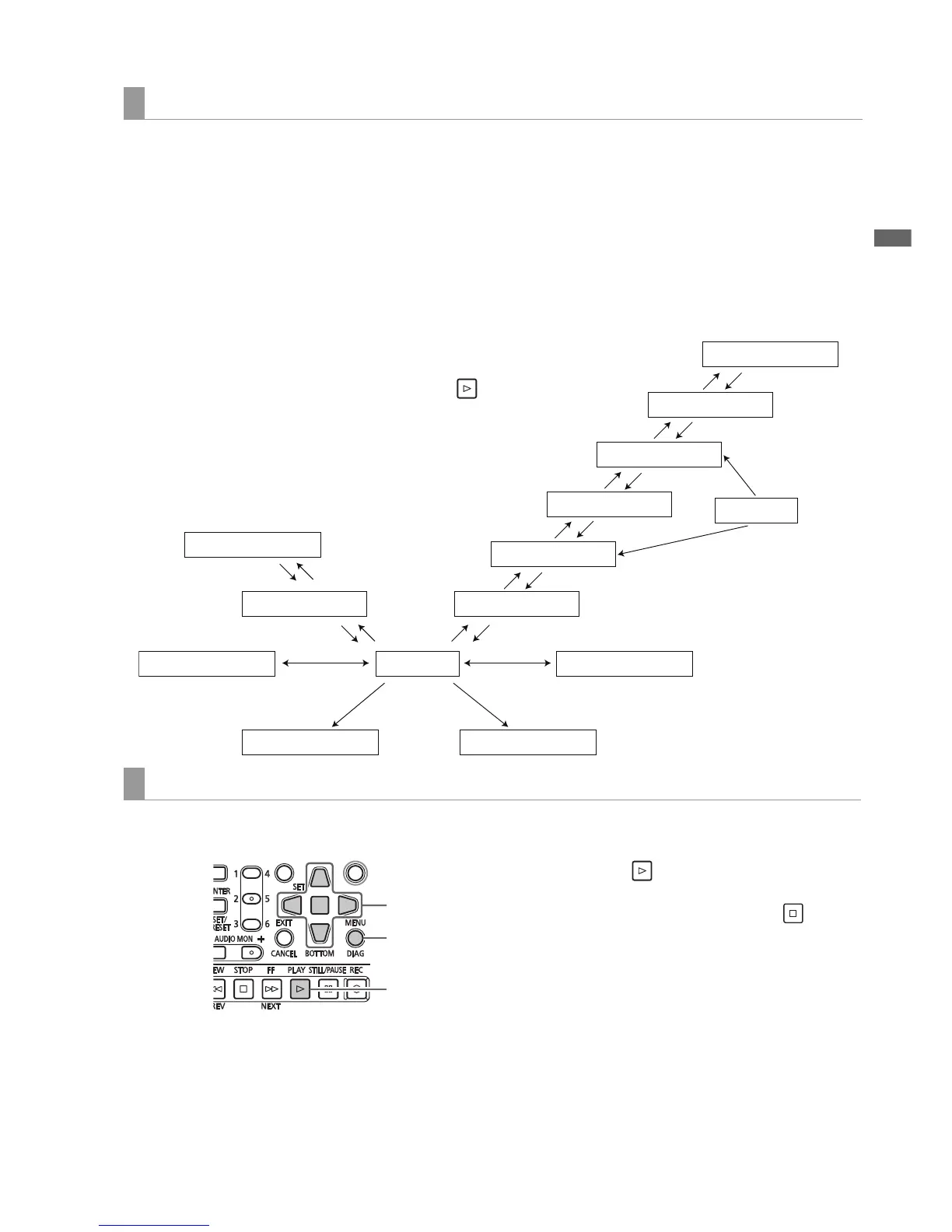
Overview of all clip playback transitions
This unit allows you to vary audio and video playback speed. The figure below shows speed and transition changes.
Data in boxes: Status and speed
Arrows: Possible direction of transition
Arrow text: Cursor button operation
• Asterisks (*) in the diagram indicate stepwise changes in speed.
Example: Pressing the Right cursor button during PLAY results in
double speed playback (SHTL + 2.0) and each press of the button
increases the speed gradually towards the SHTL MAX setting.
+SHTL MAX setting
–SHTL MAX setting
Rewind by frame
Rewind by clip Forward by clip
Forward by frame







 To Next Page