18
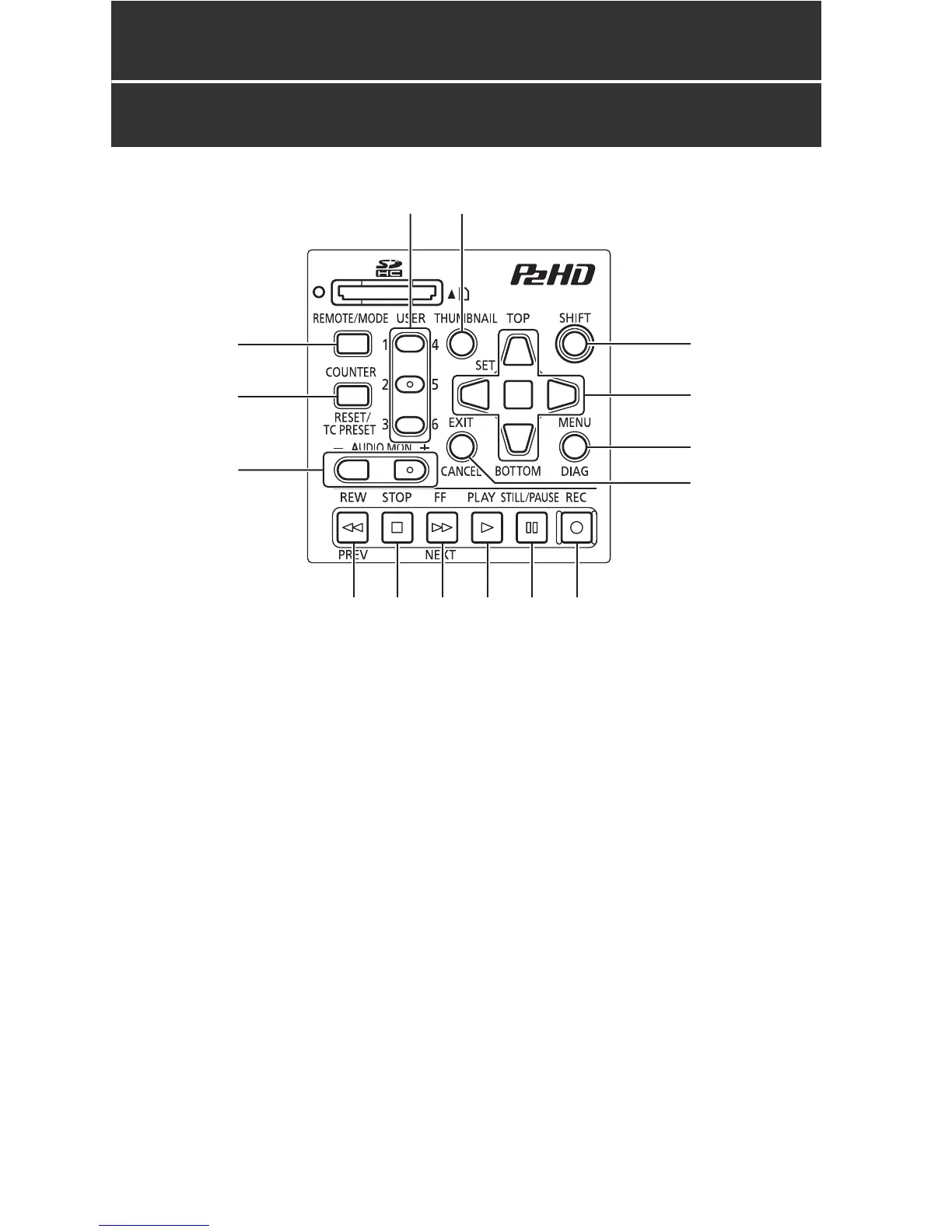
Control Reference Guide: Controls
Control Reference Guide
Controls
About button labels:Orange labels indicate alternate functions enabled by simultaneously pressing
SHIFT.
<Example> Press the SHIFT and REMOTE/MODE buttons at the same time to execute the MODE
button function.
1. REMOTE/MODE button
REMOTE button:
Enables remote control of the unit via the
REMOTE connector.
MODE button:
Selects the USB device mode (USB DEVICE),
3D recording/playback mode (3D REC/PB),
or synchronous playback mode (SYNC PB).
USB DEVICE
Enables access to the P2 card in the P2
card slot of this unit as a mass storage
device on a personal computer
connected via USB 2.0.
3D REC/PB
Synchronizes the operation of two units to
record and playback Dual P2 3D clips
(page 38).
SYNC PB
Synchronizes the operation of two units to
play back 3D clips (page 48) on P2 cards
that were recorded using machines that
do not have native support for Dual P2 3D.
2. COUNTER, RESET/TC PRESET button
COUNTER button:
Selects the type of data for the counter
display, in the following sequence.
(➝ “Time Code, User Bits, CTL” Vol. 2, page 47)
1 6
8
9
7
2
3
4
10 11 12 14 1513
5





 To Next Page