26
Power Preparations: Using the AC adaptor
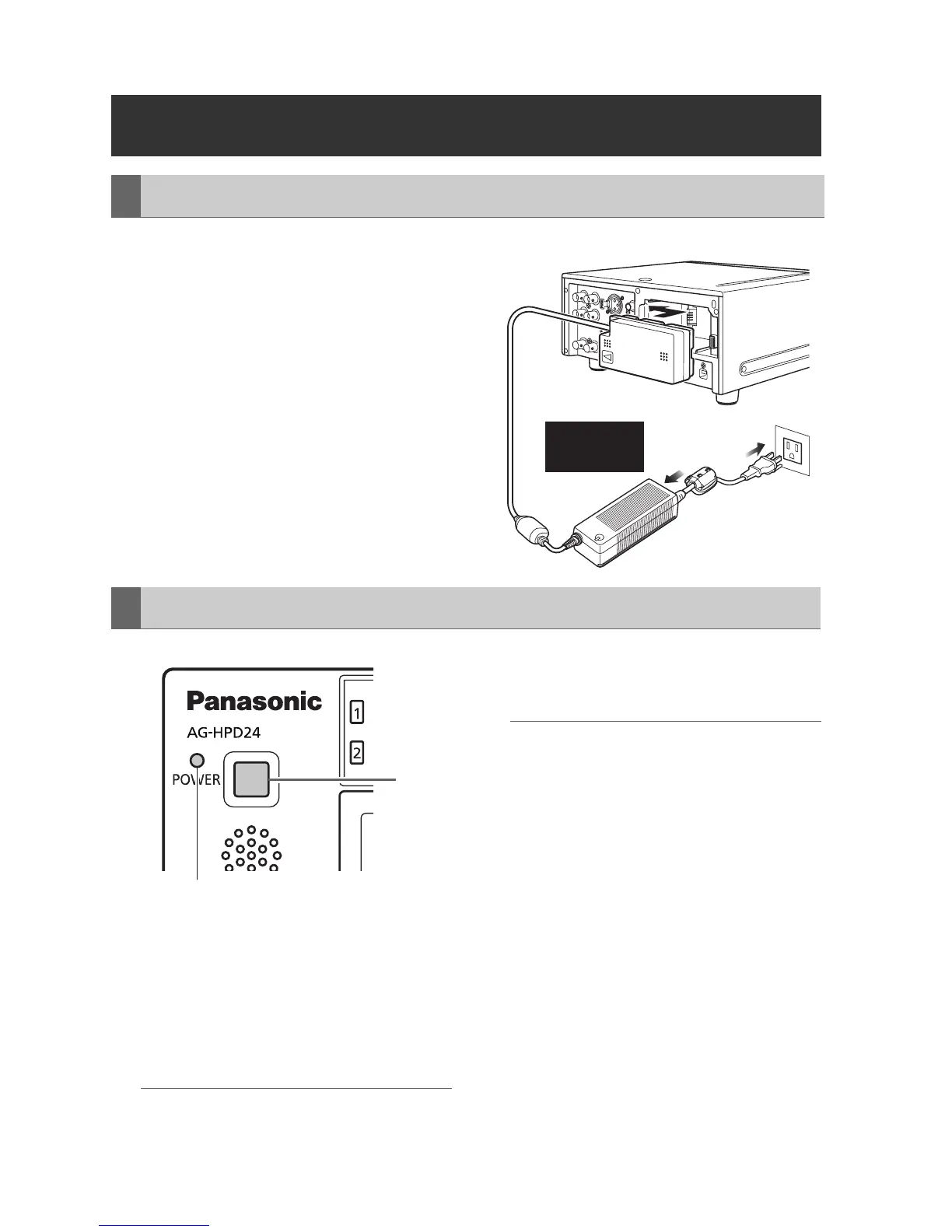
1 Plug the AC adaptor’s AC power supply
cable into the adaptor, and then into a
power outlet.
Connect the AC power supply cable in A-B
order.
2 Slide in the DC power supply cable plate
until it clicks into place.
1 Hold the POWER button for two seconds to
turn the power off, and confirm that the
POWER lamp is off.
2 Press the battery lock release button and
slide out the DC power supply cable plate.
◆ NOTE:
• Always be sure that the unit is turned off before
removing the DC cord connector plate.
3 Unplug the adaptor’s AC power supply
cable from the wall outlet.
◆ NOTE:
• The AC Adaptor is designed to operate on
world-wide mains voltages (100 to 240 V)
and frequencies (50/60 Hz). However,
power outlet configurations differ in
different countries. Use a plug that is
designed for the country of operation. If
necessary, contact your supplier to obtain
the appropriate plug adaptor.
• When not using the unit, unplug the
adaptor’s AC power supply cable from the
wall outlet.
• The power lamp on the AC adaptor
normally remains lit for a while after it is
unplugged from the wall outlet.
Using the AC adaptor
Installation
Insert the
plugs all the
way in.
A
B
Removal
1
POWER lamp





 To Next Page