26
Main Mode: Thumbnail Screen
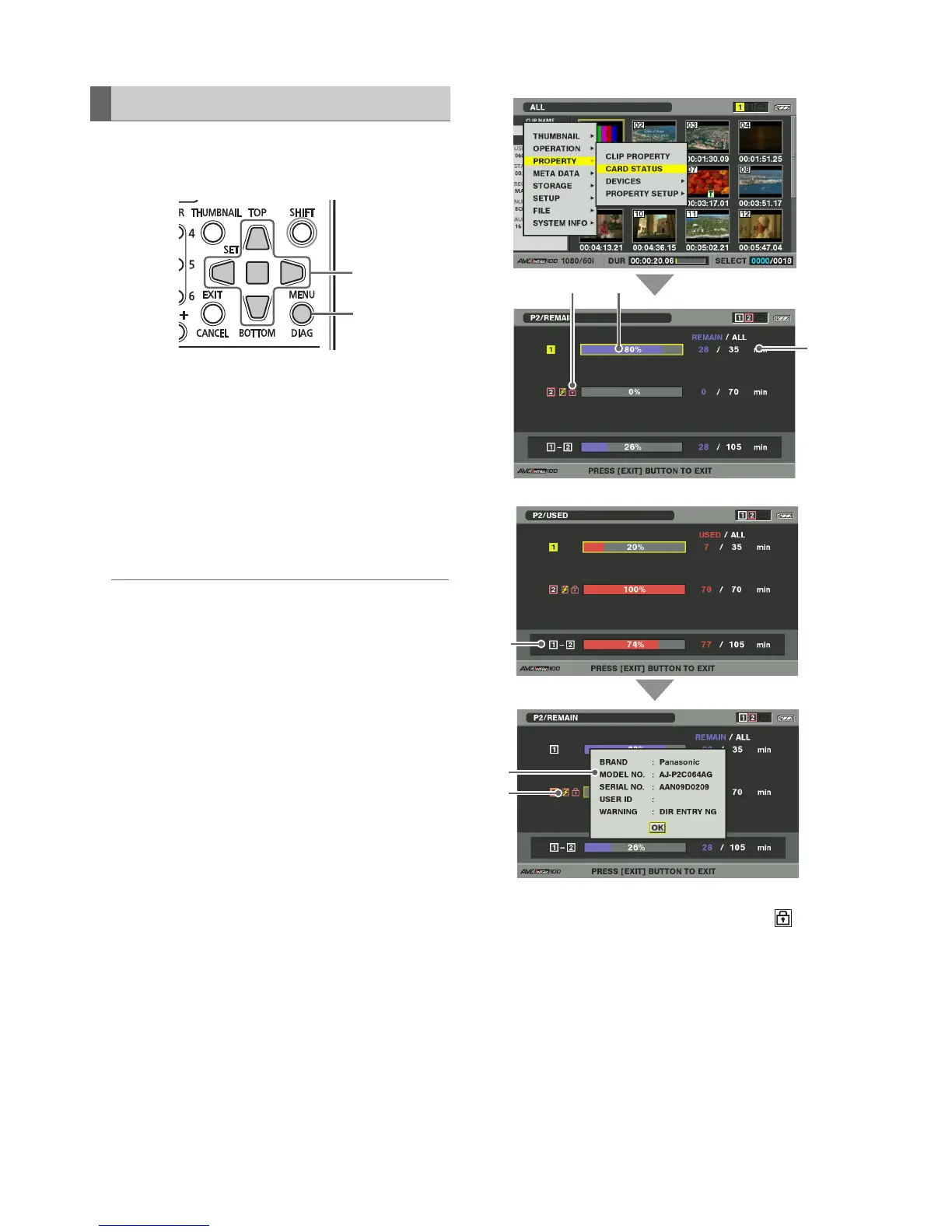
Use the following steps to view P2 card slot status, P2 card
usage and other card information on the screen.
1 Open the thumbnail screen.
2 Press the MENU button.
3 Use the Up/Down/Left/Right cursor buttons to
choose the PROPERTY - CARD STATUS menu
setting and press the SET button.
The status of P2 card will be displayed.
◆ NOTE:
• Choose the PROPERTY - PROPERTY SETUP - P2CARD CAP
menu setting to switch between remaining free space and used
space.
(➝ Setup Menu “PROPERTY” - “PROPERTY SETUP - P2 CARD
CAP” page 53)
1)Write protect mark
A write-protected P2 card is indicated by the mark
displayed here.
2)P2 card status
The remaining free memory on the P2 card is
displayed here in the form of a bar meter and a
percentage value.
Memory used on the P2 card is also displayed in the
form of a bar meter and a percentage value.
The following status information may also appear
depending on card status.
Checking Card Status
3







 To Next Page