Main Mode: Thumbnail Screen
23
Main Mode
■ Preparing for meta data recording
Use this procedure to determine whether or not to attach the
loaded meta data to clip that is recorded.
(➝ Setup Menu “META DATA” page 54)
■ Select method for recording the USER CLIP
NAME
Use this procedure to set the type of data recorded as USER
CLIP NAME.
(➝ Setup Menu “META DATA” page 54)
Choose the META DATA - USER CLIP NAME menu setting
and the META DATA - RECORD menu setting combinations to
record different data.
■ Counter value
The counter value is indicated as a four-digit number. When
recording method “TYPE 2” is selected for the USER CLIP
NAME in the clip meta data that is loaded, the counter value
is incremented by 1 for each new recording and a new clip is
generated.
Use the following procedure to reset the counter value.
1. Press the MENU button.
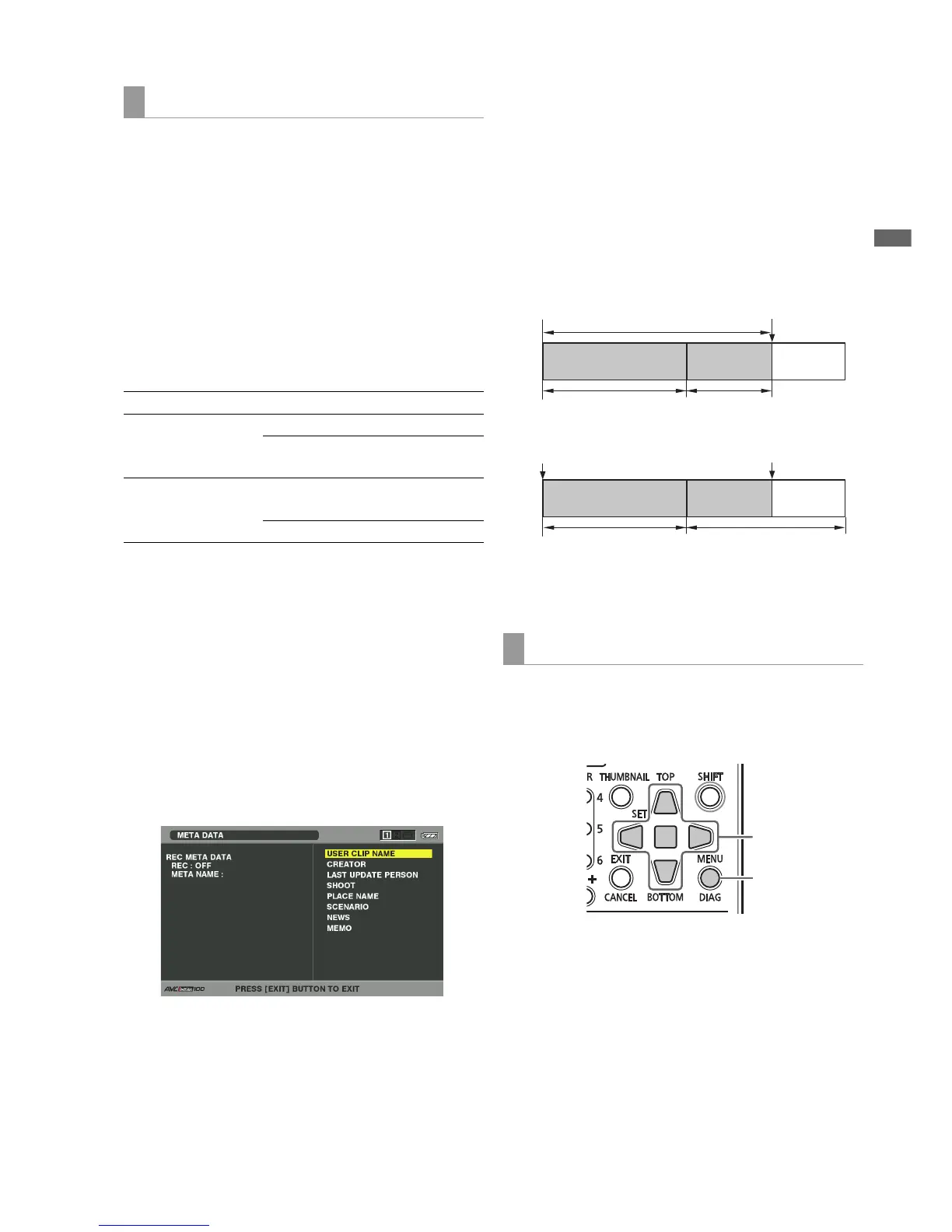
2. Use the Up/Down/Left/Right cursor buttons to
choose the META DATA - PROPERTY - USER CLIP
NAME menu setting from the meta data screen and
press the SET button.
3. Use the Up/Down/Left/Right cursor buttons to
choose COUNT RESET and press the SET button.
The counter value is reset to 1.
4. Press the EXIT button to end processing.
Incrementing the counter value of the USER CLIP
NAME for clips exceeding 4 GB
In the following case, one shot is recorded as multiple clips
and the counter value is automatically incremented and
recorded for each shot.
• When an 8 GB or larger P2 card is used in this unit and each
continuous recording exceeds a specified time.
(➝ “Dividing clips over 4 GB in length” Vol. 1, page 30).
• When one recording spans multiple cards.
A P2 device will indicate the thumbnail and the counter value
of clip 1 when thumbnails and property of the clip are
displayed.
■ Loading files
Use the following procedure to load meta data from an SD
memory card.
1. Insert the SD memory card storing the meta data
upload file.
2. Open the thumbnail screen.
3. Press the MENU button.
Setup to attach meta data
Recording method USER CLIP NAME to be recorded
Clip meta data
RECORD=ON
TYPE1 Read meta data settings
TYPE2 Read meta data settings
+ counter value
Clip meta data
RECORD=OFF
TYPE1 Same as GLOBAL CLIP
ID
TYPE2 Same as CLIP NAME
Meta data upload files
Example of a recording on one P2 card (DVCPRO HD):
REC start
(start of recording)
Stop
(recording stop)
Recording duration = 6 minutes
Clip 1
Counter value = A
Clip 2
Counter value = A + 1
Approx. 5 min.
Approx. 1 min.
Example of recording a clip on two P2 cards:
REC start
(start of recording)
Stop
(recording stop)
Clip 1
Counter value = A
Clip 2
Counter value = A + 1
1st card
2nd card
4,5,6
3,7







 To Next Page