28
Main Mode: Thumbnail Screen
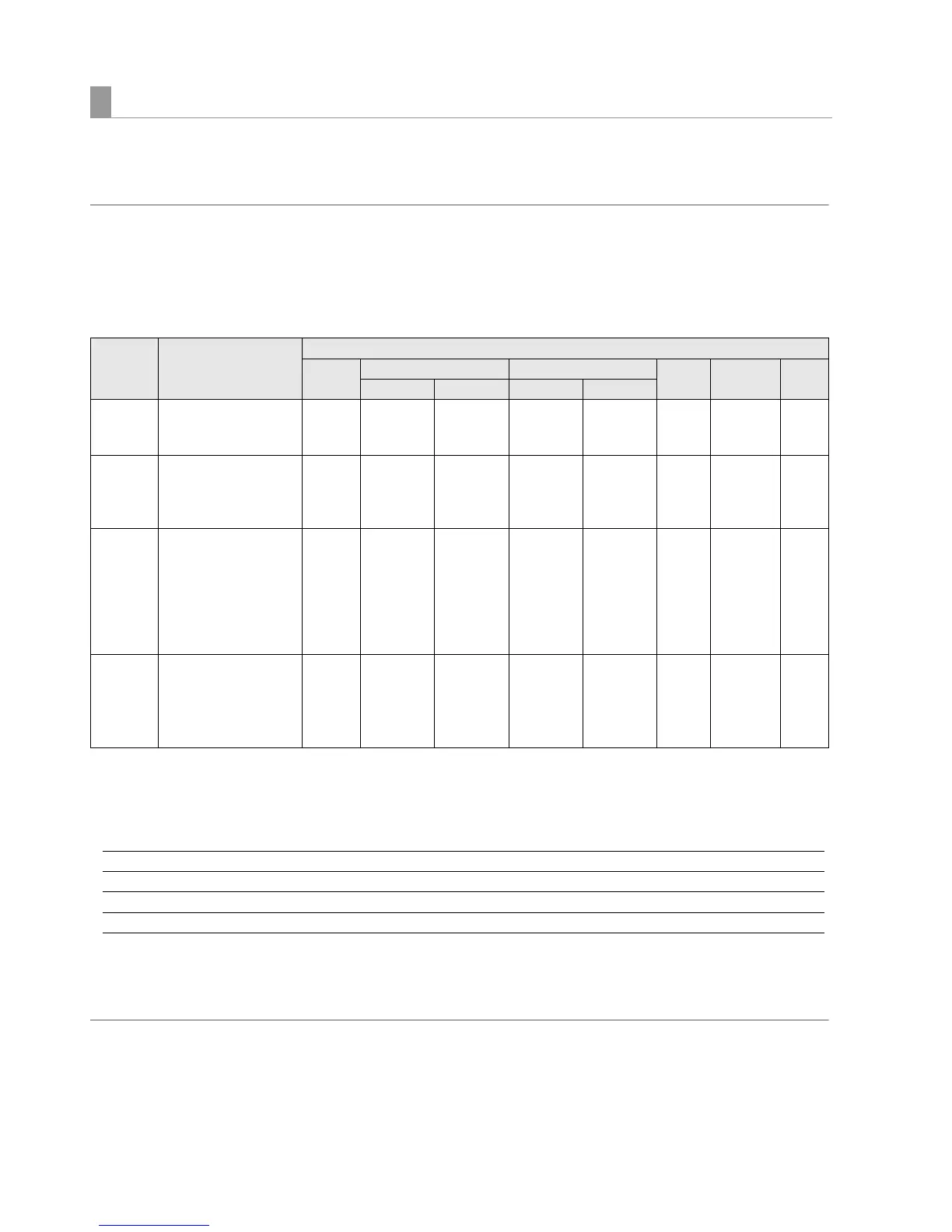
Available functions depend on the type of storage device used. “PARTITION:” in the left half of the EXPLORE screen provides
information on the particular storage device that is connected.
(➝ “Viewing storage device information (EXPLORE screen)” page 31)
◆ NOTE:
• The USB 3.0 connector supports USB bus power (5 V, 0.9 A) and may not be enough to start up some storage devices. Should this happen,
provide the storage device with a separate power supply.
• This unit does not support hard disks that are 2 TB (2048 GB) or larger.
Storage device types and available functions
*
1
Adding clips to a partition will prevent writing back data by the card to that partition.
*
2
This enables up to 100 folders in up to three levels. Folders appear in order from the top level. Long file names and two-byte character file
names are not supported.
Example:
*
3
Audio and video dropouts may occur during playback from a storage device depending on its performance and operating conditions.
Perfect playback cannot be guaranteed.
*
4
2 TB or larger storage devices cannot be formatted.
◆ NOTE:
• Use storage devices under the following conditions.
• Use storage devices within their operating specifications (temperature, etc.).
• Do not install storage devices in locations that are unstable or exposed to vibration.
• Some storage devices and cables may not operate normally.
• Use a storage device with sufficient space for copying.
Storage device types and available functions
Storage
device type
Features Available functions
Thumbnail
display
P2 card unit Clip unit Playback
check
*
3
Displaying
clips
Format
P2 ➝ Storage Storage ➝ P2 P2 ➝ Storage Storage ➝ P2
TYPE S A special disk format for
high-speed writing/loading
data by P2 card unit.
MM M M
*
1
MMMM
P2STORE The P2 store (AJ-
PCS060G) hard disk.
Cannot be used for writing
data.
M
×
M
×
MMM
×
FAT A hard disk whose primary
partition is formatted either
using FAT16 or FAT32. The
root partition or
“CONTENTS” directory
under any directory
*
2
is
used.
MM
×
MMMMM
OTHER Hard disk other than those
above
• NTFS or other hard disk
using a file system other
than FAT16 or FAT32.
×× × × ×××
M
*
4
/CONTENTS Can be displayed
/SAMPLE/CONTENTS Can be displayed
/SAMPLE/20090101/CONTENTS Can be displayed
/SAMPLE/20090101/1200/CONTENTS Cannot be displayed ➝ This is the fourth level and will therefore not appear.







 To Next Page