- 35 -
The down-conversion mode is selected here.
≥ Only enabled when [Format] is [480p (576p)]*.
* When [System Frequency] is [59.94Hz(NTSC)], you can select [480p], and when it is set to
[50Hz(PAL)], you can select [576p].
∫ Setting Using the Camera Menu
≥ When the camera menu is being displayed, [SideCut] display becomes [LetterBox] display.
You can change the system frequency.
≥ When you press [Set] after setting the option, a message confirming that you want to
reboot the unit is displayed. Press [OK] to restart the unit.
∫ Setting Using the Camera Menu
≥ A message confirming whether you wish to restart the unit is displayed. Select [YES] to
restart the unit.
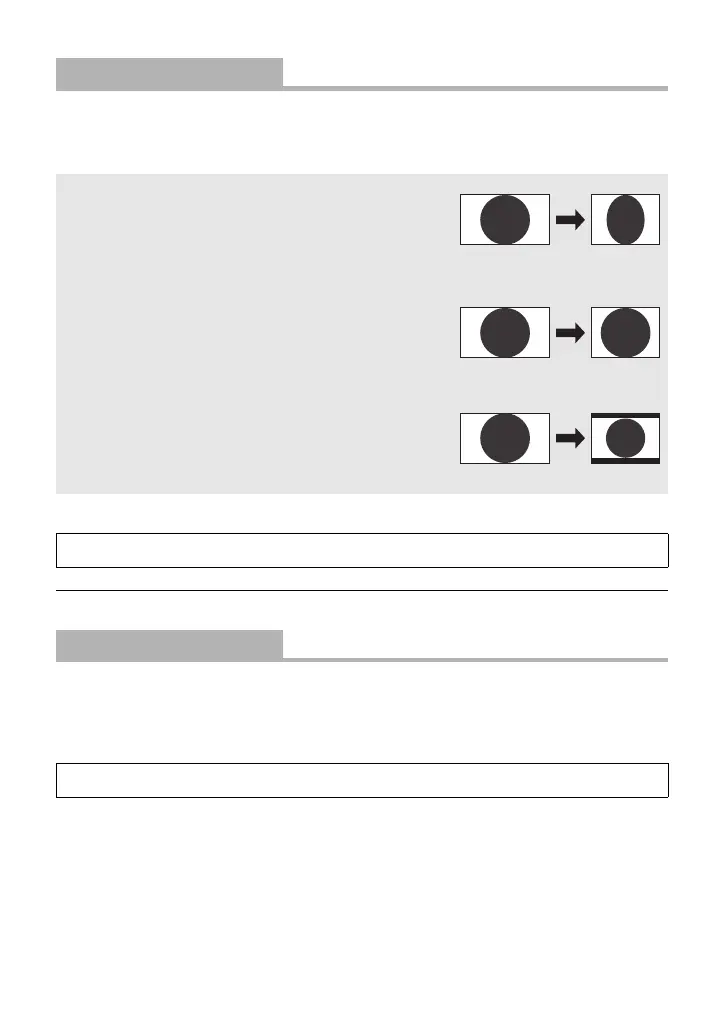
[Down CONV. Mode]
[Squeeze]/[SideCut]/[LetterBox]
[Squeeze]: Used when the aspect ratio of the
monitor is 16:9. If the aspect ratio of the
monitor is 4:3, the width of an image is
squashed in and the image is elongated
vertically.
[SideCut]: Used when the monitor aspect ratio is
4:3. Based on the vertical length,
portions that extend off the sides of the
screen are cut off, and the angle of view
is adjusted.
[LetterBox]: Used when the monitor aspect ratio is
4:3. Based on the width, the top and
bottom of the image are blackened, and
the angle of view is adjusted.
[SYSTEM] # [DOWN CONV. MODE] # desired setting
[System Frequency]
[59.94Hz(NTSC)]/[50Hz(PAL)]
[SYSTEM] # [SYSTEM FREQ] # desired setting



 To Next Page