21
(ENG) DVQX2553
≥ In the following situations, you need an SD card conforming to Class 10 of the SD Speed
Class Rating to record motion pictures.
Use of a non-compatible card may cause recording to stop suddenly.
j FULL HD Slow Motion Video Mode
j When [Backup for Twin Camera] is set to [ON]
(For the )
j 4K Photo Mode
j Slow & Quick Video Mode
Inserting/removing an SD card
Before using SD cards to be used on this unit, format with this unit. (l 32) When the SD card is
formatted, all of the recorded data is deleted. Once the data is deleted, it cannot be restored.
Caution:
Check that the access lamp has gone off.
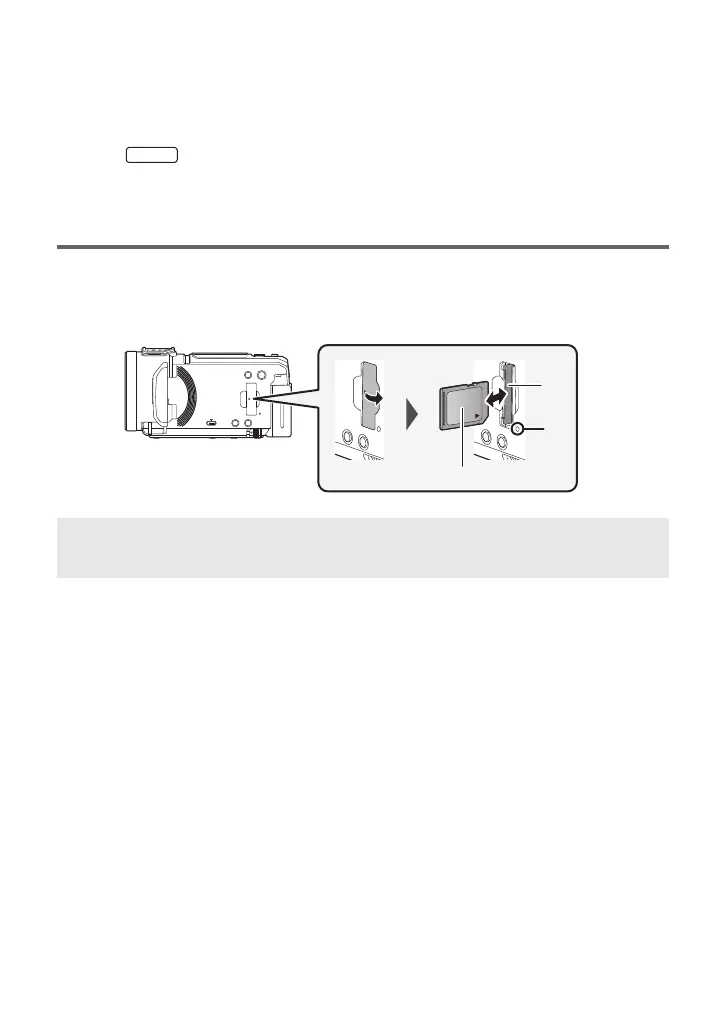
1 Open the SD card cover and insert (remove) the SD card into (from) the card
slot B.
≥ Face the label side C in the direction shown in the illustration and press it straight in as far as it
will go.
≥ Press the center of the SD card and then pull it straight out.
2 Securely close the SD card cover.
≥ Securely close it until it clicks.
Access lamp [ACCESS] A
≥ When this unit is accessing the SD card, the access lamp lights up.
HC-VX3_V900PP-DVQX2553_eng.book 21 ページ 2024年9月17日 火曜日 午後8時24分



 To Next Page