25
(ENG) DVQX2553
How to use the touch screen
You can operate by directly touching the LCD monitor (touch screen) with your finger.
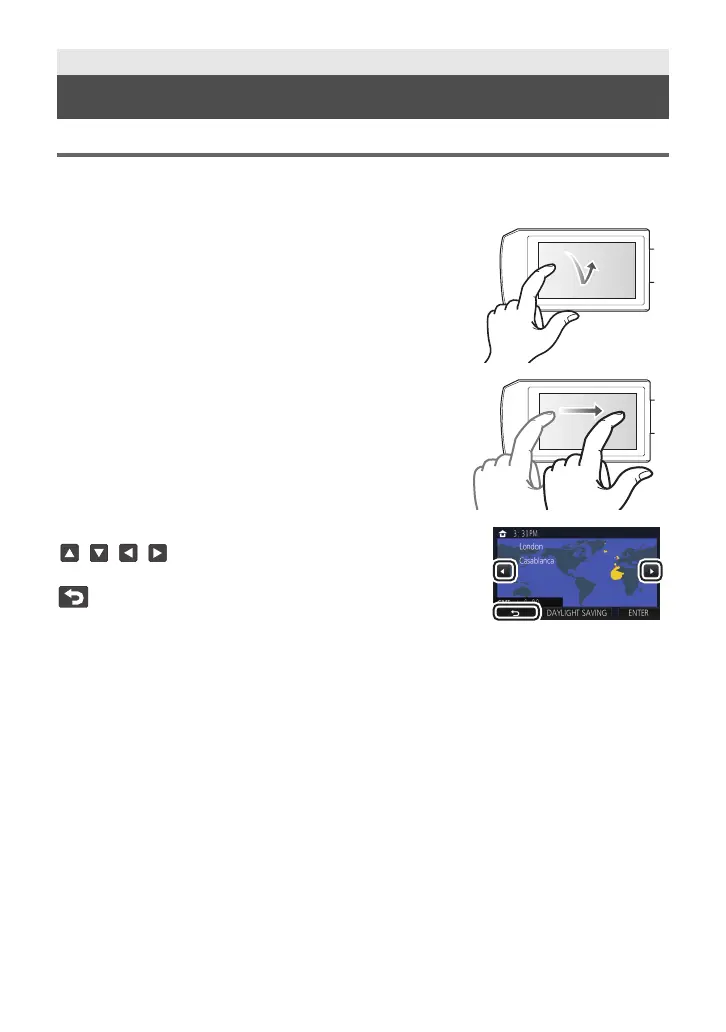
∫ Touch
Touch and release the touch screen to select icon or picture.
≥ Touch the center of the icon.
≥ Touching the touch screen will not operate while you are
touching another part of the touch screen.
∫ Slide while touching
Move your finger while pressing on the touch screen.
∫ About the operation icons
///:
Touch when changing a page or performing settings.
:
Touch to return to the previous screen.
Preparation
LCD monitor
HC-VX3_V900PP-DVQX2553_eng.book 25 ページ 2024年9月17日 火曜日 午後8時24分



 To Next Page